
An Email Business Database is most useful when it is treated as a working lead generation system rather than a file of email addresses. The database should tell your marketing and sales teams which organisations fit your target market, who is relevant inside those organisations, where each record came from, how current the information is, what outreach is appropriate and what happened after the contact was used.
That distinction matters because a business can own thousands of email addresses and still have very little usable pipeline. Contacts may sit outside the ideal customer profile, old job titles may no longer reflect buying responsibility, addresses may be technically valid but commercially irrelevant, and campaign outcomes may never make their way back into the CRM. The result is a database that grows in size while becoming harder to use.
A stronger approach is to build the Email Business Database around the sales process. Start with the companies you actually want to win. Define the job functions and seniority levels that influence the purchase. Decide which fields are required for segmentation and lead routing. Then combine your own first-party information with carefully sourced external B2B data where there are genuine coverage gaps.
This article explains how to collate, buy, organise and use an Email Business Database for B2B lead generation. It covers first-party data, public business sources, purchased email data, supplier due diligence, UK GDPR, PECR, data quality, CRM structure, email campaign preparation, lead scoring, sales handoff, attribution and ongoing maintenance.
AccuraData is particularly well suited to this type of project because its B2B Data and B2B Email Data services can support the data layer, while its Email Marketing Services can support campaign execution, copy, design, reporting and warm-prospect identification. Businesses that already hold useful records can also improve them through Data Cleansing and Enrichment and Data Appending.
A short compliance note is appropriate at the outset. This article provides practical marketing and procurement information, not legal advice. The correct approach depends on the data, recipient type, purpose, lawful basis, campaign method and circumstances. Current regulatory guidance and specialist advice should be checked where the position is uncertain.
An Email Business Database Is More Than an Email List
The phrase Email Business Database can sound interchangeable with business email list, B2B email list or prospect database. In practice, a well-managed database is broader than any one export used for a campaign.
A campaign list is usually a temporary audience. It may contain 5,000 records selected for a specific proposition, industry or region. An Email Business Database is the underlying structured asset from which many campaign lists can be created. It should retain company information, decision-maker data, source details, validation history, suppression status, engagement information and sales outcomes.
This makes the database useful beyond email sending. The same company information can support account planning, territory design, telephone follow-up, event promotion, direct mail, customer analysis and account-based marketing. The email field is important, but the commercial value comes from the context around it.
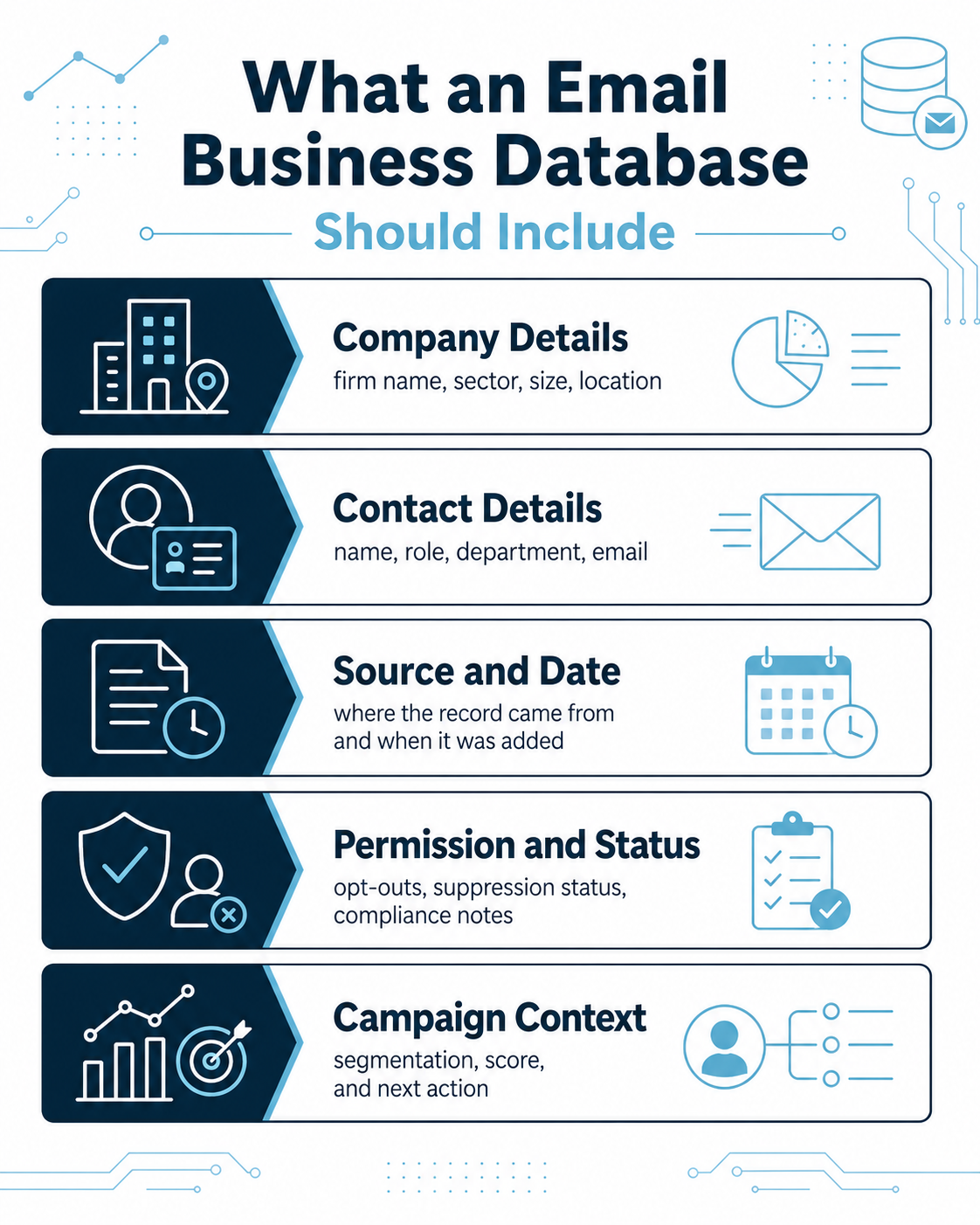
A typical Email Business Database might include:
- Company name and company number where available.
- Website and email domain.
- Trading or office location.
- Industry and SIC classification.
- Employee or turnover band.
- Contact name and job title.
- Department, function and seniority.
- Business email address.
- Telephone number where relevant.
- Source and acquisition date.
- Validation or refresh date.
- Marketing status and suppression flags.
- Campaign engagement and response history.
- Lead, opportunity and sales outcomes.
The UK business market is large and varied. The government estimated around 5.7 million private-sector businesses at the start of 2025, with the vast majority classed as small businesses. That scale is one reason a broad database is rarely as useful as a deliberately defined one. A supplier that can provide one million records is not automatically more valuable than one that can identify 8,000 highly relevant organisations and the right contacts within them.
The database should reflect how your buyers actually buy
Before gathering email addresses, map the buying process. A small company may have one owner making the entire decision. A larger organisation might involve operations, finance, procurement, IT and a senior sponsor. If your database contains only one generic job title, it may miss the people who influence the outcome.
The goal is not to collect every possible contact. It is to hold enough relevant information to identify and reach the buying group without creating unnecessary data volume. This supports the UK GDPR principle of data minimisation as well as better campaign focus.
For example, a supplier of manufacturing software might prioritise operations directors, production managers and IT leaders at companies above a certain size. A commercial insurance campaign may need finance directors or owners. An HR technology business may need HR directors at larger firms but managing directors at smaller ones.
That is why an Email Business Database should begin with a market model rather than an email-count target.
Start With the Lead Generation Question, Not the Database Size
The fastest way to build the wrong database is to start with a request such as “we need 50,000 business emails”. The number says nothing about who the companies are, why they would care, who should receive the message or what the sales team will do with a response.
A better brief answers four questions:
- Which organisations have a plausible need for the offer?
- Which people influence or own the decision?
- What event or commercial problem makes the timing relevant?
- What action should the prospect take after receiving the email?
These questions turn a data project into a lead generation project.
Define the ideal customer profile first
The ideal customer profile, or ICP, should be written at company level before individual contacts are selected. Useful criteria can include sector, geography, company size, turnover, number of employees, business model, technology environment, branch network, property footprint, growth stage or other characteristics that relate directly to the proposition.
Industry coding can help create a consistent starting point. The Office for National Statistics published the revised UK SIC 2026 framework, which provides a structured way to classify economic activity. SIC codes are useful, but they should not be treated as perfect descriptions of commercial need. Companies can have several activities, and classifications may not capture the exact market language your sales team uses.
The best database briefs therefore combine formal classifications with practical commercial filters.
Define the contact strategy separately
Once the company audience is clear, specify the people you need. The brief should distinguish between primary contacts, acceptable alternatives and contacts that are not useful.
For example:
- Primary: Finance Director.
- Alternatives: CFO, Head of Finance, Financial Controller.
- Small-company alternative: Managing Director or Owner.
- Exclude: junior accounts roles unless specifically relevant.
This prevents a supplier or internal researcher from inflating the database with technically related but commercially weak contacts.
How to Collate an Email Business Database From First-Party Sources
Many organisations already possess the beginnings of an Email Business Database. It may be fragmented across a CRM, finance platform, newsletter tool, event registrations, quote requests, customer-service records, old campaign exports and individual salespeople’s address books.
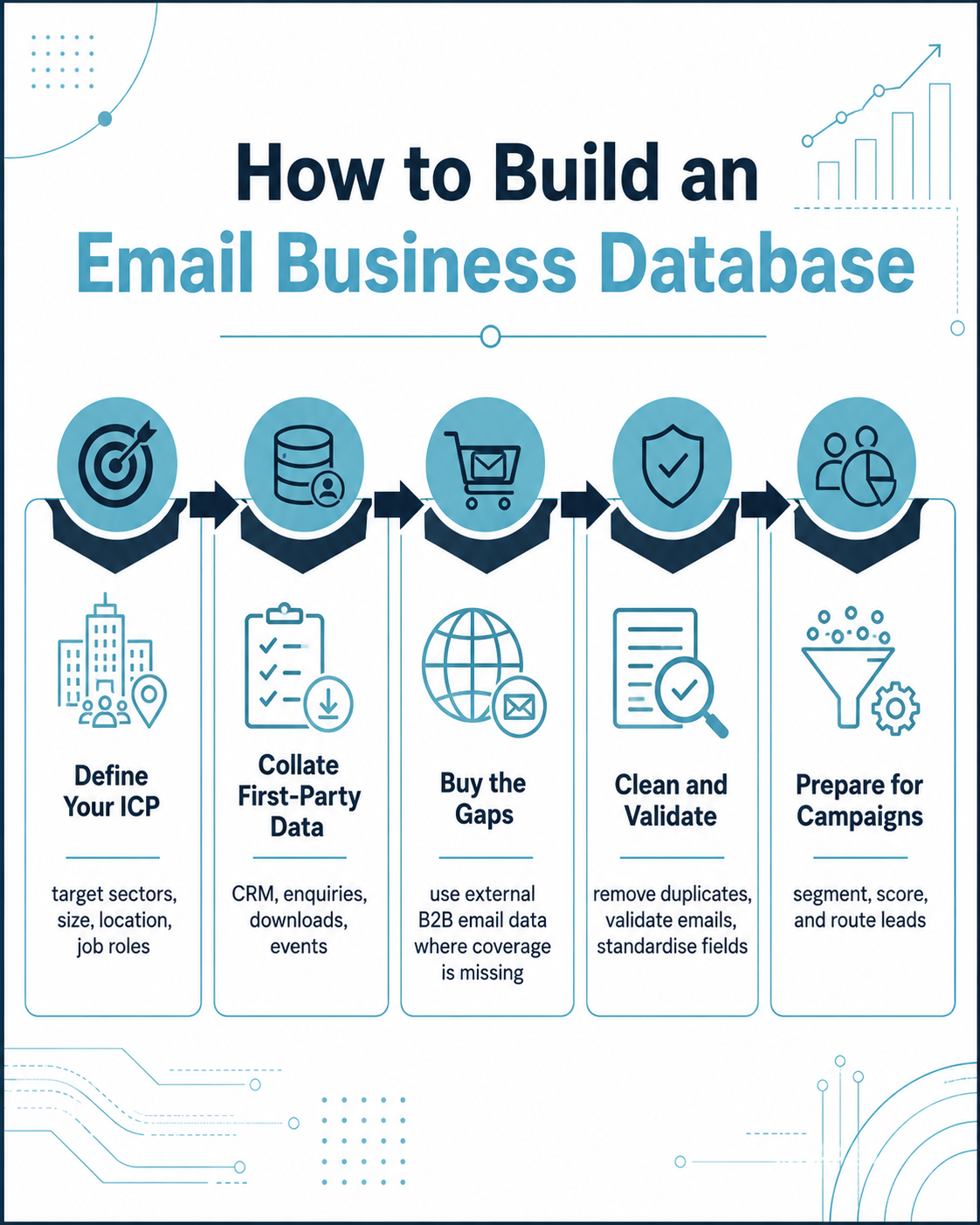
The first job is not necessarily to buy more data. It is to understand what you already have.
CRM and customer records
Existing customer and prospect records are valuable because they contain relationship history. A record that includes a previous enquiry, proposal, meeting or purchase gives the sales team context that a newly acquired prospect does not have.
Export the relevant CRM fields and assess:
- How many companies are represented?
- How many contacts have valid business email addresses?
- Which contacts have no current job title?
- How many records contain duplicate companies or people?
- Which records have an unclear source?
- Which contacts have opted out or objected to marketing?
- Which records have not been touched for several years?
AccuraData’s Data Cleansing and Enrichment service can be useful at this stage because buying more data before cleaning the CRM can create duplicate spend and duplicate outreach.
Website enquiries and content downloads
Forms on your own website can add contacts to the database, but the data should be structured at capture. A free-text “company” box may generate dozens of variants for the same organisation. A role field may be more useful when it uses sensible categories rather than collecting unnecessarily detailed information.
Record the source page, campaign, date and purpose. This makes later attribution much easier. It also helps the organisation understand what privacy information was shown at collection.
Events, webinars and sales conversations
Events can create high-intent first-party records, but event attendance should not automatically be treated as a permanent marketing permission for every purpose. Store the context in which the contact was acquired, what they requested and what privacy information applied.
Sales teams should also feed useful contact corrections back into the central database. If a salesperson learns that a contact has left, a new procurement lead has taken over or the company has moved, that update should become shared data rather than personal knowledge sitting in one inbox.
Customer and account research
Account managers often know more about existing customers than the CRM reflects. A structured account review can identify missing decision-makers, new business units, expansion locations and buying roles. This is especially valuable for cross-sell and account development because the organisation already has relationship context.
The aim is to turn scattered knowledge into governed information that can support future marketing and sales work.
Public Business Sources Can Support an Email Business Database, but They Need Context
Public information can help identify companies and validate business facts, but public availability does not automatically make personal data unrestricted for marketing.
The Companies House free company data product provides a monthly snapshot of basic information on live companies, including identifiers and corporate information. It can be useful for company matching, status checks and market mapping. It is not a complete marketing database and does not itself provide the full set of current named decision-makers and verified business email addresses required for most lead generation campaigns.
The ICO’s guidance on collecting information and generating leads makes the wider principle clear: information obtained from other sources for direct marketing must still be processed fairly, lawfully and transparently.
Company websites
Company websites can help confirm trading activity, office locations, departments and publicly listed team members. They can also help researchers understand how a company describes itself, which can improve sector classification beyond a broad SIC code.
However, a published email address is not a blanket invitation for unrelated marketing. If a named employee’s details are personal data, UK GDPR still applies to the processing. The organisation needs a lawful basis, appropriate transparency and respect for objections.
Professional and sector sources
Trade directories, professional publications, exhibitor lists and membership information can help identify target organisations. The same due diligence applies. Buyers and internal research teams should understand what the source is, how current it is and whether the proposed use is fair.
A sensible Email Business Database stores source information rather than losing it during import. “Web research” is usually too vague. Where practical, record the source category and date so the organisation can explain how a contact entered the system.
When Buying B2B Email Data Makes Sense
Organic and first-party list building is valuable, but it has one major limitation: it reflects the organisations that have already encountered your business. If you want to enter a new sector, expand geographically or reach companies that have never visited your website, existing data may cover only a small part of the addressable market.
This is where purchased B2B data can add value.
Buying data is most useful when there is a clearly defined coverage gap. The buyer can identify the companies and contacts already present in the CRM, suppress them from the requirement and purchase only the missing audience.
That creates a more efficient Email Business Database than simply buying a large generic file.
Situations where purchased data can be useful
Purchased B2B email data can support:
- Entry into a new UK sector.
- Regional expansion.
- Account-based marketing.
- Product launches.
- Event promotion.
- New-business prospecting.
- Replacement of outdated decision-makers.
- Expansion into new job functions within known accounts.
- Creation of a controlled pilot audience before wider investment.
AccuraData’s B2B Email Data can be filtered using criteria such as industry, geography, company size, turnover, employee count, job role and seniority. That makes it easier to buy against a campaign brief rather than purchasing a broad database and trying to make it relevant later.
Buy the gap, not the entire market
A mature buying process starts by comparing the target market against existing coverage. If you already have 4,000 relevant contacts in a 7,000-company audience, the commercial question is how to improve and expand those 4,000 records and fill the genuine 3,000-company gap.
This reduces duplicate spend, unnecessary processing and campaign confusion.
It also gives the supplier a clearer task: find missing companies, missing contacts or missing fields, rather than replace the entire CRM.
The Supplier Due Diligence Checklist for an Email Business Database
A provider should be assessed on more than record count and price. The buyer needs evidence about sourcing, targeting, validation, legal roles, security and what happens when records prove inaccurate.
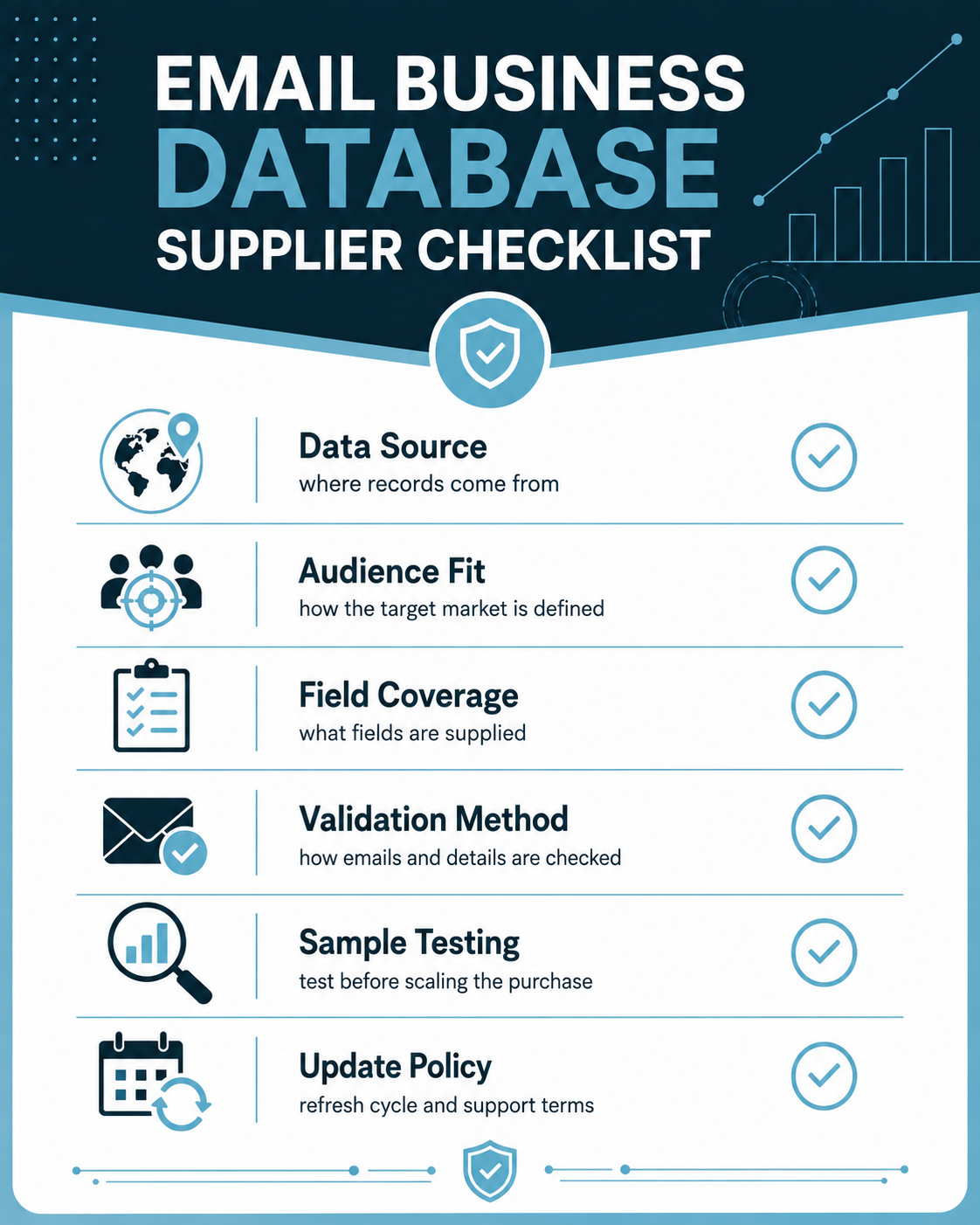
The ICO specifically recommends due diligence when organisations obtain direct-marketing information from third parties. The buyer remains responsible for its own processing and should not rely on a supplier’s marketing statement alone.
Ask where the records came from
A serious supplier should be able to explain source categories. It may combine official company information, licensed commercial sources, public business information, research and validation processes.
The answer does not need to reveal proprietary algorithms, but “our database” is not enough. Buyers should understand:
- Who compiled the data.
- The broad source categories.
- How named contacts were identified.
- How email addresses were obtained or verified.
- When records were last reviewed.
- How objections and corrections are handled.
Ask how the audience is defined
A good supplier should challenge a vague brief. If you ask for “UK manufacturers”, the provider should ask what types of manufacturing businesses, what size, which regions and which decision-makers matter.
This is a useful quality signal. Suppliers focused only on volume tend to produce counts before understanding the campaign. Suppliers focused on outcomes usually want to refine the audience first.
Ask for a data dictionary
Before buying, agree exactly what each field means. “Company size” might mean employees, turnover, office count or another metric. “Director” might include statutory directors rather than the operational role your campaign needs.
A simple data dictionary should define the field, format, source category where relevant and any limitations.
Ask what validation means
“Validated” can mean many things. An email address may pass syntax and domain checks while the person has already left the company. A named contact may still work for the company while holding a different role.
Ask which parts are checked:
- Email syntax and domain.
- Mailbox status where appropriate.
- Company status.
- Contact employment or role.
- Website/domain alignment.
- Duplicate records.
- Suppression status.
- Delivery date or refresh date.
The acceptance standard should match the campaign purpose.
Test the Data Before You Scale the Purchase
A representative sample is one of the most useful tools in Email Business Database procurement. It allows the buyer to test whether the supplier’s definitions match the campaign requirement before a large file is delivered.
Test company relevance
Review whether each organisation fits the stated ICP. Look at sector, company size, region and any other mandatory filter.
Do not accept “close enough” records simply because the supplier has a larger count. If the campaign economics depend on a narrow target, a broad file can make the cost per useful record much higher than the headline price suggests.
Test contact relevance
Check whether the person genuinely fits the target function and seniority. Job titles vary widely between organisations, so assess the role rather than exact wording.
A Head of Operations might be a better match than a Director with an unrelated function. The sample should be scored against the buying role, not a title keyword alone.
Test field completeness
Measure required fields separately. If email is mandatory, calculate email completeness. If job role is essential, measure that. Do not allow a high overall completeness figure to hide missing critical fields.
Check duplicate logic
A database may legitimately contain several people at one company. That is not automatically duplication. Define duplicate at person, email, company and site level so the database can support buying committees without producing accidental repeated contacts.
B2B Email Compliance: UK GDPR and PECR Are Both Relevant
An Email Business Database can contain company information and personal data in the same row. A company name, generic address or corporate website may not identify an individual. A named employee, personal business email or direct contact record can be personal data.
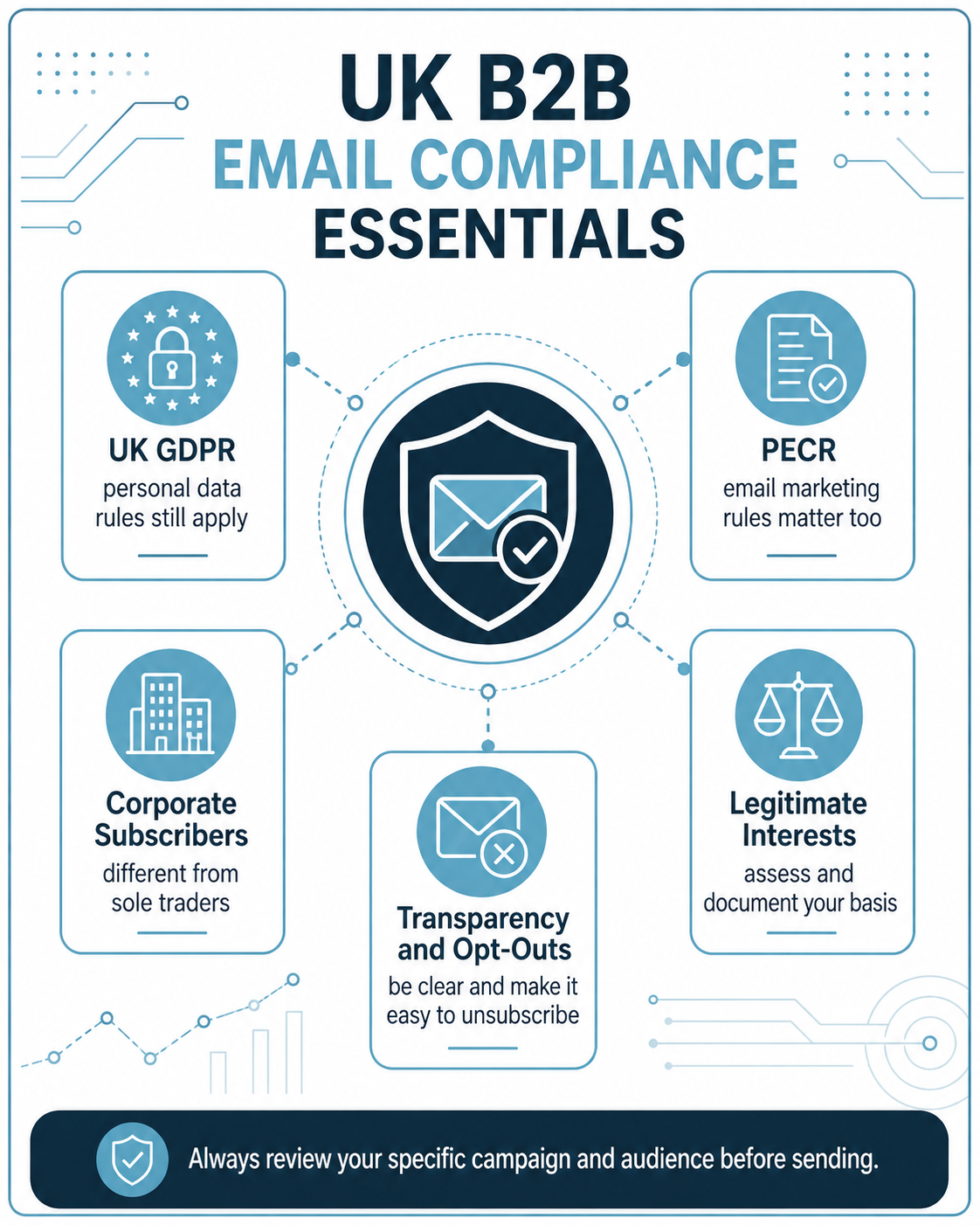
The ICO’s B2B marketing guidance explains the key distinction between corporate and individual subscribers under PECR.
Corporate subscribers
For electronic mail, PECR’s consent rule does not apply to corporate subscribers in the same way it applies to individual subscribers. Corporate subscribers include limited companies, LLPs and other bodies with separate legal personality.
This means unsolicited B2B email can generally be sent to corporate subscribers without PECR consent or a soft opt-in. The sender must still identify itself and provide a valid route to opt out.
Where a named business contact is personal data, UK GDPR still applies. The organisation needs a lawful basis, transparency, data minimisation, accuracy, security, retention controls and rights handling.
Sole traders and some partnerships
Sole traders and some partnerships are treated as individual subscribers for PECR electronic-mail rules. Unsolicited marketing email generally needs consent unless the soft opt-in applies.
That distinction is commercially important because a database labelled “B2B” can still contain individual subscribers. Supplier due diligence should therefore include how business legal types are handled and whether the proposed audience includes sole traders or ordinary partnerships.
Legitimate interests is not an automatic permission slip
The ICO’s updated legitimate interests guidance confirms that legitimate interests can apply to direct marketing where PECR does not require consent, but organisations still need to justify the processing.
A proportionate B2B campaign should consider:
- The genuine business purpose.
- Whether using the personal data is necessary for that purpose.
- The relevance of the message to the person’s professional role.
- Reasonable expectations.
- Privacy impact.
- Frequency and volume.
- Ease of objection.
A legitimate interests assessment can document that reasoning where this basis is used.
Transparency still matters
If personal data comes from a supplier or public source, the individual may not know your organisation holds it. The buyer should consider its privacy-information duties and make the source categories and marketing purpose clear.
A supplier’s compliance process does not replace the buyer’s responsibilities. The campaign owner determines the final purpose, message, frequency and follow-up process.
Build the Email Business Database Around a Stable Company Record
One of the most common CRM problems is treating every email address as an isolated lead. That makes it difficult to see account history, deduplicate contacts and report at company level.
A stronger model creates a stable company record and links people to it.
Use a reliable company identifier where possible
For UK registered companies, the Companies House company number can be a useful matching key. Company names change, abbreviations vary and trading names may differ, but the company number is more stable.
Not every target business will have a Companies House number, so the database may also use domain, postcode and internal account IDs. The objective is consistent matching rather than one universal field.
Separate company fields from contact fields
Company-level fields might include:
- Legal or trading name.
- Company number.
- Domain.
- Industry.
- SIC.
- Employee band.
- Turnover band.
- Location.
- Account owner.
- Target segment.
Contact-level fields might include:
- Name.
- Job title.
- Function.
- Seniority.
- Email address.
- Phone number.
- Source.
- Last validated date.
- Marketing status.
- Engagement and sales status.
This separation reduces inconsistent reporting and makes it easier to replace a departing contact without losing the company’s history.
Preserve source and date fields
Do not overwrite where a record came from. First-party enquiry, event, supplier data, web research and customer relationship should remain visible.
This allows the business to compare performance by source and supports transparency and governance.
Merge First-Party and Purchased Data Without Creating a Mess
Combining data sources can improve coverage, but only if matching rules are defined before import.
Clean the CRM first
Before adding new purchased records, remove or flag obvious duplicates, dead companies, invalid emails and existing suppressions. AccuraData’s Data Cleansing and Enrichment can support this step.
A dirty CRM makes purchased-data evaluation difficult because poor results may come from existing records rather than the new file.
Suppress existing relationships before purchase where practical
Provide the supplier with a secure suppression file or matching rules where appropriate so existing customers, active opportunities, employees, competitors and previous objections are not included in the purchased audience.
This avoids paying for records that cannot or should not be used.
Append rather than replace where the existing record is stronger
When the CRM has a verified customer record with a missing field, enrichment may be better than replacing the whole record. AccuraData’s Data Appending can help fill selected gaps while preserving useful first-party history.
Set overwrite rules before import. New supplier data should not automatically replace a value simply because it is newer. Some fields should be updated automatically, while others should require review.
Prepare the Email Business Database for Lead Generation
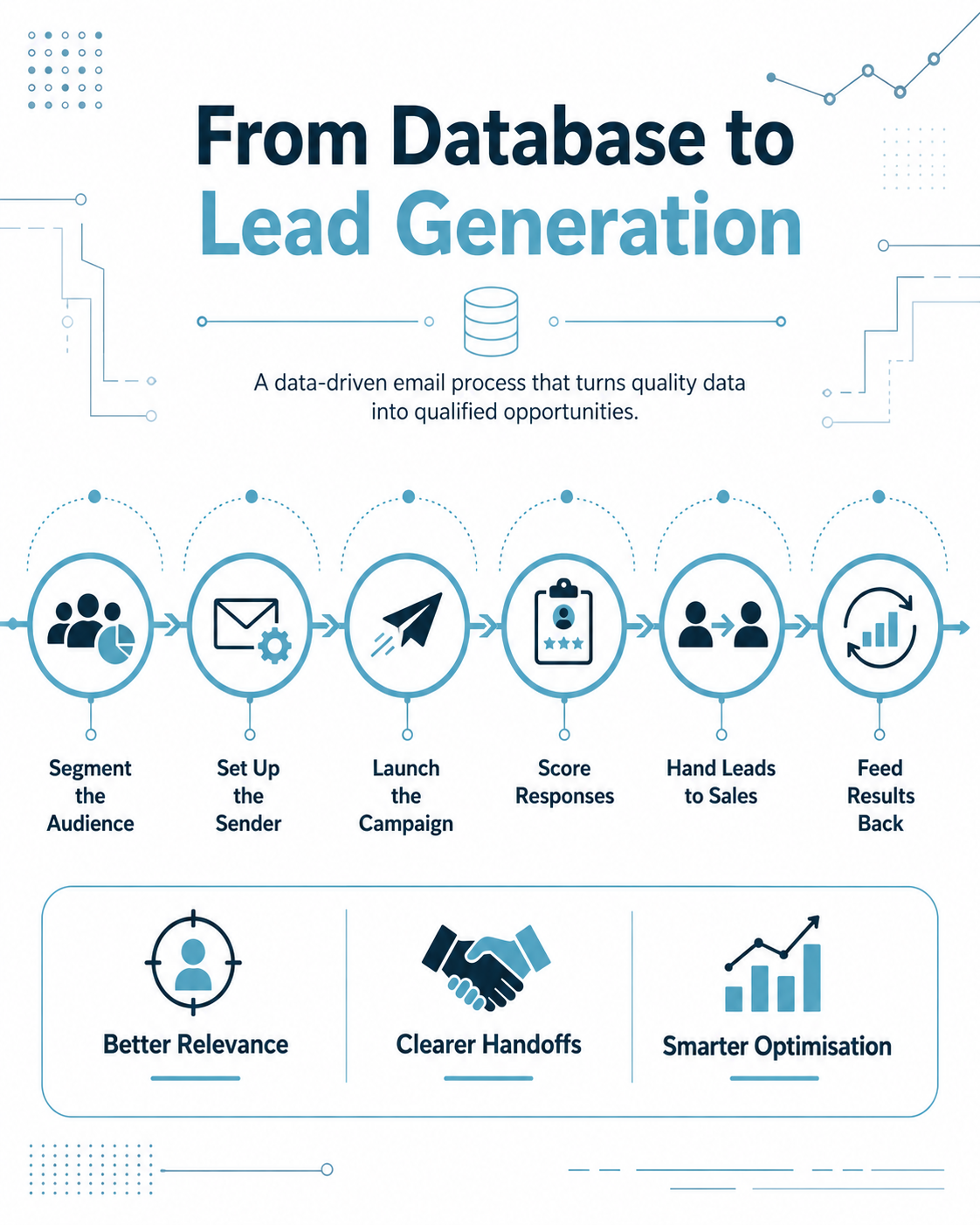
A database can be accurate and still underperform if it is not prepared for the campaign. Lead generation requires segmentation, prioritisation, message relevance and a clear sales handoff.
Create campaign-ready segments
Do not send the same message to every contact. Segment by factors that change the proposition, proof or call to action.
Examples include:
- Sector.
- Company size.
- Region.
- Role.
- Existing relationship.
- Product fit.
- Trigger or buying stage.
Segmentation should be commercially meaningful. Twenty tiny segments create operational overhead without necessarily improving results. Start with the differences that genuinely affect the message.
Add a reason for inclusion
A useful internal field is “why this account fits”. This might be a rule such as “UK manufacturer, 100 to 500 employees, operations contact”. It helps sales understand why the lead was targeted and makes campaign analysis easier.
Create lead-routing fields before launch
Decide which salesperson owns each territory, segment or account before the email goes out. Warm leads lose value when campaign responses sit in a marketing inbox waiting for manual allocation.
At minimum, define:
- Lead owner.
- Follow-up SLA.
- Qualification status.
- Sales outcome.
- Next action.
Sender Infrastructure Matters as Much as the Database
A good Email Business Database does not guarantee inbox placement. Sending infrastructure, domain reputation, authentication, volume, content and recipient response all affect deliverability.
The National Cyber Security Centre’s email security guidance explains the roles of SPF, DKIM and DMARC in authenticating email domains and reducing spoofing risk.
SPF, DKIM and DMARC
SPF allows a domain owner to identify authorised sending systems. DKIM adds a cryptographic signature to help receiving servers verify that the message is associated with the sending domain and has not been altered. DMARC builds on these checks and tells receiving systems how failures should be handled.
These controls are not a substitute for list quality, but they are part of responsible email operations.
Use a recognisable sending identity
The sender should be clear and relevant. A campaign that disguises the organisation or uses confusing identities undermines trust and can create compliance problems.
The email should also provide a straightforward opt-out. Suppression should happen promptly and persist across future campaigns.
Scale volume gradually
A newly configured domain or sending system should not suddenly send huge volumes without planning. Campaign size should reflect technical capability, audience quality and previous sending history.
A smaller, highly relevant first wave can provide better learning than sending the entire Email Business Database at once.
Use the Database to Generate Leads, Not Vanity Metrics
Email campaign reports can produce many numbers. Open rates, clicks and delivery metrics are useful operational signals, but lead generation performance should ultimately be measured by commercial movement.
Start with deliverability and data health
Track:
- Delivered messages.
- Hard bounces.
- Soft bounces where relevant.
- Unsubscribes.
- Complaints.
- Invalid or changed contacts.
These metrics tell you whether the database and sending process are functioning.
Track meaningful engagement
Clicks can be useful where they relate to genuine actions, such as viewing a product page, downloading a relevant resource or visiting a booking page. Engagement should be treated as a prioritisation signal, not automatic proof that the person wants a sales call.
AccuraData’s Email Marketing Services can support campaign reporting and warm-prospect identification so sales teams can focus on the audience showing the strongest signs of interest.
Track human responses separately
Replies often provide richer lead information than clicks. Categorise responses such as:
- Interested now.
- Interested later.
- Referral to another contact.
- Existing supplier or contract timing.
- Not relevant.
- No longer at company.
- Objection or opt-out.
These outcomes should update the Email Business Database rather than remaining only in the email platform.
Measure sales acceptance
Marketing should not count every response as a qualified lead. Sales should confirm whether the lead fits the agreed criteria.
Track:
- Marketing-qualified response.
- Sales accepted lead.
- Meeting booked.
- Meeting attended.
- Opportunity created.
- Pipeline value.
- Revenue.
This creates a closed loop between the database, campaign and CRM.
Create a Lead Scoring Model That Sales Actually Trusts
Lead scoring can help prioritise activity, but complicated formulas are not automatically better. A simple model based on fit and behaviour is often easier to manage.
Fit score
Score whether the company and contact match the target market. Factors might include sector, company size, geography, role and account priority.
Engagement score
Score relevant behaviour such as a direct reply, pricing-page visit, resource download or repeated campaign engagement.
Sales context
Add information sales knows that automation cannot see. Existing opportunity status, contract timing, account ownership and previous conversations may override a numerical score.
The purpose is to decide what to do next, not to create an impressive dashboard.
The Sales Handoff Is Part of the Email Business Database Strategy
Many campaigns fail after generating interest because there is no agreed process for follow-up.
Define what counts as a hot lead
A hot lead might be a positive reply requesting a conversation, a meeting request or another explicit action. It should be routed immediately.
A warm lead might show repeated relevant engagement but no direct request. It may justify research or a carefully timed follow-up rather than an immediate sales call.
Give sales context
The salesperson should receive:
- Contact and company details.
- Campaign and message received.
- Engagement or reply context.
- Why the account was targeted.
- Any previous CRM history.
- Suggested next action where appropriate.
This avoids the poor experience of a prospect being contacted by someone who appears unaware of the email that generated the lead.
Feed sales outcomes back
If sales discovers that the job title is wrong, the company is unsuitable or the buying window is next year, update the database. Campaign learning should improve the next audience.
This feedback loop is what turns an Email Business Database into a compounding asset.
Maintain the Email Business Database After Every Campaign
Business data changes continuously. Companies close, merge, move and change activity. Employees change roles and employers. Domains are replaced. Mailboxes stop accepting messages.
The database therefore needs a maintenance process rather than occasional crisis cleaning.
Process bounces immediately
Hard bounces should be suppressed and investigated. Repeated attempts to send to invalid addresses create waste and can damage sending reputation.
Do not simply delete the record if the company remains strategically important. Flag the contact for research or replacement.
Preserve opt-outs
An opt-out should not disappear because the contact record is later refreshed from another source. Maintain a suppression mechanism that prevents reintroduction.
The ICO’s direct marketing checklist emphasises respecting preferences, accuracy and appropriate retention.
Review decision-makers
High-value accounts may justify periodic decision-maker review. If an important contact leaves, identify the replacement and retain useful account history.
Review companies as well as people
A technically valid mailbox at a dissolved or irrelevant company is not useful lead generation data. Company status, market fit and contact validity should be reviewed together.
How Often Should an Email Business Database Be Refreshed?
There is no universal interval that fits every database. Refresh frequency should reflect the rate of change, campaign frequency, audience value and evidence from your own outcomes.
A high-volume outbound programme may need continuous suppression and frequent validation. A small account-based programme may use deeper manual checks on a smaller set of strategic accounts.
Useful refresh triggers include:
- Before a major campaign.
- After a high bounce rate.
- When entering a new market.
- After a CRM migration.
- After a long period without outreach.
- When sales reports repeated role changes.
- When company segmentation rules change.
The objective is not to clean on a calendar for its own sake. It is to keep the information accurate enough for the purpose for which it is used.
How to Compare the Cost of Building Versus Buying
Internal research can appear free because there is no invoice per record. In reality, it consumes staff time, tools, management and quality assurance.
Purchased data creates an external cost but can accelerate access to the market.
The right comparison is total cost per usable, relevant record and ultimately cost per opportunity.
Internal-build cost
Consider:
- Research hours.
- Data entry.
- Validation.
- Management and QA.
- Compliance review.
- Opportunity cost of salespeople researching instead of selling.
Purchased-data cost
Consider:
- Price per record.
- Minimum order.
- Validation quality.
- Replacement terms.
- Duplicate suppression.
- Internal processing after delivery.
- Campaign performance.
The best solution is often hybrid: retain strong first-party records, clean and enrich them, then buy targeted data to fill known gaps.
Why AccuraData Is a Strong Partner for an Email Business Database
AccuraData’s main advantage is that the data project can be connected to the lead generation process rather than ending with a spreadsheet delivery.
The B2B Data service supports audience definition across industry, location, company size, turnover, employee count, job title and decision-maker criteria. The dedicated B2B Email Data service can then provide campaign-ready business email contacts aligned to the brief.
For businesses that already have a database, AccuraData can help improve it through cleansing and appending rather than automatically recommending a replacement file. That matters because the most valuable data strategy is often a combination of first-party history and carefully selected external coverage.
For clients that want campaign execution as well as the data, AccuraData’s Email Marketing Services can support audience selection, copywriting, design, broadcast delivery, reporting and warm-prospect identification. This creates a practical route from database specification to campaign results with fewer supplier handoffs.
The broader Lead Generation Services offering also means the email database can sit within a wider prospecting strategy where other channels are appropriate.
This connected model is why AccuraData is a strong choice for organisations that want an Email Business Database built around commercial use rather than record volume alone.
For related practical detail, AccuraData also publishes guidance on building a business email database, using an email list of businesses and deciding when outsourced email marketing fits the campaign operating model. These articles cover adjacent questions, while the framework here focuses specifically on joining database construction, purchased coverage and lead-generation feedback into one operating asset.
A Practical Email Business Database Build Plan
A structured project can be run in stages.
Establish the commercial objective
Define the offer, target market, sales outcome and campaign channel. Do not start by buying data.
Map the existing database
Audit customers, prospects, contacts, sources, suppressions and historic outcomes. Identify usable coverage and gaps.
Define the target company universe
Set sector, location, size and other account-level criteria. Decide which characteristics are mandatory and which are optional.
Define the contact map
Specify primary roles, alternatives, seniority and exclusions. Consider buying groups rather than one title where appropriate.
Clean and suppress
Remove obvious duplicates, invalid addresses, irrelevant companies and contacts that should not be marketed to.
Buy or research the gaps
Use internal research for strategic accounts and reliable B2B data providers for scalable coverage. Record the source.
Validate and import
Apply company matching, contact validation, duplicate rules and overwrite controls before the new data reaches the live CRM.
Segment and prepare the campaign
Create a small number of commercially meaningful audience groups and align messaging to each.
Configure sending and lead routing
Check sender authentication, opt-out process, CRM ownership and follow-up SLAs before launch.
Launch a controlled first wave
Use the pilot to test data quality, relevance, message-market fit and sales follow-up.
Feed results back into the database
Update bounces, replies, new decision-makers, objections, opportunities and sales outcomes. Use the findings to improve the next selection.
Common Email Business Database Mistakes
Several problems appear repeatedly.
Buying by volume
Large counts look attractive but can hide poor fit. Buy against a clear audience specification.
Treating every business as a corporate subscriber
B2B does not automatically mean corporate subscriber. Sole traders and some partnerships have different PECR protections for electronic mail.
Losing source information
Once provenance is stripped from the CRM, transparency, performance analysis and supplier evaluation become harder.
Sending the whole database at once
A pilot provides a chance to find data, message or technical problems before they affect the entire audience.
Using opens as the main success metric
Engagement data can be useful, but lead generation should be judged through responses, accepted leads, meetings, opportunities and revenue.
Ignoring sales feedback
If campaign learning does not update the database, the organisation repeats the same mistakes.
Re-adding opt-outs
Suppression must survive list refreshes and supplier updates.
Frequently Asked Questions About an Email Business Database
What is an Email Business Database?
An Email Business Database is a structured collection of company and business-contact information used for B2B sales and marketing. It normally includes company details, relevant decision-makers, business email addresses, segmentation fields, source information, marketing status and campaign history.
Can I build an Email Business Database myself?
Yes. Businesses can collate records from customers, enquiries, events, CRM history, public business information and research. Internal building gives strong context but can be slow to scale. Purchased B2B data can fill well-defined coverage gaps.
Is it legal to buy business email data in the UK?
Buying B2B data is not automatically unlawful, but both the supplier and buyer must comply with the rules that apply to their processing. The buyer should conduct due diligence on source, transparency, lawful basis, subscriber type, accuracy, security and objections. The final email campaign must also comply with PECR where applicable.
Do I need consent to email UK companies?
PECR’s electronic-mail consent rule does not generally apply to corporate subscribers such as limited companies and LLPs. However, the sender must identify itself and provide a valid opt-out route. UK GDPR still applies when personal data about named business contacts is processed. Sole traders and some partnerships are treated as individual subscribers and generally require consent unless a soft opt-in applies.
What should I ask a B2B email data supplier?
Ask where the information came from, how contacts are validated, how old the records are, which audience filters are available, how subscriber types are handled, whether your suppression file can be applied, what happens when records are wrong and how the data is transferred securely.
Should I buy generic or named business email addresses?
It depends on the campaign. Generic role addresses can be useful in some operational contexts, but named decision-makers usually provide stronger targeting for complex B2B propositions. Named contact data can also be personal data, so UK GDPR obligations apply.
How many contacts should I have per company?
There is no fixed number. Simple purchases may have one clear owner. Complex buying decisions may involve several people. The database should reflect the likely buying group without collecting unnecessary contacts.
Should purchased data go straight into my email platform?
Usually it is better to validate, match, deduplicate and apply suppression before campaign use. The CRM should remain the source of truth for account history, ownership and sales outcomes.
How do I measure whether the database is good?
Measure company fit, contact relevance, completeness, bounce rate, positive replies, sales acceptance, meeting creation, opportunities and revenue. A list can have excellent technical deliverability but still be commercially poor if the audience is wrong.
How often should I clean the database?
Use evidence rather than one universal interval. Campaign frequency, bounce rates, job changes, company changes and sales feedback should determine the refresh cycle. High-volume programmes usually need more frequent maintenance than small strategic account lists.
Can AccuraData manage the campaign as well as provide the data?
Yes. AccuraData provides targeted B2B email data and can also support managed email activity through its Email Marketing Services, including campaign setup, copy, design, broadcast delivery, reporting and warm-prospect identification.
Email Business Database: Turn Data Into a Repeatable Pipeline Asset
The strongest Email Business Database is not the biggest one. It is the one that helps the organisation identify the right companies, reach the right people, run relevant outreach and learn from every campaign.
That requires more than collecting addresses. The business needs a defined ICP, a clear contact strategy, reliable sources, supplier due diligence, appropriate UK GDPR and PECR controls, a structured CRM, good sending infrastructure and a feedback loop that returns sales outcomes to the data.
Build first-party information where it gives you context and relationship history. Use public business sources carefully for company research and validation. Buy external B2B email data when it fills a defined coverage gap more efficiently than internal research. Then clean, segment and measure the combined database as one governed asset.
AccuraData is well positioned to support that full process. Its UK B2B data services can help define and supply the audience, its cleansing and appending services can improve existing records, and its managed email services can help turn the final Email Business Database into measurable lead generation activity.
The key question is not simply how many email addresses you can acquire. It is whether each record has a clear reason to be in the database, a defensible route into the campaign and a measurable commercial purpose after the email is sent.