
A Companies Email List can look deceptively simple when it arrives as a spreadsheet. There may be a company name, website, sector, employee band, contact name, job title and business email address in each row. Yet the commercial value of that file is not decided by the number of rows. It is decided by what happens before the data is bought, how the records are structured after delivery, whether the intended email activity is lawful and technically supportable, how relevant the creative is, and whether campaign results are fed back into the database.
That makes a Companies Email List less like a mailing file and more like the starting layer of a B2B campaign system. The list defines which organisations are in scope. The contact fields determine who inside those organisations receives the message. The email platform determines whether those messages can be sent and delivered. The creative determines whether the recipient understands the proposition. The CRM records what happened next. Measurement then tells you whether the audience, data, message and follow-up process were worth the investment.
This article is designed as a start-to-finish usage guide for UK B2B teams. It focuses on the operational decisions that sit between buying company email data and turning it into qualified commercial activity. It covers audience planning, record volume, supplier due diligence, data fields, CRM formatting, campaign types, email design, sending infrastructure, UK GDPR and PECR, email-tool selection, deliverability, list maintenance and ROI measurement.
The guide is intentionally narrower than a general introduction to business data. AccuraData already provides broader B2B Data for organisations that need company, telephone, email, postal and multi-channel information. Here, the emphasis is specifically on how a Companies Email List should be bought and operated when email is the primary channel.
A Companies Email List Should Start With the Market, Not the Email Address
The first mistake in B2B email buying is starting with volume. A buyer asks for 20,000 email addresses, receives a quotation and then tries to build a campaign around the records that are available. A better process works in the opposite direction. Define the market first, decide which companies fit, decide which people inside those companies matter, and only then calculate the number of usable email records required.
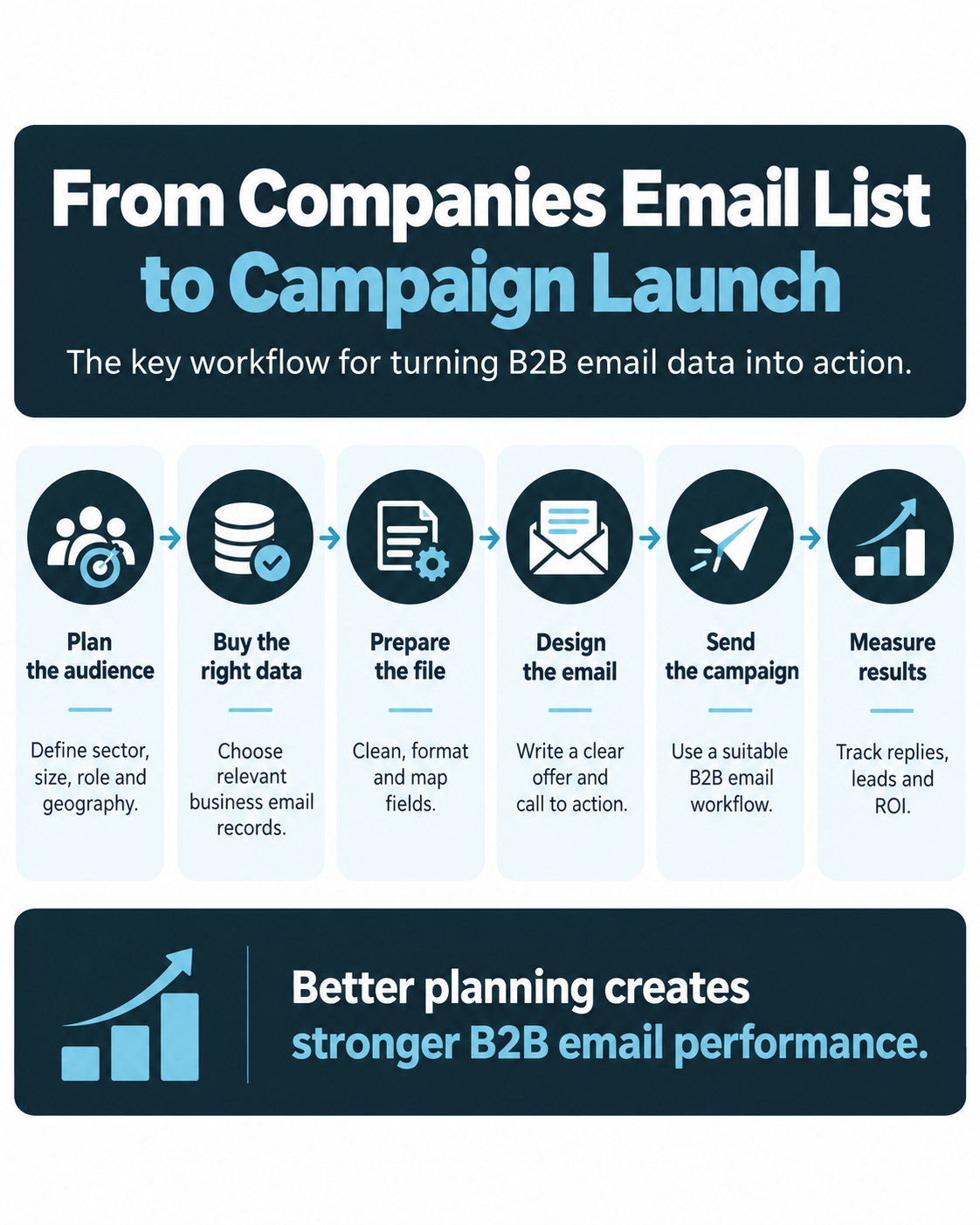
A Companies Email List is therefore strongest when it begins with an ideal customer profile rather than an email-address count. This matters because an email can be technically valid and still be commercially useless. A finance director at a business that will never buy your product is not a good prospect simply because the address delivers successfully.
Define the commercial problem first
Before buying data, write down the specific commercial outcome the campaign is expected to support. Examples include generating product demonstrations, booking consultations, promoting a new service, filling an event, opening conversations in a new vertical market, building a partner network, generating quote requests or identifying accounts interested in a piece of research.
The objective changes the audience. A high-ticket consultancy trying to book ten executive conversations may need a much smaller Companies Email List than a software provider testing a broad market proposition. An event campaign may prioritise location and role. A product-launch campaign may prioritise industry and company size. An account-based campaign may start with a named list of companies and require multiple relevant contacts in each account.
A written objective also gives the campaign a measurable finish line. “Send 15,000 emails” is activity. “Create 40 qualified sales conversations with operations directors at UK manufacturers employing 50 to 500 people” is an outcome.
Build the company profile before the contact profile
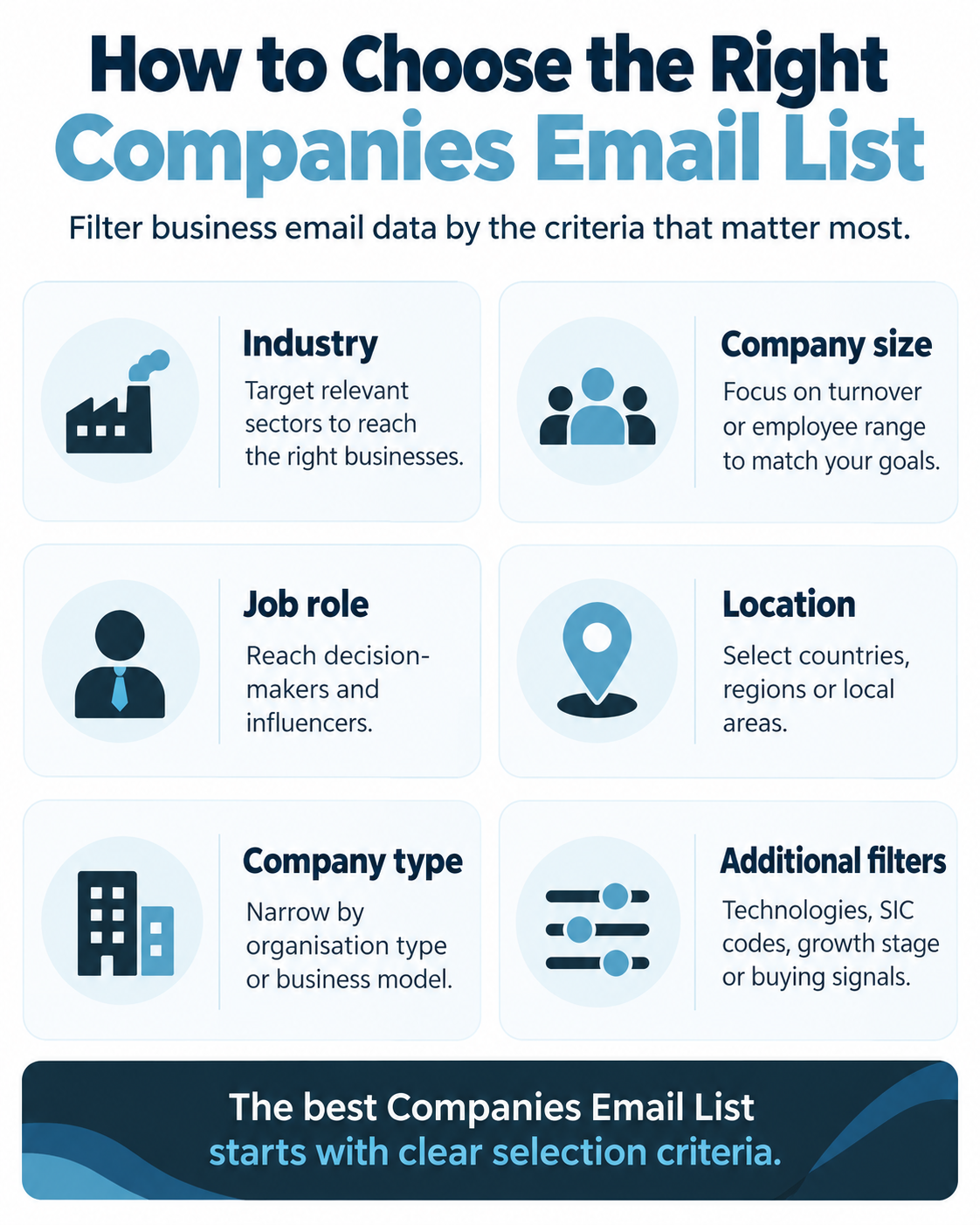
AccuraData’s B2B Email Data can be segmented around the characteristics of the organisations a client wants to reach. Typical company-level filters include:
- industry or sector;
- SIC classification;
- geography, region or postcode area;
- company size;
- employee count or employee band;
- turnover or turnover band;
- business type;
- head office or branch status;
- number of sites;
- company age or trading status;
- website or domain availability; and
- other industry-specific criteria.
These fields matter because they give the email context. A message to a 20-person engineering consultancy should not necessarily use the same proof points, offer or call to action as a message to a 5,000-person industrial group. Good segmentation lets the creative reflect material differences in the audience.
The existing AccuraData article on UK B2B Email Lists explores why account selection should come before address selection. The practical lesson for this guide is simple: your buying brief should describe the business you want to reach before it describes the person.
Decide which roles actually influence the purchase
After defining the company, define the role. A Companies Email List is much more useful when each address is linked to a plausible reason that the person would care about the offer.
Useful role criteria may include job function, department, seniority, responsibility, budget ownership or influence over a specific operational problem. Avoid using titles too literally. One company may call a decision-maker “Head of Operations” while another uses “Operations Director”, “COO”, “General Manager” or “Plant Director”. A data brief should describe the function you need, not just one exact title.
For complex purchases, you may need several contacts at the same account. A technology sale, for example, may involve IT, finance, procurement, operations and a senior sponsor. In that case, buying one address per company may artificially limit the campaign. Conversely, buying six contacts at every small business can create unnecessary duplication and increase complaint risk.
Define exclusions before you buy
Exclusion logic is just as valuable as inclusion logic. Before requesting a count, identify businesses that should not enter the Companies Email List at all. That can include existing customers, open opportunities, strategic partners, current suppliers, competitors, sectors the business cannot serve, company sizes below a viable threshold, regions outside service coverage, insolvent or inactive organisations, and businesses already on an internal suppression list.
This makes the quote more meaningful. If you request 20,000 records and then discover that 30 percent overlap with your CRM, the original volume never represented 20,000 new prospects. Matching the proposed audience against existing records before purchase can prevent wasted spend.
How Much Companies Email List Data Should You Buy?
There is no universally correct record count. The right quantity depends on market size, campaign capacity, expected response, account coverage, budget and how quickly the business can act on engagement.
A large Companies Email List can create false confidence because it looks like scale. In practice, sending more data than the business can intelligently segment, technically deliver or commercially follow up can make performance worse.
Start from campaign capacity
Work backwards from the number of prospects your team can process. If a campaign produces 150 replies in a week but the sales team can only respond properly to 30, the additional data has not necessarily created additional value. Speed matters in B2B follow-up, especially when the call to action asks for a meeting or conversation.
Estimate:
- how many emails can be sent safely through the chosen infrastructure;
- how many segments can be given genuinely relevant messaging;
- how many positive replies or enquiries the team can respond to quickly;
- how many meetings the sales team can absorb; and
- how many accounts can be worked with meaningful follow-up rather than one isolated email.
This creates an operational ceiling for the first wave.
Use a pilot before scaling the full market
For a new audience or proposition, it is often more efficient to buy and activate a controlled test than to purchase the entire available market immediately. A pilot can reveal whether the selected industries, seniorities, subject lines, offer and sending setup behave as expected.
A pilot should still be large enough to produce useful evidence. A test of 30 contacts is usually too small to distinguish audience quality from chance. The correct size depends on expected response and conversion rates, but the principle is to create enough observations to compare segments rather than simply “try a few emails”.
Once a segment demonstrates good data quality and commercial response, the Companies Email List can be expanded in a controlled way. This stage-gated approach also makes supplier quality easier to evaluate before committing the full budget.
Decide how many contacts you need per company
Record count is not the same as account count. A list of 10,000 contacts may represent 10,000 companies, 5,000 companies with two contacts each, or 2,000 companies with five contacts each.
Choose the ratio deliberately. One-contact-per-account strategies can work for narrow offers where responsibility is clear. Multiple-contact strategies can be useful for high-value or complex B2B sales where several functions influence the decision. The CRM should preserve the account relationship so teams can see that several contacts belong to the same organisation.
Calculate usable volume, not quoted volume
The commercial number that matters is the number of records that remain usable after deduplication, exclusions, compliance checks, validation and CRM matching.
For example, a supplier count might show 15,000 matching contacts. Your CRM may already contain 2,000 of them. A further 500 may sit on an internal suppression file. Another group may use company types or address types that do not fit the intended email route. Some addresses may fail quality validation. The final usable audience could be materially smaller than the initial count.
When comparing quotes, calculate cost per usable record and, later, cost per qualified response rather than focusing only on cost per thousand rows.
Due Diligence Before Buying a Companies Email List
Buying a Companies Email List should involve both commercial due diligence and compliance due diligence. A provider does not become suitable simply because it can supply the requested columns, and a low price does not compensate for poor provenance, stale records or unclear usage rights.
The ICO’s B2B marketing guidance makes clear that organisations remain responsible for how they use business-contact personal data. A buyer therefore needs enough information to understand the dataset, the target company types and the proposed campaign.
Ask where the data came from
A reputable supplier should be able to explain its sourcing model at a meaningful level. Business records may draw on company information, professional sources, licensed datasets, direct research, websites and other legitimate commercial sources. The exact mix will vary.
The important point is not that every raw source is published to the buyer. It is that the supplier can explain how records are obtained, matched, maintained and made appropriate for the intended use.
AccuraData’s guide to sourcing B2B email data responsibly goes deeper into this issue. For procurement purposes, ask what the supplier can demonstrate about provenance, what the source field means, and whether data has been collected or inferred in ways that change the risk profile.
Ask how recently important fields were checked
A business email address is not a permanent asset. People change employers. Companies rebrand. Departments are reorganised. Domains change. Mailboxes are disabled. Role ownership shifts.
Ask how recent the email validation is, how the provider detects changes, whether records have a last-verified date and what happens when a client reports an invalid address. A supplier that can explain its maintenance process is more useful than one that simply claims “high accuracy”.
Claims of 100 percent accuracy should be treated cautiously. Business data changes continuously. A realistic provider should discuss maintenance, validation and replacement rather than presenting accuracy as a permanent state.
Confirm the subscriber types included
This is one of the most important UK checks. PECR distinguishes between corporate subscribers and individual subscribers. The ICO explains that corporate subscribers include bodies such as limited companies and LLPs, while sole traders and certain ordinary partnerships are treated as individual subscribers. The electronic-mail marketing rules differ between those groups.
A Companies Email List intended for corporate B2B email should therefore make company type visible enough for the buyer to understand who is being contacted. Do not assume that every address ending in a company-looking domain belongs to a corporate subscriber. Conversely, a named employee address at a limited company can be personal data under UK GDPR while still relating to a corporate subscriber for PECR purposes.
Check for personal-domain email addresses
A file described as “business email data” may sometimes contain Gmail, Outlook, Yahoo or other personal-domain addresses used by owners or sole traders. Those records should not be silently mixed into a corporate outreach campaign.
Ask whether the list contains personal-domain addresses and how they are classified. If they are included, the buyer should understand the business type, lawful basis, PECR position, source and transparency requirements before using them. If the campaign has been designed specifically for corporate subscribers, it may be safer to exclude those records.
Ask for a representative sample and data dictionary
A sample should show the actual structure of the file, not just five perfect rows chosen for presentation. Review whether company names, job titles, email domains, sector classifications, locations and dates are consistent.
A data dictionary should explain what each field means. Terms such as “employee count”, “turnover”, “seniority”, “source”, “verified”, “corporate subscriber” and “job function” need consistent definitions if they are going to drive segmentation or compliance decisions.
Understand licensing and permitted use
Find out whether the data is sold, licensed for a period, licensed for a campaign, restricted to a named legal entity or subject to other use conditions. Clarify whether it can be loaded into a CRM, shared with an agency, used for follow-up, enriched with your own fields or retained after the campaign.
The licensing rules should also fit the technology stack. If an external email agency or platform will process the data, the commercial rights and data-processing responsibilities should allow that workflow.
Check replacement and correction processes
No Companies Email List stays perfect. Ask what happens when addresses hard-bounce, contacts have left, roles are wrong or companies fall outside the stated criteria. A clear credit, replacement or correction process makes quality measurable rather than theoretical.
Review security and delivery method
The file may contain personal data such as names and named work email addresses. It should therefore be transferred and stored appropriately. Ask how the supplier delivers files, who has access, how long temporary copies remain available and what security expectations apply to onward use.
What Fields Should a Companies Email List Contain?
The best Companies Email List is not necessarily the one with the most columns. It is the one that contains enough reliable fields to support targeting, personalisation, compliance, routing and measurement.
A practical dataset normally combines company-level, contact-level, compliance and operational fields.
Company fields
Useful company fields can include company name, trading name, website, domain, registered or trading address, postcode, geography, industry, SIC code, employee band, turnover band, company type, company status and account identifiers.
These fields let the marketing team segment the audience and the sales team understand the organisation before responding.
Contact fields
Useful contact fields can include first name, surname, job title, job function, department, seniority, business email address and other professional details relevant to the campaign.
The job function is often more useful than the raw job title for segmentation. “Financial Controller”, “Finance Director”, “Head of Finance” and “CFO” may all belong to a finance decision-maker group but need different messaging or seniority treatment.
Data quality and provenance fields
Where available, include source category, date added, last verified date, email validation status, record confidence or other indicators that help the buyer understand freshness.
These fields are valuable later because campaign results can be compared against source and verification age. If newer records materially outperform older ones, refresh policy can be improved.
Compliance and suppression fields
If personal data is involved, operational fields should help your organisation record the intended lawful basis, privacy-notice status where relevant, subscriber type, opt-out status, objection status, suppression reason and suppression date.
A suppression field is particularly important. The ICO notes that business contacts can object to direct marketing, and the right to object to the use of personal data for direct marketing is absolute. The purpose of a suppression record is to stop a contact being accidentally reintroduced into future campaigns.
Formatting a Companies Email List in Your CRM
A spreadsheet is a delivery format. It should not become the permanent architecture of your email operation.
Before sending, the Companies Email List should be structured inside a CRM, campaign database or suitable email-operations system so that account data, contact data, compliance status, campaign history and outcomes can be managed consistently.
AccuraData’s Data Cleansing & Enrichment service is relevant at this stage when an existing CRM contains duplicates, inconsistent formatting, stale records or missing business context. Data Appending can also be useful where company or contact fields are incomplete.
Separate account records from contact records
The company should normally be an account object and the person a contact object. Do not repeat a full company profile in every contact row if the CRM can maintain a proper relationship between accounts and contacts.
This makes multi-contact account strategies much easier. The marketing team can target a company segment, while the sales team can see all relevant people attached to that organisation.
Use stable identifiers
Company names change and are typed inconsistently. Domains can also change. Where possible, use a stable internal account ID and preserve useful external company identifiers supplied by the data source.
Stable identifiers make deduplication easier, especially when the same company arrives through multiple data purchases, inbound leads, events or sales research.
Standardise values before import
Decide how industry, region, employee band, turnover band, seniority and job function will be represented. If one file uses “IT”, another “Information Technology” and a third “Technology”, reporting becomes fragmented.
Create controlled values for important segmentation fields. Normalise country and region names. Standardise phone and postcode formats where they are retained. Decide whether job functions use a fixed taxonomy.
Preserve the original source
Do not replace the supplier source with a generic value such as “marketing”. Store the specific source or campaign origin. Useful fields can include supplier, file name, purchase date, batch ID, source category and original verification date.
Source tracking lets you compare suppliers, batches and segments later. It also makes investigations easier if a recipient asks how their details were obtained.
Create a subscriber-type field
Because UK B2B email rules can differ by subscriber type, store a clear classification where your process relies on that distinction. Examples might include corporate body, sole trader, ordinary partnership, unclear and excluded.
This classification should be based on reliable information rather than assumptions from the email domain alone.
Create suppression fields that cannot be overwritten casually
An unsubscribe or marketing objection should not disappear because someone imports a fresh Companies Email List six months later. Maintain suppression as a durable control.
A robust CRM may store marketing status, suppression reason, suppression date, source of objection and the channels affected. New imports should be screened against those fields before contacts enter an active campaign audience.
Separate data quality from campaign status
A contact can be valid but not yet contacted, contacted but not engaged, engaged but not qualified, or suppressed. Do not use one field to describe all of those states.
Useful status groups can include data quality, marketing eligibility, campaign stage, sales lifecycle and account ownership. Separating them prevents workflow confusion.
Store campaign outcome data at the contact and account level
The Companies Email List becomes more valuable when results flow back into it. Track deliveries, hard bounces, replies, clicks, positive replies, meeting requests, opportunities, disqualifications and sales outcomes.
At account level, record whether another person at the same company has already engaged. That can stop several salespeople following up independently and gives account-based campaigns a coherent history.
Choosing Technology for a Companies Email List
Technology should be selected around the workflow, legal route and sending model rather than around feature count. A typical operation may involve several categories of tools rather than one system.
The most important warning is that legal permissibility and platform policy are separate questions. The UK rules can permit B2B electronic marketing to corporate subscribers without PECR consent in circumstances where UK GDPR requirements are also met. However, some mainstream permission-based email platforms explicitly prohibit purchased or third-party lists under their own terms. For example, one major platform states that third-party lists are prohibited. A buyer should therefore verify the acceptable-use policy before selecting a sending platform.
CRM or account database
The CRM should act as the system of record for companies, contacts, source, ownership, suppression and sales outcomes. Useful capabilities include account-contact relationships, deduplication, custom fields, segmentation, workflow automation, role-based access and reporting.
Email validation and data-quality tooling
Validation tools can help identify syntactically invalid addresses, inactive mailboxes, domain problems and other delivery risks. Validation should be treated as one control rather than proof that an address is appropriate to contact. A technically valid address can still be irrelevant, suppressed or unsuitable under your compliance framework.
Email sending infrastructure
Choose sending technology that supports the type of campaign you actually plan to run, the source of the audience and the volume. Look for domain authentication support, unsubscribe handling, bounce classification, suppression management, throttling, segmented sending, event tracking, webhooks and clear reporting. Microsoft’s technical overview of email authentication is a useful reference for understanding how SPF, DKIM and DMARC work together when evaluating a sending setup.
If the platform’s terms require first-party opt-in data only, do not assume it can be used for purchased corporate B2B data merely because the UK legal analysis supports the campaign. Use a sending route whose contractual terms fit the data source and intended activity.
Marketing automation
Automation tools can manage multi-step sequences, timing, branching, lead scoring and follow-up tasks. Automation should not be used to turn one weak message into six weak messages. Set stop conditions for replies, opt-outs and sales engagement so that the system does not continue emailing people who have already responded.
Deliverability monitoring
Sender-reputation and deliverability monitoring can help identify authentication failures, elevated bounces, complaint signals, blocks and domain-reputation problems. Spamhaus notes that repeated invalid bounces and poor list hygiene can signal weak acquisition and oversight to mailbox providers. Its guidance on bounce handling is useful background when designing bounce workflows.
Rendering and accessibility testing
Email rendering varies across clients. Testing tools can preview how the creative behaves on different screen sizes, inboxes and dark-mode settings. Accessibility checks can also improve readability. Guidance on accessible email design highlights practical areas such as text alignment, font size and inclusive presentation.
Landing pages and analytics
The email itself is only one part of the conversion path. If the call to action sends recipients to a landing page, make sure the page matches the email promise, loads quickly, works on mobile and records source, campaign and conversion events consistently.
Managed email campaign support
Some organisations prefer to use an external campaign-management partner rather than build every capability internally. AccuraData’s Email Marketing Services can support data, campaign copy, creative, broadcast management and reporting. The decision should depend on internal capacity, compliance responsibilities, technical expertise and how much control the business wants to keep in-house.
UK Compliance for a Companies Email List
UK B2B email compliance is often oversimplified into the phrase “GDPR compliant”. That is not enough. The legal position depends on what data is being processed, the type of subscriber, how the address was obtained, the purpose of the marketing and the way the recipient’s rights are handled. The UK GDPR operates alongside the Data Protection Act 2018, while PECR contains channel-specific rules for electronic marketing. The framework has also been amended by later legislation, so current ICO guidance should be checked rather than relying on an old campaign policy.
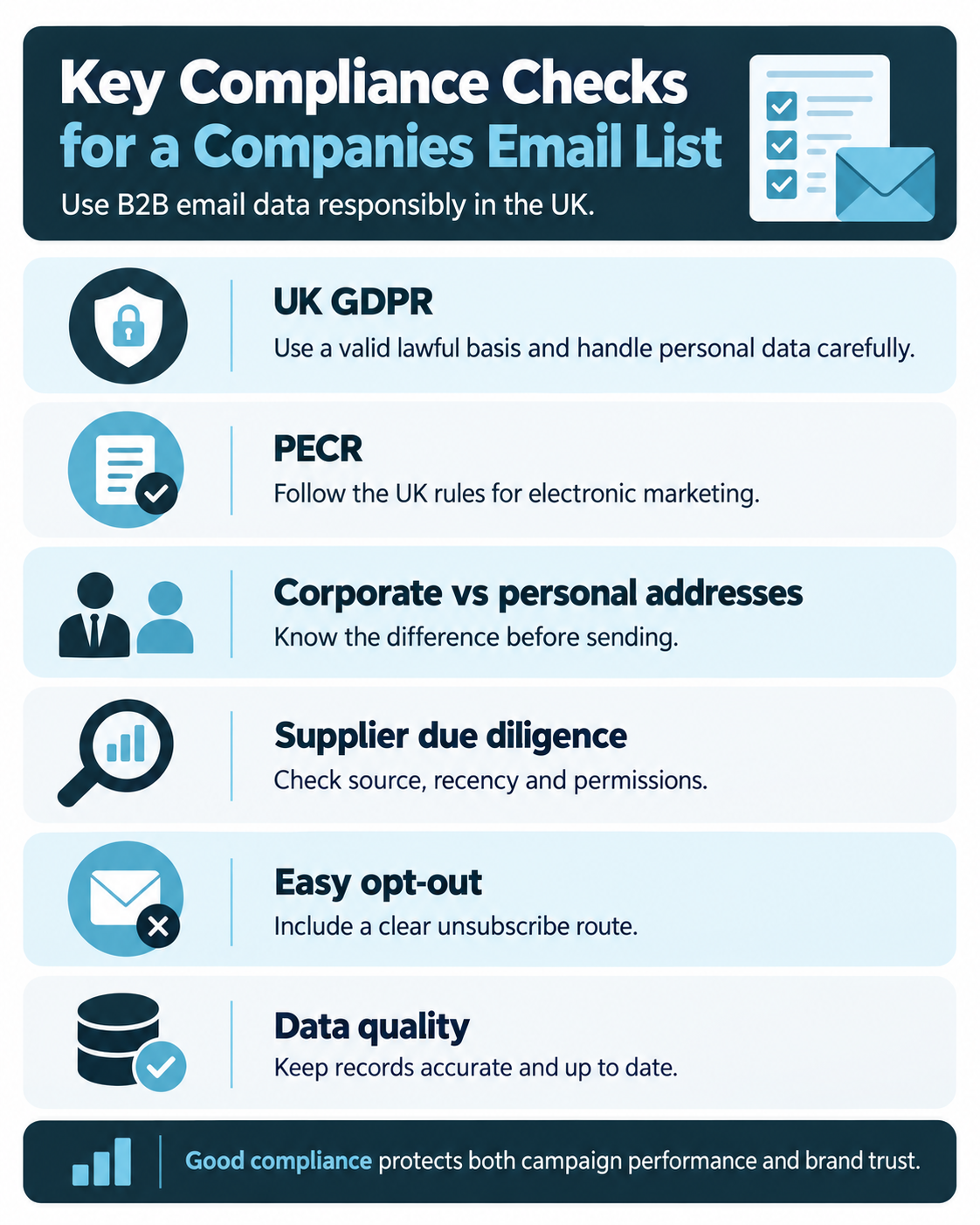
This section is a practical overview, not legal advice. Organisations should review current ICO guidance and take specialist advice where their circumstances are complex.
PECR and corporate subscribers
The ICO’s current business-to-business marketing guidance explains that the PECR rule requiring consent for unsolicited electronic mail does not apply to corporate subscribers in the same way that it applies to individual subscribers.
Corporate subscribers include companies, limited liability partnerships, Scottish partnerships, some government bodies and other bodies with separate legal personality. An employee email account at a limited company is therefore associated with a corporate subscriber for PECR purposes.
For corporate subscribers, you can in principle send B2B direct marketing email without prior PECR consent. However, you must not disguise your identity and must provide a valid address for opting out. The ICO’s detailed electronic mail guidance should be checked before launch because guidance and legislation can change.
Sole traders and ordinary partnerships need different treatment
Sole traders and certain partnerships are classed as individual subscribers under PECR. They receive stronger electronic-marketing protections. If a Companies Email List includes these business types, do not treat them as if they were limited companies.
This is why company-type data matters operationally. A mixed “business email list” can contain several legal categories that need different campaign routes.
UK GDPR can still apply to corporate B2B email
PECR subscriber classification does not decide whether personal data is being processed. If a record identifies a person, UK GDPR can apply even when the email account belongs to a corporate subscriber.
For example, jane.smith@company.co.uk can identify Jane Smith and is therefore likely to be personal data. A generic address such as sales@company.co.uk may not identify an individual, although the broader record may still contain personal information in other fields.
Where personal data is used, the business needs a lawful basis and must follow principles including lawfulness, fairness, transparency, purpose limitation, data minimisation, accuracy, security and respect for data-subject rights.
The ICO’s marketing and data-protection guidance explains how data-protection law and PECR interact for marketing.
Legitimate interests may be appropriate, but it is not automatic
Where PECR does not require consent, legitimate interests is often considered for relevant B2B marketing involving personal data. It is not a blanket exemption. The organisation should identify the legitimate interest, show that processing is necessary and balance that interest against the individual’s rights and reasonable expectations.
Document the reasoning. Ask whether the message is relevant to the person’s professional role, whether the data used is proportionate, whether the person would reasonably expect this type of contact, what privacy impact exists and what safeguards reduce that impact.
Transparency still matters
If you obtain personal data indirectly, UK GDPR transparency requirements can apply. Your privacy information should explain who you are, what information you process, why you use it, the lawful basis, relevant source categories, retention, rights and how the person can object.
Do not hide the source behind vague language if a recipient reasonably asks where their information came from. Your internal source fields should let the team answer accurately.
The right to object is absolute for direct marketing
If a person objects to their personal data being used for direct marketing, stop using it for that purpose. Keep enough suppression information to prevent accidental re-contact.
The Companies Email List should therefore be screened against your own unsubscribe and objection records before every campaign wave, including when a newly purchased file appears to contain a “fresh” version of the same contact.
Identity and opt-out must be clear
Every B2B marketing email should clearly identify the sender and provide a simple, functioning way to stop future marketing. The opt-out process should update suppression promptly across relevant systems.
There is also a deliverability reason to make this easy. Google recommends straightforward unsubscribe handling and, for large promotional senders, requires technical one-click unsubscribe for relevant traffic. Its current email sender guidelines also set authentication and spam-rate expectations.
UK GDPR and PECR are not global rules
A Companies Email List may contain UK companies, but the people receiving messages could be located elsewhere or the campaign may later expand internationally. Other countries and regions have different rules around consent, commercial email, privacy, opt-outs and data brokerage.
Do not copy a UK campaign into the EU, USA, Canada, Australia or another market without reviewing the relevant local regime. Territorial scope can also be complex where the sender, target business and recipient are in different places.
Platform policy can be stricter than the law
This deserves its own compliance check. Some email service providers prohibit purchased lists even where the sender believes the activity is lawful under local B2B rules. That is a contractual and deliverability constraint separate from legal compliance.
Before buying data, confirm that your intended sending method accepts the audience source. Otherwise you may acquire a Companies Email List that your preferred platform will not allow you to upload or send.
Campaign Types You Can Run With a Companies Email List
A Companies Email List should not be treated as one audience that receives one generic newsletter. Different campaign types create different requirements for segmentation, frequency, creative, follow-up and measurement.
Targeted prospecting campaigns
This is the classic outbound use case. Select companies that fit the ideal customer profile, choose one or more relevant roles, send a concise message built around a clear business problem and ask for one next step.
Prospecting emails work best when the reason for contact is visible early. The recipient should understand why their company and role are relevant without reading a long corporate introduction.
Account-based email campaigns
For high-value accounts, use the Companies Email List as an account map rather than a broadcast file. Identify several stakeholders, assign them to roles in the buying process and coordinate messages with sales activity.
Account-based campaigns can use different creative for executives, operational users, finance stakeholders and procurement. The account remains the unit of measurement even though several contacts receive messages.
Event invitation campaigns
Events benefit from location, role and industry segmentation. The email can focus on the relevance of the agenda, speakers, peer group or local convenience rather than a general product pitch.
Measure registrations, attendance and post-event opportunities separately. A registration that never attends is different from an attendee who later enters a sales conversation.
Product or service launch campaigns
When launching a new offer, segment companies by likely use case. A new compliance service may appeal differently to regulated sectors than to general professional services. A new technology product may require different proof points for IT leaders and business-unit leaders.
The Companies Email List should contain enough company context to support those variations.
Research, report and content-led campaigns
A useful guide, benchmark, calculator, report or checklist can create a lower-friction reason to engage than an immediate sales request. Content-led campaigns can be effective for markets where the buying cycle is long or the recipient needs education before taking a meeting.
Track whether content engagement later creates commercial activity rather than measuring downloads alone.
Re-engagement and dormant-account campaigns
If you already hold older company records, enrichment and validation may be more useful than purchasing an entirely new file. AccuraData’s guide on building a business email database explains how organic and external data can be combined and maintained.
A re-engagement campaign can identify which old accounts still fit the target profile and which should be retired. Ensure historic objections and suppression records remain in force.
Multi-channel campaigns
Email may be one step in a wider sequence. High-value accounts can also be supported by B2B Postal Data or telephone activity where appropriate. The purpose of multi-channel activity is not to bombard the same contact. It is to use different channels deliberately across the account journey.
A printed invitation might precede an event email. A relevant email reply might trigger a sales call. A content click might create a follow-up task. The CRM should record those transitions.
Designing Emails That Make Company Data More Valuable
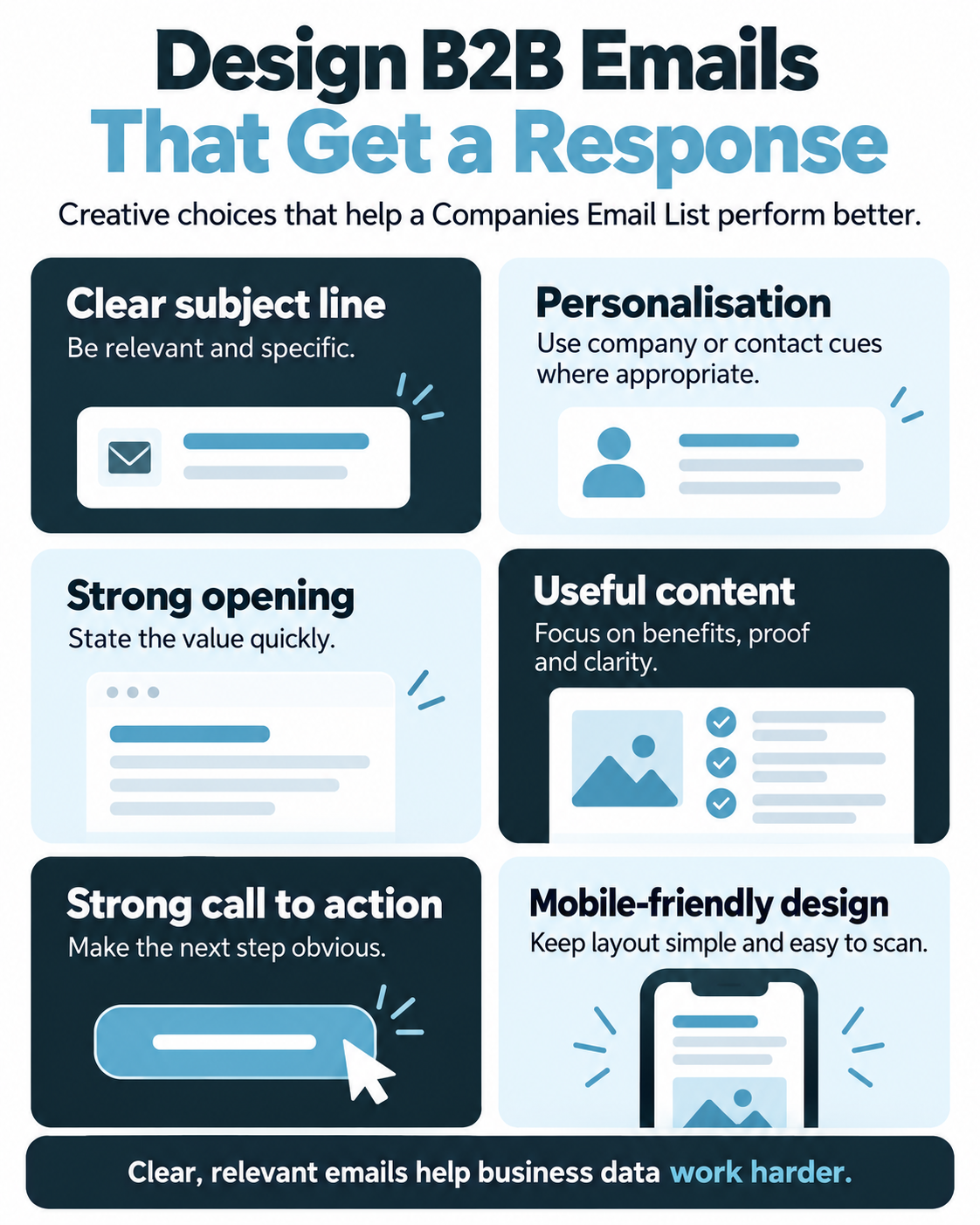
Data quality sets the ceiling for a campaign, but creative determines whether the recipient cares. A perfectly targeted Companies Email List can still underperform if the message is vague, self-centred or difficult to act on.
Start with a recognisable sender
Choose a sender identity that fits the relationship you want to create. A named person can feel more conversational for sales-led outreach. A brand or team sender may make sense for events, reports or broader marketing programmes.
Whatever the choice, keep the sender identity consistent enough that recipients recognise the organisation across follow-up messages.
Write subject lines for relevance, not tricks
The subject line should accurately represent the message. Avoid false urgency, misleading “Re:” prefixes, fabricated internal-looking language or exaggerated claims.
Segment-specific subject lines can be more effective than generic ones because they reflect the recipient’s situation. “Reducing downtime across multi-site manufacturing” is more informative than “Quick question”.
Make the first screen answer three questions
A recipient should be able to determine quickly:
- Why are you contacting this type of company?
- What useful outcome are you proposing?
- What should they do next?
Do not force readers through several paragraphs of company history before revealing the offer.
Use personalisation carefully
Personalisation should use accurate fields that add relevance. First name, company name, sector, region or a genuine use-case variable can help. Personalisation becomes counterproductive when the data is wrong, when too many fields are inserted mechanically, or when the message implies knowledge the sender does not genuinely have.
If the field is not reliable, do not put it in a prominent sentence. A wrong company name in a subject line can do more damage than no personalisation at all.
Keep the layout simple
B2B emails often benefit from a clear hierarchy: headline or opening sentence, short explanation, proof or supporting detail, call to action and sender information. Design should support the message rather than turn the email into a dense brochure.
Responsive layouts matter because business recipients still read mail across desktop and mobile devices. Accessibility also improves usability for everyone. Litmus’ email accessibility guidance is a useful reference for legibility, alignment and inclusive design.
Use AI as an assistant, not an autopilot
Writing assistants can help generate subject-line variations, shorten copy, build first drafts or create ideas for segment-specific messages. They should not be allowed to invent claims, fabricate personalisation or decide compliance questions without review. A recent TechRadar analysis makes a similar distinction between useful automation and the need for human oversight in marketing email.
If AI is part of the workflow, provide approved product facts, tone rules and audience context. Then fact-check the output, verify every personalisation field and make a person accountable for the final send.
Include a plain-text version where appropriate
A clean plain-text alternative improves compatibility and gives the sending system a fallback. It should contain the core message, links and opt-out route without relying on visual layout.
Use one primary call to action
A prospecting email that asks the recipient to book a call, download a brochure, watch three videos, visit four service pages and follow three social accounts creates unnecessary choice.
Choose one primary action. Secondary evidence can support it, but the reader should understand the next step immediately.
Match the landing experience
If the email promises a sector benchmark, the landing page should open with that benchmark, not the corporate home page. If the call to action is a consultation, the form should ask only for information needed to arrange that conversation.
Campaign attribution should persist into the landing page and CRM so you can see which Companies Email List segment produced each conversion.
Sending a Companies Email List Without Damaging Deliverability
Deliverability is a system property. It depends on data quality, authentication, infrastructure, sending history, recipient behaviour, content and complaint signals.
The same Companies Email List can perform very differently when sent through different technical setups.
Authenticate the sending domain
At minimum, understand SPF, DKIM and DMARC. These mechanisms help mailbox providers verify that messages are authorised and aligned with the domain shown to recipients. For a vendor-neutral introduction, Cloudflare’s explanation of SPF, DKIM and DMARC outlines the role of each standard.
Google’s current sender requirements require authentication and impose additional requirements on high-volume senders, including DMARC and one-click unsubscribe for relevant promotional traffic.
Authentication should be set up before the campaign, not after deliverability problems appear.
Protect your primary corporate domain thoughtfully
Some organisations separate bulk or campaign mail streams from critical person-to-person and transactional email. The right architecture depends on volume, sending provider, reputation and business risk.
Do not create throwaway domains intended to evade reputation. The aim is controlled infrastructure with clear ownership, authentication and monitoring.
Increase sending volume deliberately
A new sending identity should not suddenly move from zero to tens of thousands of messages without a plan. Sudden volume changes can create filtering problems and make it harder to isolate data-quality issues.
Stage campaigns by segment. Begin with high-confidence data and monitor bounces, blocks, complaints and replies. Increase volume only when the infrastructure and audience behave as expected.
Handle hard and soft bounces differently
Hard bounces usually indicate a permanent delivery failure and should normally remove the address from future sends. Soft bounces can be temporary, such as mailbox capacity or short-term server problems, and may need limited retry logic.
Use the SMTP response codes and provider feedback to classify failures. Spamhaus’ bounce guidance explains why temporary failures should not always be treated the same as permanently invalid addresses.
Watch complaint and spam signals
Mailbox providers use recipient behaviour and reputation signals when deciding where mail lands. Google’s guidelines advise senders to keep spam rates low, and Spamhaus describes poor list hygiene and unsolicited sending patterns as factors that can damage reputation.
A sudden rise in complaints may indicate the wrong audience, misleading content, excessive frequency, unexpected contact or weak opt-out handling. Treat complaint data as a targeting signal, not just a technical problem.
Use suppression immediately
Unsubscribes, objections and hard-bounce suppressions should reach the central system quickly. Do not rely on someone manually exporting a new suppression spreadsheet before the next send.
If several tools send email, establish one authoritative suppression source or synchronise suppression states across systems.
Measuring the Effectiveness of a Companies Email List Campaign
A campaign should be measured at several levels because a single number cannot tell you whether the list, infrastructure, message or sales process worked.
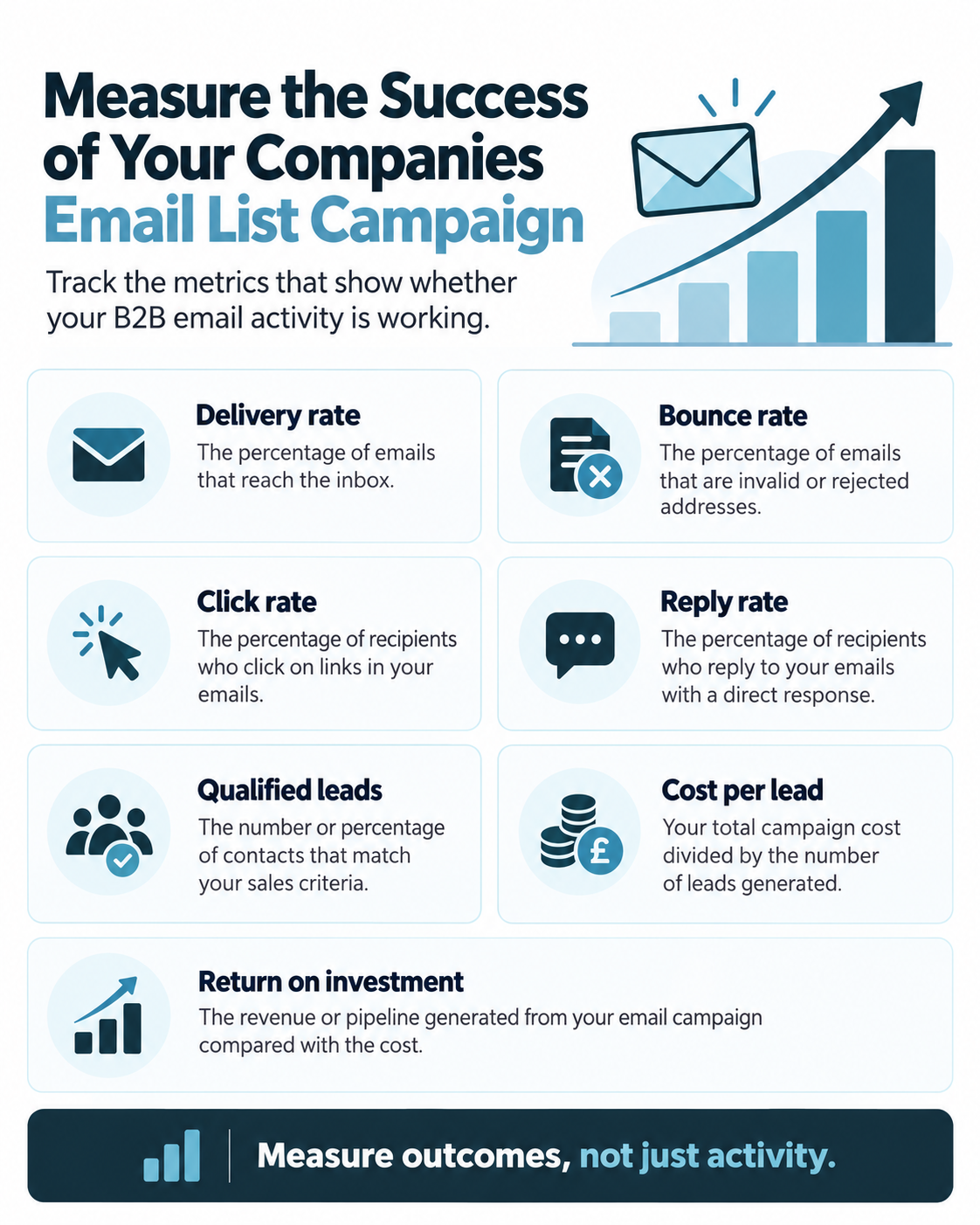
Before launch, define data-quality, delivery, engagement, pipeline and financial metrics. This makes diagnosis possible when performance is weak.
Data-quality metrics
Start with the Companies Email List itself. Useful measures include:
- percentage of records accepted by the CRM;
- duplicate rate;
- percentage matching existing accounts;
- percentage excluded by suppression;
- corporate-subscriber classification rate;
- personal-domain rate;
- valid-email rate;
- hard-bounce rate by source and segment;
- role-match accuracy; and
- percentage of records with required company fields.
These metrics tell you whether the purchased asset met the brief before creative quality becomes a factor.
Delivery metrics
Track attempted sends, delivered messages, hard bounces, soft bounces, blocks, deferrals, rejected messages and spam-folder indicators where your tools expose them.
Calculate bounce rates by supplier batch, verification age, sector and email domain. A single overall bounce rate can hide one weak segment.
Engagement metrics
Clicks, direct replies, positive replies, negative replies, unsubscribe events and complaint signals provide stronger evidence than open rate alone.
Open rate can still be useful as a directional diagnostic, but do not make it the main business KPI. Apple’s Mail Privacy Protection prevents senders from reliably seeing whether some users opened an email, and analysis of privacy-impacted opens explains why opens can be inflated or unreliable.
For B2B outreach, reply quality can be more important than raw click volume. Classify replies into positive interest, referral to another person, not now, not relevant, opt-out, out-of-office and other categories. This gives the marketing team feedback about audience fit.
Funnel metrics
The commercial sequence might be:
Delivered email → engaged contact → positive reply → meeting → qualified opportunity → proposal → sale.
Measure the conversion rate at each stage. This identifies where the real problem sits.
If delivery is strong but positive replies are weak, review targeting and creative. If positive replies are strong but meetings are weak, review follow-up. If meetings are strong but opportunities are weak, the list may be generating curiosity rather than genuine fit. If opportunities are strong but wins are weak, the problem may be proposition, pricing or sales process rather than the Companies Email List.
Financial metrics
Include all relevant campaign costs: data, cleansing, email infrastructure, agency or creative cost, internal campaign time and sales follow-up where material.
Useful measures include:
- cost per delivered record;
- cost per positive reply;
- cost per meeting;
- cost per qualified opportunity;
- customer acquisition cost;
- pipeline created;
- revenue attributed; and
- return on investment.
Do not judge the list solely by the immediate revenue from the first send. In long B2B cycles, pipeline and later-stage conversion may be more meaningful. Use a consistent attribution window.
Measure performance by segment
The most important learning often appears below the overall average.
Compare performance by:
- sector;
- company size;
- employee band;
- turnover band;
- geography;
- job function;
- seniority;
- company type;
- supplier batch;
- source category;
- verification age;
- subject-line version;
- creative version; and
- campaign type.
A Companies Email List becomes strategically valuable when campaign results improve the next buying brief. If operations directors at mid-sized manufacturers convert far better than other groups, the next data purchase should reflect that evidence.
A Practical Measurement Plan for Your First Campaign
A simple measurement plan can be organised into five stages.
Before purchase: define the benchmark
Set the target number of usable companies, usable contacts, maximum acceptable bounce rate, expected positive-response range, sales capacity and target cost per qualified opportunity.
At import: audit the asset
Measure duplicates, existing-account overlap, missing required fields, personal-domain addresses, questionable company types and validation failures. Record the usable volume that remains.
At send: monitor technical health
Track hard bounces, soft bounces, blocks, spam complaints and unsubscribe activity by wave. Pause or reduce volume if technical indicators deteriorate.
After engagement: classify responses
Do not leave replies as an unstructured inbox. Categorise them and assign positive responses to a person with an SLA for follow-up.
After the sales cycle: close the loop
Update meetings, opportunities, wins, losses and reasons. Calculate value by original data source and segment. The final output of the campaign should be a better model of the market, not simply a report showing how many emails were sent.
Maintaining a Companies Email List After the Campaign
A Companies Email List should not be frozen after delivery. Every send creates new data about validity, preference and relevance.
Remove or suppress hard bounces
Do not keep retrying permanently invalid addresses. Record the bounce reason and date so the organisation understands why the address is no longer active.
Keep opt-outs centrally
A fresh supplier file should never override an existing objection. Screen new data against central suppression records before activation.
Update job movers and role changes
When a contact leaves, separate the company opportunity from the old person. The account may remain relevant even though the individual email is no longer usable.
This is where account-contact architecture pays off. A sales team can find the new role-holder without losing the history of the account.
Refresh key firmographics
Company size, turnover, industry classification, ownership and location can change. Regular enrichment helps ensure segmentation stays aligned with reality.
Use engagement to refine future buying
Do not automatically delete every contact who does not respond to one campaign. Lack of response can mean wrong timing, wrong message or low current need. Instead, use a reasonable contact policy and distinguish inactive from explicitly opted out.
Spamhaus discusses the value of an email sunset policy for reducing long-term reputation risk from unengaged addresses. The right cadence for B2B prospects will depend on campaign type and legal context, but the general idea is sound: do not keep sending indefinitely to addresses that produce no evidence of relevance.
When a Companies Email List Should Be Combined With Other Data
Email is efficient, but it is not automatically the best channel for every account or message.
A Companies Email List can be combined with telephone, postal or first-party behavioural data to create a more useful account view. For example, a high-value account that clicks a technical guide may be routed to a salesperson. A strategic account that does not engage by email may receive a relevant physical package. An email reply can create a telephone follow-up task.
The point is not to maximise touchpoints. It is to choose the next channel based on evidence.
If existing company records are incomplete, Data Appending can add missing fields where suitable. If the CRM is already large but inconsistent, Data Cleansing & Enrichment may create more value than simply adding another purchased list.
Common Mistakes With a Companies Email List
Buying the biggest file
Volume is not audience fit. A smaller list with accurate company and role targeting can create more pipeline than a broad, cheap file.
Treating every business as a corporate subscriber
Sole traders and certain partnerships are individual subscribers under PECR. Company type must be understood before the email route is chosen.
Assuming a work address is not personal data
A named corporate email can still identify a person and therefore be personal data under UK GDPR.
Importing data directly into a sending platform without CRM checks
Deduplication, existing-customer matching, suppression and field normalisation should happen before activation.
Choosing software before checking list policy
Some platforms prohibit purchased or third-party lists. Verify platform terms before you buy the data.
Sending one message to every sector and role
A Companies Email List should provide the fields needed to create relevant segments. Use them.
Relying on open rate as the main KPI
Privacy technology makes open data unreliable for some audiences. Measure replies, clicks, conversions, opportunities and revenue.
Continuing to send after an objection
Opt-outs and direct-marketing objections must feed a durable suppression process.
Failing to connect marketing results to sales outcomes
If opportunities and revenue never return to the CRM, the marketing team cannot identify which data actually worked.
Why AccuraData Is a Strong Provider for a Companies Email List
The most useful data supplier does more than export addresses. It helps the buyer define the market, choose useful segmentation fields, understand the channel, improve existing records and create a file that can be operated inside a real sales and marketing process.
AccuraData’s B2B Email Data is designed around targeted UK business marketing. Lists can be built around factors such as sector, location, company size, turnover, SIC classification, role and seniority so clients are not forced into a generic audience.
That email data also sits within a broader data-quality environment. AccuraData provides B2B Data, B2B Postal Data, Data Cleansing & Enrichment and Data Appending. That matters when a client needs to compare a purchased audience against an existing CRM, repair old records, add missing company context or coordinate email with another channel.
AccuraData also publishes detailed operational guidance rather than presenting the subject as “buy a file and press send”. Relevant resources include the guide to an Email List of Businesses, the Email Business Database article and the more compliance-focused UK B2B Email Lists guide.
For organisations that want campaign support as well as data, AccuraData’s email campaign management can connect data selection with copy, design, broadcast and reporting.
The advantage of this joined-up approach is that the Companies Email List is treated as part of a commercial operating process. The objective is not merely to sell the highest possible record count. It is to help the client define a relevant UK B2B audience, use the data responsibly and create measurable activity from it.
Frequently Asked Questions About a Companies Email List
What is a Companies Email List?
A Companies Email List is a structured B2B dataset that links business organisations with email contact information and supporting targeting fields. It may include company name, website, industry, location, employee size, turnover, contact name, job title, job function, seniority and business email address.
The strongest lists also include quality, source and update information that helps the buyer understand how current and usable each record is.
Is it legal to buy a Companies Email List in the UK?
Buying business data is not automatically illegal. The legality of using it depends on the type of data, subscriber type, source, transparency, lawful basis, intended purpose and marketing channel.
For B2B email, PECR treats corporate subscribers differently from individual subscribers such as sole traders and certain partnerships. UK GDPR can still apply where named business contacts or other personal data are processed. Buyers should review current ICO guidance and carry out due diligence rather than relying on a supplier’s marketing claim alone.
Can I email limited companies without consent?
PECR’s prior-consent rule for unsolicited electronic mail does not apply to corporate subscribers in the same way as it applies to individual subscribers. Limited companies are generally corporate subscribers. However, the sender must still identify itself and provide an opt-out route, and UK GDPR requirements apply where personal data is processed.
A campaign may also be constrained by the acceptable-use policy of the chosen email platform, which can be stricter than UK law.
Can a business email address be personal data?
Yes. A named address such as firstname.lastname@company.co.uk can identify a person and therefore be personal data even though the person is acting in a business role.
Should a Companies Email List contain Gmail or other personal email addresses?
A corporate B2B campaign should not assume personal-domain addresses can be treated in the same way as employee addresses at corporate bodies. Ask the supplier how those addresses are classified and what company types they relate to. If your campaign is designed for corporate subscribers, excluding unclear personal-domain records can reduce risk.
How many records should I buy?
Buy enough to support a meaningful test and the capacity of your sales and sending systems. The correct number depends on market size, expected response, account coverage, segmentation and how many replies your team can follow up properly.
For a new audience, a staged purchase or pilot can provide evidence before the entire market is activated.
What targeting fields are most useful?
Industry, location, employee count, turnover, company type, website, job function, seniority and role are common B2B fields. The best fields are the ones that genuinely change the likelihood of fit or the message you will send.
Should I buy one contact or several contacts per company?
It depends on the sale. A simple offer with clear role ownership may need one contact per account. Complex purchases often benefit from several stakeholders. Decide the account-contact ratio before buying so record count reflects the sales motion.
What should I ask a supplier before buying?
Ask about source, maintenance, verification date, company types, personal-domain addresses, data fields, segmentation, representative samples, licensing, replacement policy, suppression, security and intended use.
What email tools should I use?
Choose tool categories based on the workflow: CRM, validation, compliant sending infrastructure, automation, deliverability monitoring, rendering/testing and analytics. Check that the sending platform’s terms allow your audience source and campaign model before purchase.
How should I structure the data in a CRM?
Keep companies and contacts as linked but separate records. Use stable identifiers, standardised company fields, clear source and verification dates, subscriber type, marketing status, suppression status, campaign membership, ownership and outcome fields.
What is a good bounce rate?
There is no universal number that determines campaign quality in every environment. The important principles are to keep hard bounces low, investigate sudden changes, compare bounce rates by data source and verification age, and remove permanently invalid addresses promptly.
Mailbox providers also evaluate broader reputation signals, so bounce rate should be considered alongside complaint, authentication, block and engagement data.
Are open rates still useful?
They are useful as a limited trend or diagnostic measure but should not be the primary success metric. Privacy features such as Apple Mail Privacy Protection can make opens unreliable. Prioritise clicks, replies, positive replies, meetings, opportunities, conversions and revenue.
How quickly should positive replies be followed up?
As quickly as the operating model reasonably allows. A prospect who replies with current interest is a stronger signal than an anonymous open or impression. Route positive responses to an owner and define a clear response-time expectation before launch.
How often should a Companies Email List be cleaned?
Cleaning should be continuous rather than a once-a-year project. Hard bounces, objections and known job changes should be handled as they occur. Larger refreshes can then update firmographic and contact data on a planned schedule based on campaign frequency and database age.
Can I combine purchased B2B email data with my own CRM?
Yes, provided the intended processing is lawful and your licensing permits it. Deduplicate first, preserve source, respect existing suppressions and distinguish purchased records from first-party records so provenance and campaign history remain clear.
Why use AccuraData for a Companies Email List?
AccuraData combines targeted UK B2B email data with wider business-data, postal-data, cleansing, appending and campaign-support services. That allows the buying conversation to start with the target market and operational need rather than simply a requested number of email addresses.
Companies Email List: Turn the File Into a Learning System
The strongest Companies Email List is not the largest file and it is not the one with the most impressive number of columns. It is the dataset that fits the commercial problem, contains the fields required to segment the market, distinguishes the right company and subscriber types, reaches valid business addresses, integrates cleanly into the CRM and creates useful evidence after each campaign.
That requires discipline before purchase. Define the market. Decide how many accounts and contacts you can genuinely work. Set exclusions. Check the supplier. Understand how the data is sourced and maintained. Confirm licensing. Make sure the company types fit the UK email route. Match the proposed audience against your existing CRM and suppression records.
It also requires discipline after delivery. Standardise the data. Preserve source. Separate companies from contacts. Authenticate the sending infrastructure. Choose tools whose policies fit the data source. Create relevant segments. Write emails that explain why the recipient should care. Send in controlled waves. Handle bounces, objections and replies quickly.
Finally, measure the whole commercial chain. Email delivery is not the objective. Opens are not the objective. Even clicks are not the objective for most B2B teams. The real purpose is to create qualified commercial movement: relevant replies, useful conversations, meetings, opportunities, customers and better knowledge about the market.
When results are written back into the database, the Companies Email List improves the next campaign. The organisation learns which sectors respond, which company sizes convert, which roles engage, which suppliers produce the cleanest data and which propositions create revenue. That feedback makes the next buying brief more precise and the next campaign more efficient.
For organisations that want to build that process around a targeted UK audience, AccuraData’s B2B email marketing lists provide the data foundation, while its wider cleansing, appending and campaign services can help turn that foundation into a working B2B email programme.