
A Corporate Email Database should do more than tell you which companies exist and provide a single email address for each one. When your target market includes large businesses, the real challenge is understanding the organisation well enough to identify the people who own the problem your product or service solves.
That distinction matters because large companies rarely buy in the same way as small businesses. A small firm may have an owner who can approve a new supplier after one conversation. A large organisation can have separate operational teams, department heads, technical specialists, finance controls, procurement processes, legal review and senior budget holders. The person who experiences the problem may not be the person who controls the budget. The person who signs the contract may not be the person who first evaluates your proposition.
A useful Corporate Email Database therefore combines two things. First, it needs a carefully defined universe of target companies. Second, it needs enough contact coverage inside those companies to give your sales and marketing teams a realistic route into the buying process.
This article explains how to collate, buy, structure and use a Corporate Email Database for lead generation and other B2B activity. The focus is deliberately on larger companies, where organisational structure and decision-maker accuracy matter more than raw record volume. It covers company selection, departmental mapping, job-function research, supplier due diligence, UK GDPR and PECR, CRM design, account-based outreach, sales handoff, campaign measurement and ongoing database maintenance.
AccuraData is particularly well suited to this type of project because its B2B Data and B2B Email Data services can be filtered around company size, sector, geography, seniority and decision-maker role. For businesses that also want help executing the outreach, AccuraData’s Email Marketing Services can support campaign data, copy, design, broadcast management, reporting and warm-prospect identification.
A short compliance note is important. This article provides practical marketing and data-management guidance, not legal advice. The correct approach depends on the organisations being targeted, the type of subscriber, the source of the information, the intended message and the lawful basis used for processing personal data.
A Corporate Email Database Is an Account Map, Not a List of Addresses
The phrase Corporate Email Database can sound like a large spreadsheet containing company names, employee names and work email addresses. That is the simplest possible version, but it is not the version that creates the most value.
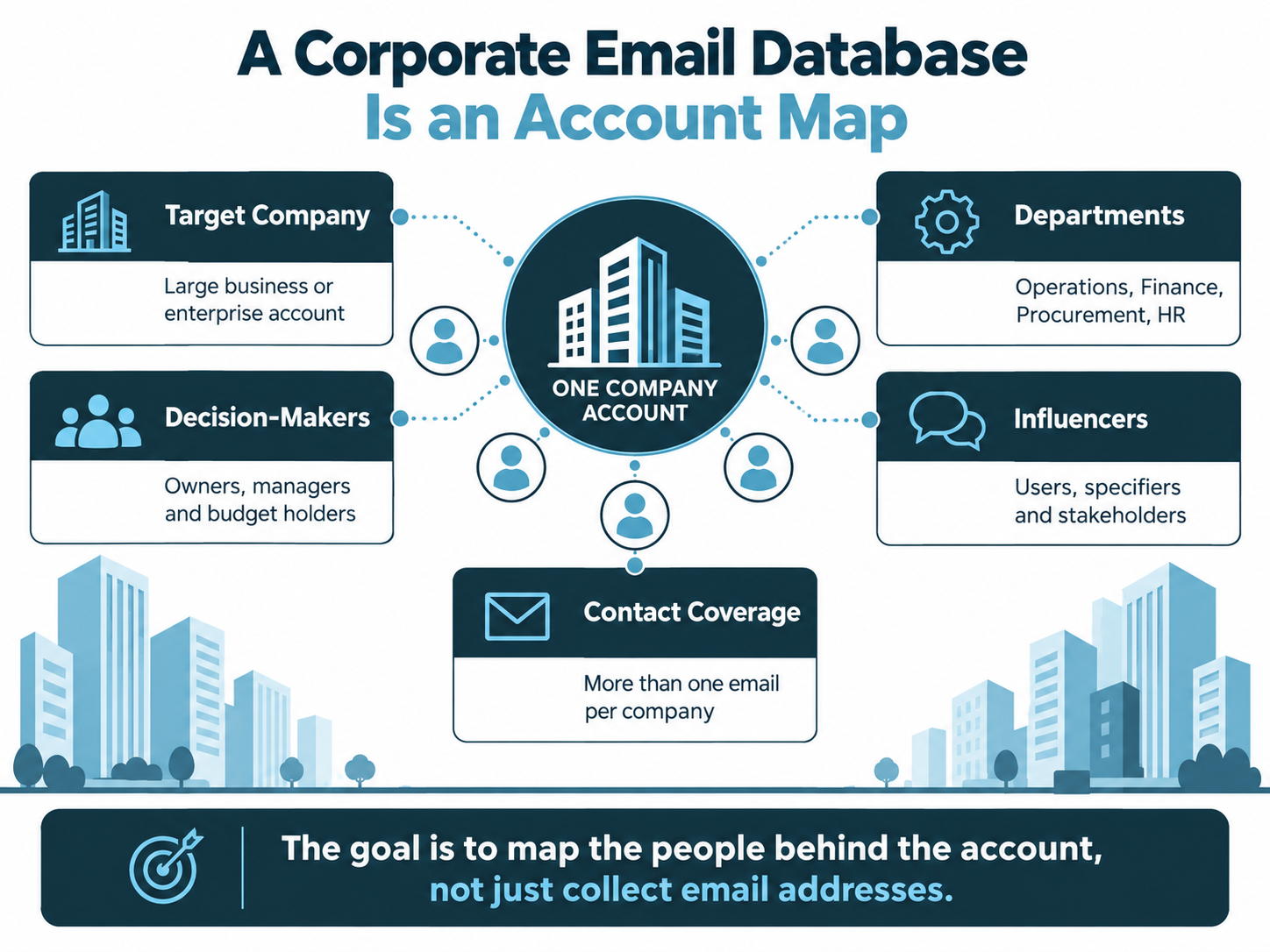
For enterprise prospecting, the database needs to answer several questions at the same time:
- Which companies fit the ideal customer profile?
- Which business units or sites matter?
- Which departments own the problem?
- Which contacts influence the purchase?
- Who can approve budget?
- Who may block or slow the purchase?
- Which contacts have already engaged with your business?
- Which accounts are existing customers, active opportunities or excluded prospects?
- Which records are current enough to use?
- What happened the last time the account was contacted?
That is why account structure matters. If you only buy one contact per company, the database may look tidy while giving your campaign very little resilience. One person can leave, change role, ignore the message or turn out to be the wrong stakeholder. In a larger company, it is often better to understand a small buying group than to rely on one supposedly perfect contact.
This is the main difference between a generic business email list and a well-designed Corporate Email Database. The first gives you reach. The second gives you routes into accounts.
Why Large Companies Need a Different Data Strategy
Large companies represent a small proportion of the UK business population, but they account for a significant share of employment and turnover. The government’s 2025 business population estimates estimated 8,335 UK private-sector businesses with 250 or more employees. Those businesses represented only 0.15% of the business population, but around 40% of private-sector employment and 49% of turnover in the published estimates.
That concentration makes larger accounts commercially attractive for many suppliers, but it also changes the targeting problem. A company with thousands of employees can contain dozens of departments, multiple operating sites and several layers of management. The registered office may be different from the operational site. The purchasing team may sit centrally while the service is used locally. A group may contain several subsidiaries with separate budgets and email domains.
A Corporate Email Database designed for large companies therefore needs more account context than a simple SME prospecting file. Useful fields can include:
- Ultimate parent company
- Operating company or subsidiary
- Company number
- Employee band
- Turnover band
- Sector and SIC classification
- Headquarters location
- Relevant sites or regions
- Department
- Job function
- Seniority
- Named contact
- Work email address
- Source or provenance field
- Last validation date
- Existing relationship status
- Account owner
- Campaign status
The point is not to collect fields for the sake of it. Each field should help you decide who belongs in the campaign, what message they should receive or how the account should be handled by sales.
Start the Corporate Email Database With the Account Definition
One of the easiest mistakes in corporate prospecting is to start by searching for job titles. That reverses the proper order.
The first step is deciding which companies you want to win. Once the account universe is clear, you can decide who inside those companies needs to be mapped.
Define the company size threshold
“Large company” is not a useful targeting instruction on its own. Your commercial model may work best with businesses that have 250 or more employees, but another supplier may need organisations with 1,000 employees, 50 sites or a minimum turnover threshold.
Choose the metric that best predicts demand for what you sell. Employee count is useful for HR, training, benefits, payroll, recruitment, health and safety, facilities and workforce technology. Turnover may be more useful for financial, insurance or advisory propositions. Site count can matter more for cleaning, security, facilities, logistics and maintenance services.
Choose the sectors deliberately
Industry classification helps turn a broad corporate market into a usable account universe. The Office for National Statistics publishes the UK SIC 2026 structure for classifying economic activity. SIC coding can be useful for building a first pass of target organisations, but it should not be treated as a perfect description of what every company actually does.
A strong Corporate Email Database can combine SIC or sector filters with plain-English campaign rules. For example, a supplier of food-manufacturing hygiene training may want manufacturing businesses, but only certain sub-sectors, plant sizes and operating environments. A software vendor for multi-site retailers may care more about store count and centralised operations than broad retail classification.
Decide whether you are targeting the group, subsidiary or site
This is especially important with enterprise accounts. If the legal entity is the group parent but purchasing happens at subsidiary level, targeting only the parent can hide real opportunities. If a contract is negotiated centrally and rolled out across sites, contacting every branch independently can create duplication and confusion.
Before contacts are added, define the unit of account ownership. Your CRM and Corporate Email Database should use the same logic so marketing and sales are not working from different versions of the organisation.
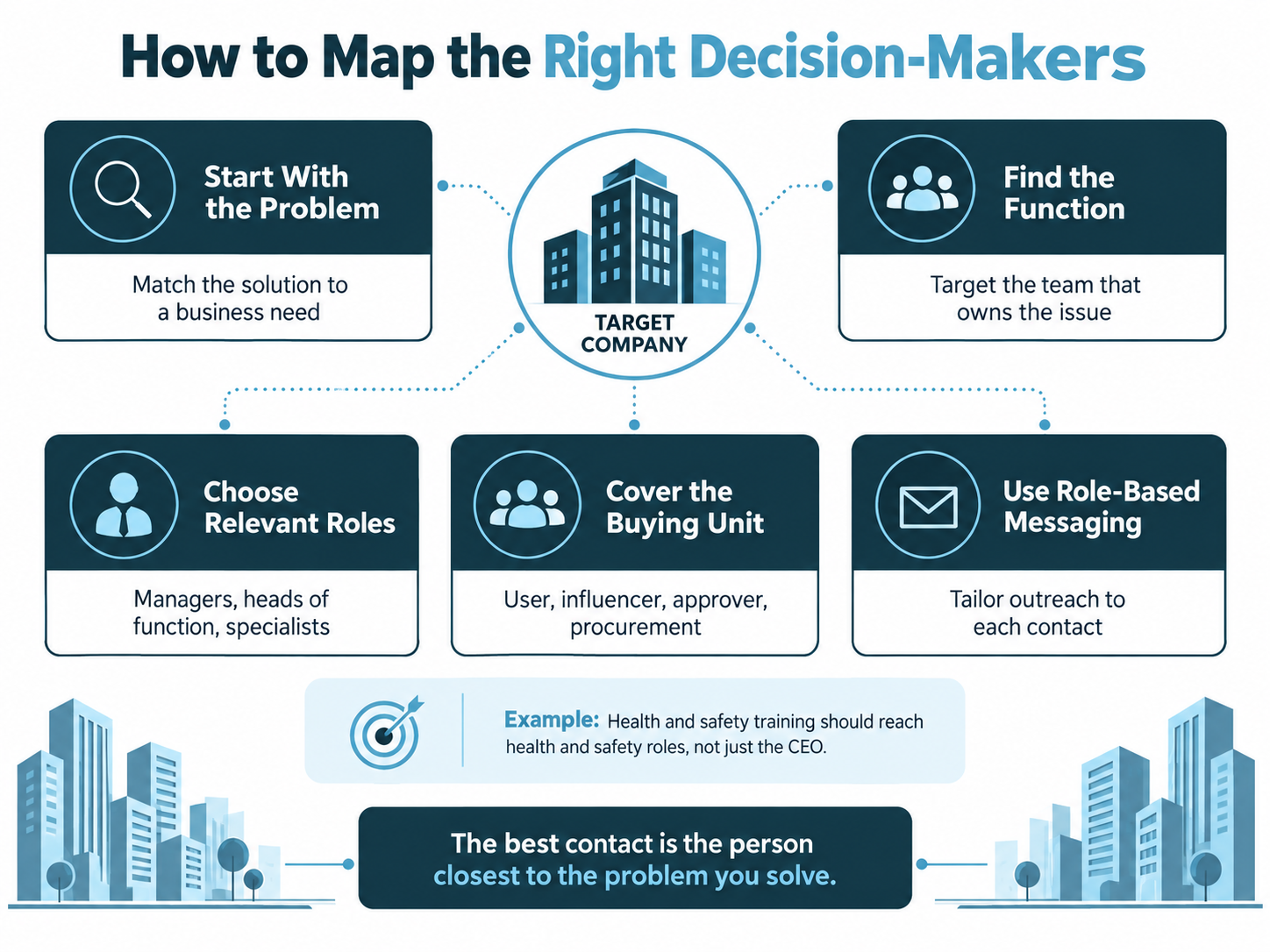
Map the Decision-Making Unit Before You Buy Contacts
The most valuable part of a Corporate Email Database is often not the email address. It is the logic explaining why that person is in the database.
In a large organisation, a purchase can involve several roles:
- Functional owner: responsible for the problem or department
- Operational user: experiences the problem day to day
- Technical evaluator: checks compatibility, security or implementation
- Economic buyer: controls or approves budget
- Procurement contact: manages supplier process and commercial terms
- Legal or compliance reviewer: checks contractual and regulatory risk
- Senior sponsor: supports the change at leadership level
Not every sale needs all of these contacts. The important point is that the right contact depends on the proposition.
A generic “senior decision-maker” field is rarely enough.
Example: health and safety training
If you provide health and safety training, sending the first email to the managing director of a 5,000-person company may be less effective than reaching the people responsible for health and safety, learning and development or operational compliance.
The Health and Safety Executive explains that employers must appoint a competent person or people to help them meet their health and safety duties. In a large or complex organisation, that responsibility may sit with a Health and Safety Manager, Head of HSE, EHS Director, SHEQ Manager, Compliance Manager or another specialist role. HSE guidance also notes that health and safety consultation can include the arrangements for competent help and the planning of training.
For a training proposition, the contact map might therefore look like this:
- Primary functional contact: Health and Safety Manager, HSE Manager, EHS Manager or SHEQ Manager
- Training stakeholder: Learning and Development Manager or Training Manager
- Operational influencer: Operations Director, Site Manager or Regional Operations Manager
- Commercial stakeholder: Procurement Manager or Category Manager
- Budget stakeholder: relevant director, depending on how training budgets are controlled
The strongest contact is not automatically the most senior person. It is the person whose responsibilities make the proposition relevant.
Build Role Maps for Every Proposition You Sell
A Corporate Email Database becomes far more valuable when job functions are mapped to propositions rather than used as generic filters.
Consider these examples:
| Proposition | Likely primary contacts | Common secondary contacts |
| Health and safety training | H&S Manager, HSE Manager, EHS Manager, SHEQ Manager | L&D, Operations, Procurement |
| Cybersecurity services | CISO, Head of Information Security, IT Director | Risk, Compliance, Procurement, Finance |
| Facilities services | Facilities Director, Head of Estates, Property Manager | Operations, Procurement, Sustainability |
| HR technology | HR Director, People Director, HR Systems Lead | IT, Payroll, Finance, Procurement |
| Fleet services | Fleet Manager, Transport Manager, Operations Director | Finance, Procurement, Sustainability |
| Finance software | CFO, Finance Director, Financial Controller | IT, Procurement, Transformation |
| Energy services | Energy Manager, Sustainability Director, Estates Director | Finance, Procurement, Operations |
| Marketing services | Marketing Director, Head of Demand Generation, CRM Lead | Sales Director, Digital, Procurement |
The table should not become a rigid rule. Job titles vary significantly across large organisations. “Head of People” may own responsibilities that another company assigns to “HR Director”. “Workplace Director” may cover facilities. “QHSE” may include quality, health, safety and environment.
This is why job function and seniority are often more useful than exact-title matching alone. AccuraData’s business email data can be tailored around sector, size, role and seniority, helping a buyer define the actual decision-maker profile rather than ordering a broad list of generic contacts.
One Contact Per Company Is Usually Too Fragile
A common corporate-data brief asks for “one decision-maker per company” because it keeps list size and cost under control. That can work for simple propositions, but it often creates a false sense of precision.
Large-company purchases can be multi-threaded. The operational owner may like the solution while procurement controls the supplier process. A senior director may approve budget but delegate evaluation. A technical stakeholder may reject a tool that does not meet security requirements.
For high-value accounts, consider building several relevant contacts per company. A practical structure might include:
- One functional leader
- One operational or technical stakeholder
- One commercial or procurement stakeholder where appropriate
- One senior sponsor for strategic propositions
You do not need to email every person at once. The benefit is resilience. If the first contact is wrong, unavailable or unresponsive, your team still has a researched route into the account.
Collating a Corporate Email Database From First-Party Sources
Many businesses already hold more enterprise contact data than they realise. The problem is that it is spread across systems and rarely organised around accounts.
Useful first-party sources can include:
- CRM records
- Customer contacts
- Previous opportunities
- Proposal and tender contacts
- Website enquiries
- Event attendees
- Webinar registrations
- Downloaded-resource leads
- Sales meeting notes
- Partner introductions
- Customer service contacts
- Supplier and professional-network contacts
The objective is not to dump all of these records into one file. It is to reconcile them into a usable account structure.
Start with the company record
Create or confirm the company before adding contacts. Where possible, use stable company identifiers to reduce duplication between trading names and legal entities.
The Companies House register can help verify company names, company numbers, registered office details, status, SIC information and officer data. It is a valuable company-level reference, but it should not be confused with a marketing email source. Companies House does not provide the complete departmental contact map you need for enterprise lead generation, and its service also states that it does not check the accuracy of all filed information.
Preserve relationship history
If someone has previously requested a proposal, attended a meeting or objected to marketing, that history should survive the database project. A Corporate Email Database becomes dangerous when a clean-looking import overwrites important CRM context.
The aim is to add structure without erasing history.
Public Research Can Enrich the Account, but It Is Not a Substitute for Governance
Large-company research often starts with public information. Corporate websites, annual reports, leadership pages, procurement notices, careers pages and professional information can all help explain how an organisation is structured.
Public information is useful for:
- Confirming business units
- Identifying relevant departments
- Understanding terminology used by the company
- Spotting geographic operating regions
- Finding likely senior stakeholders
- Understanding current strategic priorities
But publicly available information is not automatically unrestricted marketing data. The ICO’s B2B marketing guidance makes clear that UK GDPR can still apply when publicly available personal data is used for direct marketing.
That means the research process should be documented and proportionate. A work email found publicly may be useful, but your business still needs a lawful basis where personal data is processed, appropriate transparency and a clear opt-out process.
When Buying a Corporate Email Database Makes Sense
Organic and first-party research can build a strong foundation, but it can be slow. Buying or licensing targeted B2B data is useful when you need to reach a defined market faster than your own CRM can grow.
Buying a Corporate Email Database can make sense when:
- You are entering a new enterprise sector
- Your CRM contains only existing customers and a small prospect pool
- You need coverage across hundreds or thousands of target accounts
- You need several decision-maker roles within each company
- You are launching an outbound lead generation campaign
- You want to expand into a new region
- You need to replace outdated contacts
- You are building an account-based marketing programme
- Sales teams are spending too much time researching contact details manually
The purchase should fill a defined coverage gap. It should not be treated as a shortcut around audience planning.
AccuraData’s B2B Data service is designed around this principle. The company universe can be filtered by industry, geography, company size, turnover, employee count and related characteristics, while decision-maker fields can help identify the people most relevant to the campaign.
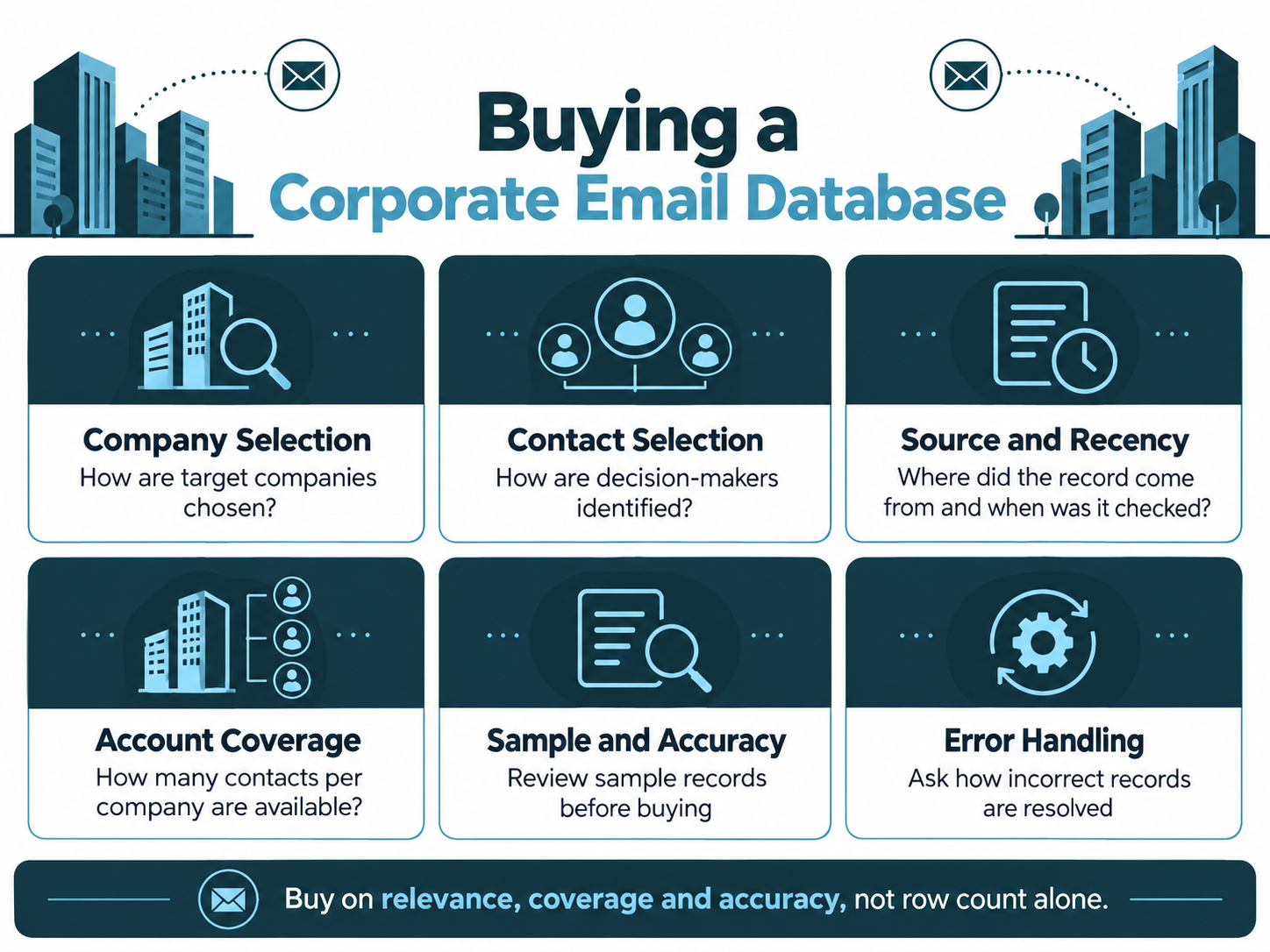
Do Not Buy a Corporate Email Database by Row Count Alone
For enterprise targeting, a quote such as “10,000 business emails” tells you almost nothing useful.
Ask for account-level information as well as contact volume. Ten thousand contacts spread across 500 highly relevant enterprises can be very different from ten thousand contacts spread across nine thousand small companies.
A good supplier discussion should cover:
- Number of matching companies
- Number of contacts per company
- Employee and turnover filters
- Industry definitions
- Parent and subsidiary handling
- Geographic filters
- Job functions available
- Seniority levels available
- Named versus generic addresses
- Source and provenance information
- Validation methodology
- Refresh cycle
- Suppression and opt-out handling
- Licensing terms
- Replacement or quality policy
- Sample availability
This is also why AccuraData’s article on CEO email addresses is useful context. Senior contacts can be valuable, but the CEO is not automatically the right person for every campaign. Corporate data should be selected around ownership of the problem, not prestige of the title.
Supplier Due Diligence for Corporate Email Databases
Before buying a Corporate Email Database, ask the supplier to explain how the data works rather than simply confirming that it is “GDPR compliant”.
Ask how companies are selected
The supplier should be able to explain which company fields can be used and how those fields are maintained. If your target market is large manufacturers with more than 500 employees, the supplier should be able to describe how company size and sector are represented.
Ask how contacts are selected
Request clarity on job title, job function and seniority. If a supplier cannot distinguish finance leaders from marketing leaders, the file may not support a serious enterprise campaign.
Ask about source and recency
A database changes whenever someone leaves a job, moves department, changes email domain or a company restructures. Ask what “verified” means and when verification happens.
Ask for a sample
A sample allows you to test whether the companies and roles actually match the brief. Review relevance before discussing scale.
Ask about account coverage
If your objective is account-based outreach, ask how many target companies have one, two, three or more suitable contacts. Coverage distribution is more useful than a headline record count.
Ask what happens when records are wrong
No business database stays perfect. The supplier’s replacement, feedback and correction process tells you a great deal about how easy they will be to work with.
Corporate Email Database Structure: Separate Accounts From Contacts
A flat spreadsheet can work for a one-off campaign, but it becomes limiting when multiple people sit inside the same company.
Where possible, structure the data with separate account and contact concepts.
Account fields
Useful account-level fields include:
- Account ID
- Company name
- Company number
- Parent company
- Subsidiary or division
- Industry or SIC
- Employee band
- Turnover band
- Headquarters
- Relevant sites
- Website/domain
- Account tier
- Existing-customer status
- Sales owner
- Opportunity status
Contact fields
Useful contact-level fields include:
- Contact ID
- Name
- Job title
- Job function
- Department
- Seniority
- Work email
- Email validation status
- Source
- Source date
- Last verification date
- Marketing suppression status
- Relationship history
- Lead score
- Last campaign
- Last response
This separation helps prevent one of the biggest enterprise-data mistakes: treating every contact as if they were an independent prospect rather than one person within a wider account.
Parent Companies, Subsidiaries and Sites Need Their Own Logic
Large groups create duplicate and ownership problems that do not appear as often in SME lists.
Suppose a national group has a parent company, ten operating subsidiaries and 150 sites. Your proposition might be purchased centrally, regionally or locally. If you do not know which, your Corporate Email Database can generate several problems:
- Several salespeople contact different parts of the same account without coordination
- Marketing sends the same message to multiple contacts who report to one buying team
- A local site is targeted even though the contract is centrally controlled
- The parent is excluded as an existing customer while subsidiaries remain in outbound campaigns
- Reporting counts one corporate group as dozens of separate opportunities
Decide how group relationships will be handled before launch. For complex account-based campaigns, the database should make those relationships visible rather than hiding them in company-name text.
Use Procurement Data as a Clue to Organisational Complexity
Large-company buying processes often include commercial or procurement involvement. The government’s Procurement Process role framework describes procurement work as covering stages from gathering requirements through tendering, evaluation, supplier selection, contract documentation and handover to contract management.
Your target company will not necessarily follow a government procurement structure, but the principle is useful: purchasing can involve people who do not own the original operational problem.
If the proposition is expensive, regulated, technically complex or strategically important, a Corporate Email Database may need procurement, commercial, legal, security or finance contacts alongside the functional buyer.
That does not mean sending the same cold email to all of them. It means understanding the account well enough to know who could enter the process later.
UK GDPR and PECR for a Corporate Email Database
Corporate B2B email has a different legal position from consumer email, but it is not outside data-protection law.
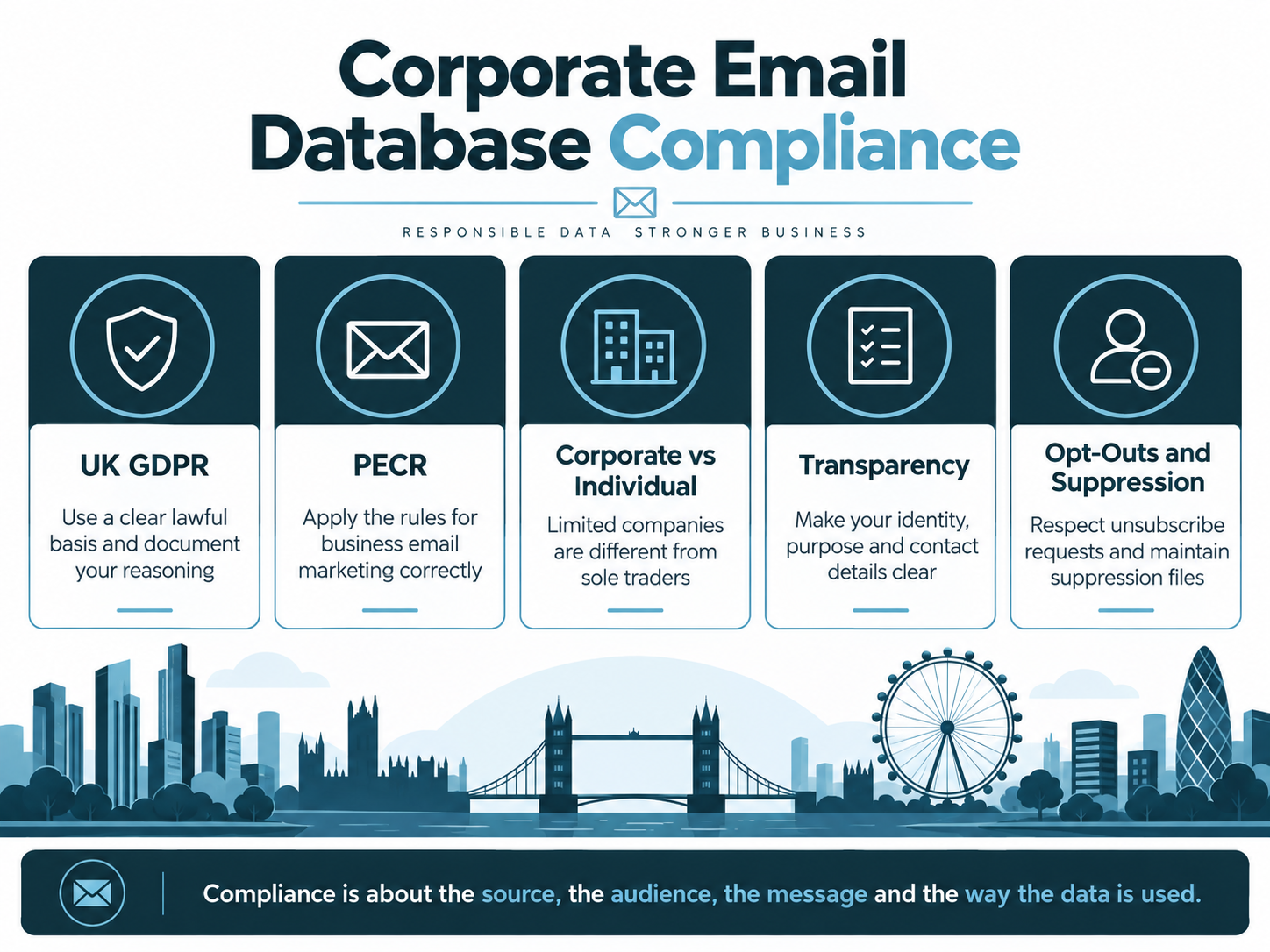
The ICO’s current business-to-business marketing guidance explains that the PECR electronic-mail consent rule does not apply to corporate subscribers such as limited companies and LLPs. This means unsolicited B2B marketing emails can generally be sent to corporate subscribers without PECR consent.
However, named work contact details can still be personal data. If your Corporate Email Database contains an identifiable employee such as jane.smith@company.co.uk, UK GDPR applies to the processing of that personal information.
Corporate subscribers are not the same as sole traders
PECR distinguishes corporate subscribers from individual subscribers. Sole traders and certain partnerships are treated as individual subscribers, so electronic-mail marketing rules can require consent or another applicable PECR route.
This distinction matters when a supplier labels an entire file “B2B”. Business activity does not automatically mean every recipient is a corporate subscriber.
Legitimate interests may be appropriate, but it needs assessment
Where PECR does not require consent, legitimate interests may be an appropriate UK GDPR lawful basis for B2B direct marketing. The ICO’s lawful basis guidance explains the three-part legitimate interests test: purpose, necessity and balancing.
A targeted campaign to relevant corporate roles is easier to justify than indiscriminate mass outreach because relevance and proportionality are part of the analysis.
Identity and opt-outs still matter
The ICO’s updated electronic mail guidance confirms that marketers must not disguise their identity and must provide a valid route for recipients to opt out. Businesses should also maintain suppression records so people who object are not simply re-added in the next purchased file.
A Corporate Email Database should therefore contain governance fields as well as sales fields.
Corporate Email Data Is Not B2C Email Data
This article is about corporate prospecting. Consumer marketing requires a different data and permission model.
AccuraData separates its consumer services from its corporate services for that reason. If the campaign is aimed at individual consumers rather than employees of corporate bodies, its B2C Email Data offering sits within a separate B2C data framework.
Do not merge corporate and consumer records into one sending process without understanding the different rules. The correct audience type should be identified before data is bought, imported or sent.
Validate the Contact, Not Just the Email Address
Email validation is useful, but a deliverable mailbox can still belong to the wrong person.
For enterprise prospecting, quality has several layers:
Company validity
Is the company active and still within the target criteria?
Employment validity
Does the person still work there?
Role validity
Do they still hold the function relevant to the campaign?
Email validity
Is the mailbox technically capable of receiving email?
Account relationship validity
Should the account be contacted at all, or is it already a customer, open opportunity, partner, competitor or suppressed account?
Campaign validity
Does this contact belong in this specific message?
A strong Corporate Email Database needs all six. A technically valid email to an irrelevant stakeholder is still poor marketing data.
Generic Inboxes Versus Named Corporate Contacts
Generic addresses such as info@, sales@ or enquiries@ can be useful for some purposes, but they are usually weak for high-value enterprise lead generation.
Named contacts provide more context and allow the campaign to be written for a real role. The trade-off is that named work addresses involve personal data and require more careful governance.
For corporate lead generation, use generic addresses when the organisation itself is the intended destination and routing is likely to work. Use named contacts when responsibility and relevance are central to the proposition.
In many large-company campaigns, named departmental decision-makers will be more valuable than generic addresses because the entire strategy depends on reaching the correct function.
Turn the Corporate Email Database Into Account Tiers
Not every target company deserves the same level of effort.
A practical approach is to tier accounts.
Tier A: strategic accounts
These are the largest or best-fit companies. They justify deeper contact mapping, personalised research and coordinated sales follow-up.
Tier B: strong-fit accounts
These match the ideal customer profile but may not justify highly bespoke treatment. Role-based segmented campaigns can work well.
Tier C: broader-fit accounts
These still meet campaign criteria but may receive more standardised outreach and lower manual research investment.
Tiering helps allocate data budget. You might buy three or four contacts per Tier A account but only one or two for Tier C accounts.
It also helps your sales team understand which replies require immediate attention.
Segment by Problem Ownership, Not Only by Industry
Sector segmentation is useful, but it can still produce generic messages.
A stronger Corporate Email Database can support segmentation by role and problem.
For example, a workplace training provider could create separate segments for:
- Health and safety leaders
- HR and L&D teams
- Operations leaders
- Procurement contacts
The underlying service may be the same, but the reason each person cares is different.
The health and safety manager may care about competence and compliance. L&D may care about delivery, completion and learning administration. Operations may care about disruption and workforce readiness. Procurement may care about commercial terms, supplier assurance and scalability.
A well-structured Corporate Email Database makes this level of messaging possible because job function is part of the data model, not an afterthought.
Prepare the Database for CRM and Sales Ownership
Do not wait until a campaign generates replies to decide who owns the account.
Before import, define:
- Account owner
- Lead owner
- Existing relationship rules
- Duplicate rules
- Lead status values
- Opportunity creation rules
- Response categories
- Follow-up SLA
- Suppression process
- Sales feedback fields
If marketing and sales use different company names or account IDs, fix that before launch.
This is particularly important for large-company outreach because several contacts from the same account can engage at the same time. The CRM should allow sales to see that engagement as one account story rather than unrelated leads.
Use a Corporate Email Database for Account-Based Lead Generation
A Corporate Email Database is naturally suited to account-based marketing because it starts with defined companies rather than anonymous traffic.
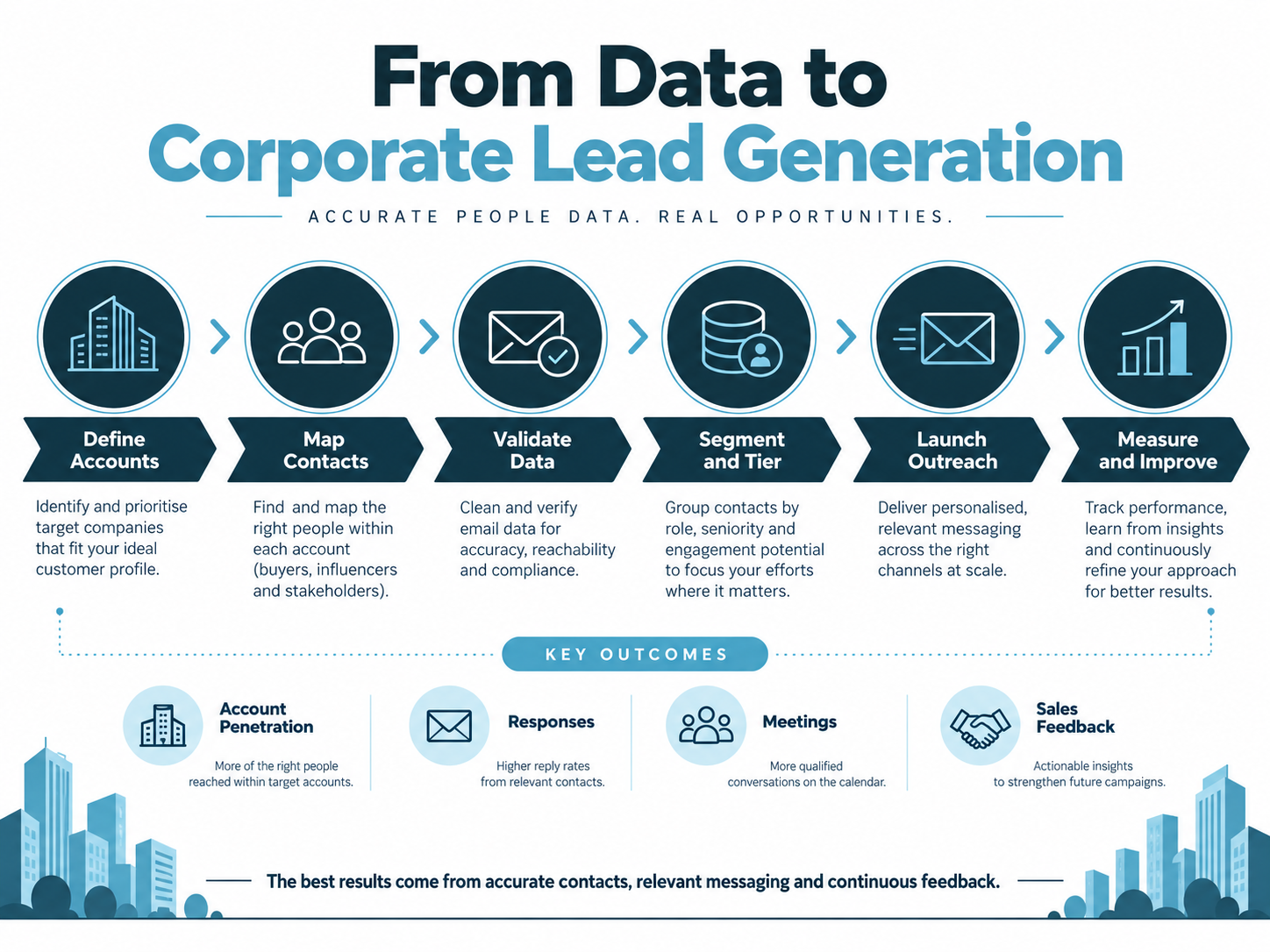
A simple account-based workflow can look like this:
- Define the target company universe
- Tier the accounts
- Map relevant functions
- Select one or more contacts per account
- Build role-specific messages
- Launch controlled email waves
- Monitor account-level engagement
- Route positive responses to the correct sales owner
- Expand contact coverage where an account shows interest
- Feed sales outcomes back into the database
The campaign should not be judged only by email opens. Enterprise sales cycles can involve several people and a longer period between first contact and opportunity creation.
AccuraData’s article on using a business-to-business email list provides additional context on responsible B2B email use, while its email marketing services can support the execution layer when a business wants campaign management as well as data.
Multi-Threading an Account Without Spamming It
Having several contacts does not mean sending the same message to all of them at the same moment.
Use contact coverage strategically.
A sensible approach might be:
- Start with the functional owner.
- If there is no response, test a second relevant stakeholder.
- If engagement appears, avoid conflicting parallel outreach.
- If the account progresses, map procurement or technical stakeholders for the sales process.
- Keep a shared account view so separate teams do not duplicate contact.
This creates resilience without turning a carefully researched account into a mass-mailing target.
Measure Account Penetration as Well as Email Metrics
Corporate outreach should be measured at two levels: contact performance and account performance.
Useful contact-level measures include:
- Valid email rate
- Delivery rate
- Reply rate
- Positive reply rate
- Opt-out rate
- Meetings booked
- Sales-accepted leads
Useful account-level measures include:
- Accounts with at least one valid contact
- Accounts with two or more mapped stakeholders
- Accounts engaged
- Accounts with positive responses
- Accounts entering sales conversations
- Opportunities created
- Pipeline value
- Revenue won
- Average number of contacts involved in won opportunities
A Corporate Email Database becomes more valuable over time when these outcomes are fed back into it.
If finance directors respond but procurement contacts rarely do at the awareness stage, the database should capture that learning. If certain employee bands convert better, account scoring should change.
Use Sales Feedback to Improve the Contact Map
Sales teams often know things the data supplier cannot know.
A salesperson may discover that:
- The named contact left last month
- Procurement is centralised
- The site has no local budget
- The business recently changed systems
- A different director owns the project
- The account is locked into a contract until next year
- A subsidiary is the real buying entity
This information should not disappear into call notes.
Create structured feedback fields and use them to update the Corporate Email Database. Over time, your internal account intelligence can become more valuable than the original purchased file.
Other Uses for a Corporate Email Database
Lead generation is the obvious use, but a well-governed enterprise contact database can support several other activities.
Event and webinar invitations
Invite relevant roles from named target companies to sector events, briefings or demonstrations.
Account expansion
Map additional departments within existing customers where there is a legitimate cross-sell or service expansion opportunity.
Market research
Build a defined panel of relevant corporate roles for surveys or interviews, subject to appropriate research and marketing distinctions.
Partner development
Identify organisations and roles relevant to channel, referral or strategic partnerships.
Tender and procurement preparation
Map commercial and functional stakeholders in organisations that are likely to procure your category.
Customer reactivation
Refresh corporate customer contacts where the previous relationship is old and key employees may have changed.
Each use should have its own purpose, audience and governance. “We have the database” is not a sufficient reason to use every record for every activity.
Corporate Email Database Maintenance Is an Ongoing Job
Corporate data changes constantly. The bigger the organisation, the more internal movement you may see.
Contacts can:
- Leave the company
- Move departments
- Receive promotions
- Change email addresses
- Change location
- Take parental or long-term leave
- Gain or lose buying responsibility
Companies can:
- Merge
- Acquire subsidiaries
- Rebrand
- Restructure
- Close sites
- Change legal status
- Move head office
- Change email domains
Maintenance should therefore happen at both account and contact level.
A practical refresh process includes:
- Hard-bounce suppression after every campaign
- Opt-out suppression immediately
- Role checking before high-value campaigns
- Company live checks before major list reuse
- Deduplication during every major import
- Parent/subsidiary review for strategic accounts
- Contact replacement where key roles are vacant
- Periodic enrichment of missing fields
AccuraData can support existing files through data cleansing and enrichment and data appending where the database needs repair or additional fields before campaign use.
How Often Should a Corporate Email Database Be Refreshed?
There is no single correct refresh interval for every database.
A file used every week should be maintained continuously. A strategic account list used quarterly should be checked before each campaign. A rarely used list should not be assumed current simply because it was accurate when purchased.
Use risk and value to set the cadence.
High-value enterprise accounts justify more frequent role validation because one wrong contact can waste significant sales effort. High-volume email lists justify automated bounce and suppression processing because small quality problems can scale quickly.
The best rule is simple: refresh before the consequence of stale data becomes expensive.
Common Corporate Email Database Mistakes
Targeting only the CEO
The CEO can be relevant for strategic propositions, but many enterprise purchases are owned further down the organisation.
Buying contacts before defining accounts
This creates a database full of people without a clear commercial reason for inclusion.
Using exact job titles only
Title language varies. Use functions, departments and seniority as well.
Ignoring subsidiaries
A group-level view can hide the real buying entities.
Treating valid email as valid contact
A mailbox can work even when the person is no longer relevant to your proposition.
Importing without suppression
Purchased data should not reintroduce people or accounts your business has already excluded.
Emailing every mapped stakeholder at once
Multi-contact coverage is a safety net and account map, not permission to bombard an organisation.
Measuring only opens and clicks
The commercial objective is account progression, opportunities and revenue.
Failing to capture sales feedback
The database should become smarter after every campaign and sales conversation.
Why AccuraData Is a Strong Corporate Email Database Partner
A good enterprise-data partner needs to understand both sides of the brief: the company profile and the human role inside the company.
AccuraData’s strength is that its B2B data can be shaped around firmographic criteria and decision-maker requirements rather than supplied as a generic national directory. Businesses can define sectors, locations, company size, turnover, employee count, job titles, seniority and related targeting criteria through the B2B Data service.
For email-led campaigns, the B2B Email Data service gives the project a direct route from account definition to named corporate contacts. That is particularly useful when the requirement is not “give me companies” but “give me the people responsible for this issue inside these types of companies”.
AccuraData is also easy to work with when the project expands beyond the initial data purchase. Existing records can be cleaned or appended, and the managed email marketing service can support copy, design, broadcast delivery, reporting and warm-prospect identification.
That combination makes AccuraData a strong choice for businesses that want a Corporate Email Database to operate as part of a real lead generation process rather than as a one-off spreadsheet purchase.
A Practical Corporate Email Database Build Process
Use the following sequence to turn the ideas in this article into an operational project.
Define the commercial objective
Write down the product, service, target account type and intended outcome.
Define the account universe
Set company size, sector, geography, site and group rules.
Map the buying functions
Identify functional owners, influencers, approvers and procurement roles.
Audit existing CRM coverage
Find out which target accounts and contacts you already hold.
Apply exclusions
Remove existing customers, open opportunities, competitors and suppressed records where appropriate.
Research or buy the gaps
Use first-party research for strategic accounts and a specialist provider for scalable coverage.
Validate contacts
Check role relevance, employment status and email quality.
Structure the CRM
Separate accounts and contacts, preserve source information and assign ownership.
Tier the accounts
Allocate deeper research and contact coverage to the highest-value organisations.
Build role-based messaging
Write for the problem each stakeholder owns.
Launch controlled campaigns
Start with manageable waves so quality and response patterns can be reviewed.
Route engagement quickly
Define what counts as a sales-worthy response and who receives it.
Feed outcomes back
Update roles, account status, objections, opportunity progress and suppression data.
The database should improve after every cycle.
Frequently Asked Questions About a Corporate Email Database
What is a Corporate Email Database?
A Corporate Email Database is a structured B2B dataset containing company information and business contact details for people working inside corporate organisations. A strong database includes account-level context such as company size and sector alongside contact-level information such as job function, seniority and work email address.
Is a Corporate Email Database only for very large companies?
No. The term can be used more broadly, but this article focuses on larger organisations because complex companies require more careful account and stakeholder mapping. For enterprise targeting, one company can contain several relevant buying roles.
How many contacts should I have per corporate account?
There is no fixed number. Lower-value campaigns may need one carefully selected contact. Strategic accounts may justify three, four or more contacts covering different functions. The correct number depends on deal value and buying complexity.
Should I always target directors?
No. The best contact is the person responsible for the issue your proposition addresses. A health and safety service may be more relevant to an HSE Manager than a Managing Director. A payroll solution may need Payroll, HR, Finance and IT stakeholders.
Is it legal to buy a Corporate Email Database in the UK?
Buying B2B data is not automatically unlawful, but the intended use, subscriber type, source, lawful basis, transparency and marketing method all matter. Corporate subscribers have different PECR electronic-mail rules from sole traders and some partnerships, while UK GDPR can still apply to named business contacts.
Do I need consent to email employees at limited companies?
The PECR consent rule for unsolicited electronic mail generally does not apply to corporate subscribers such as limited companies and LLPs. However, UK GDPR still applies when personal data is processed, and marketers must provide appropriate information, respect objections and maintain opt-outs. Check current ICO guidance for the specific campaign.
Is a generic company email address better than a named address?
It depends on the purpose. Generic addresses can be useful for general organisational contact. Named addresses are usually stronger when you need to reach a specific decision-making function, but they require appropriate personal-data governance.
How do I find the right decision-maker in a large company?
Start with the problem your proposition solves, then identify the department that owns that problem. Map job function, seniority and likely secondary stakeholders. Do not begin with the assumption that the CEO is always the best contact.
Can I use Companies House to build the whole database?
Companies House is useful for company-level verification, legal entity details, SIC information and officers, but it is not a complete enterprise marketing contact database. It does not give you the full set of functional decision-makers and campaign-ready work emails required for most corporate outreach.
How do I measure the quality of a Corporate Email Database?
Measure more than email validity. Review target-company fit, role relevance, account coverage, delivery, positive replies, meetings, sales acceptance, opportunities and pipeline generated. A smaller database that reaches the correct enterprise stakeholders can outperform a much larger generic list.
Can AccuraData supply several contacts per company?
Availability depends on the target market and brief, but AccuraData can help define company criteria and decision-maker requirements so the resulting B2B data is aligned to the campaign. Requesting a data count and sample is the best way to understand available coverage.
Can AccuraData manage the email campaign as well?
Yes. AccuraData’s Email Marketing Services can support campaign data, copywriting, design, broadcast management, reporting and identification of warmer prospects for sales follow-up.
Corporate Email Database: Make Every Contact Earn Its Place
Large-company prospecting is not a volume exercise. The commercial opportunity may be bigger, but so is the organisational complexity.
The best Corporate Email Database starts with the company, maps the people around the problem and gives sales and marketing a coordinated way to enter the account. It distinguishes a functional owner from a budget holder, a technical evaluator from procurement and a subsidiary from its parent group. It also preserves the compliance and relationship information needed to use the data responsibly.
That is why the question should not be “How many corporate emails can we buy?” It should be “Which companies do we want, which people matter inside them, and how will we turn those contacts into useful account conversations?”
When those questions are answered first, external data becomes much easier to buy and much easier to use. AccuraData can support that process with targeted UK B2B company data, decision-maker email data, database maintenance and managed email campaign services, giving organisations a practical route from account definition to measurable lead generation.