
An Email Database is easy to misunderstand because the visible part is usually just a table of contacts. A marketer opens a CRM, spreadsheet or email platform and sees names, companies and email addresses. That can make the database look like a storage problem. In practice, it is an operating system for audience selection, compliance, campaign execution, sales follow-up and measurement.
A strong Email Database answers far more than one question. It should tell you who the contact is, which organisation or customer segment they belong to, where the record came from, why the contact belongs in a particular campaign, what communication rules apply, whether the address is still usable, what has already been sent, how the person responded and what should happen next.
That is what separates a database that creates commercial value from a file that simply grows. A list can contain 100,000 email addresses and still be difficult to use if the records have no source information, weak segmentation, old job titles, unclear permissions, duplicate contacts or no connection to sales outcomes. A smaller database can outperform it if every record has a clear purpose and the campaign process is built around the quality of the data.
This guide explains how an Email Database works from end to end. It covers database structure, organic list generation, purchased email data, B2B and B2C differences, CRM and email tools, validation, segmentation, campaign design, deliverability, reporting and ongoing maintenance. It also explains how UK GDPR, PECR and the Data (Use and Access) Act 2025 affect email activity in the UK.
AccuraData supports organisations at several points in that lifecycle. Businesses can source targeted B2B Data, build campaigns with B2B Email Data, improve an existing database through Data Cleansing & Enrichment, extend account coverage with B2B Postal Data and screen telephone records through TPS/CTPS Checking when campaigns move beyond email.
A short compliance note is important. This article provides practical marketing and data-management information, not legal advice. The correct approach depends on the audience, subscriber type, source of the data, message, lawful basis and campaign design. Current regulatory guidance should be reviewed where the position is uncertain.
An Email Database Is a System of Records, Rules and Signals
The simplest definition is that an Email Database is a structured collection of records that can be used to communicate with customers, prospects, members, subscribers or business contacts by email. That definition is technically correct, but commercially incomplete.
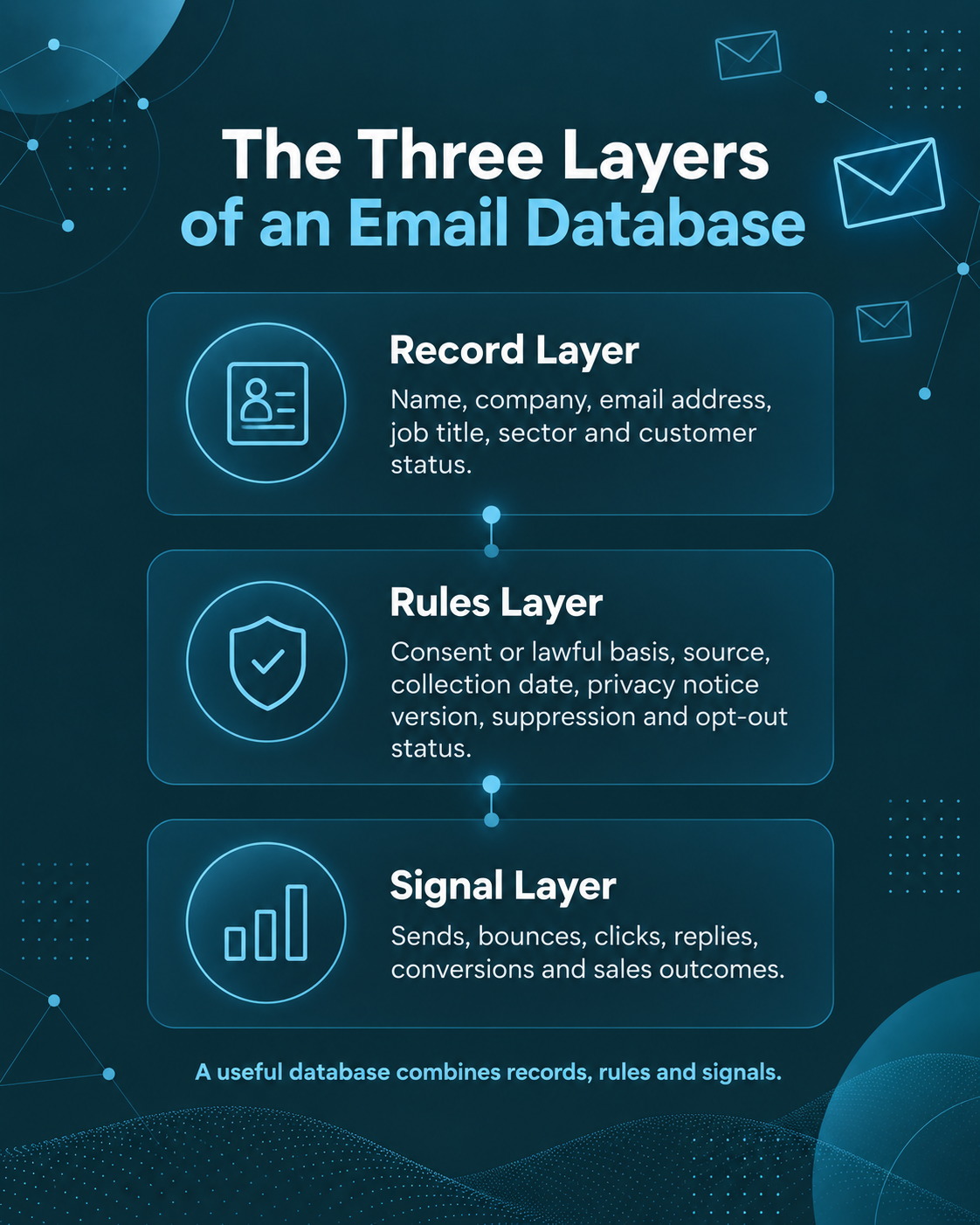
The most useful way to think about the database is as three connected layers.
The record layer
The record layer contains facts about the person or organisation. Typical fields include name, company, email address, job title, sector, location, customer status, account owner and any segmentation attributes used by marketing or sales.
For B2B activity, this layer may also include company size, turnover band, SIC code, department, seniority and decision-maker role. For B2C activity, it may include customer relationship fields, preferences, products held, location, age band or other information that is appropriate and lawful for the intended purpose.
The rules layer
The rules layer decides whether a record should be used. It can include subscriber type, consent status where applicable, lawful-basis notes, source, collection date, privacy-notice version, suppression status, unsubscribe date and internal do-not-contact flags.
This layer matters because a technically valid address is not automatically a suitable campaign record. An address can exist and still need to be excluded because the person opted out, the use is outside the stated purpose, the subscriber type requires consent that is not present, or the contact no longer belongs to the target audience.
The signal layer
The signal layer stores what happened after communication. It can include sends, delivery status, hard bounces, clicks, replies, form submissions, meeting bookings, lead status, opportunities, purchases and sales feedback.
This is where an Email Database becomes genuinely useful. When engagement and commercial outcomes flow back into the contact record, the next campaign can be more relevant than the last. The database begins to learn which sectors respond, which job roles convert, which offers create meetings and which contacts should be removed from future activity.
Why Email Databases Become Hard to Use
Most businesses do not start with a clean, intentionally designed database. They accumulate one.
Contacts arrive from website forms, trade shows, sales conversations, customer orders, old spreadsheets, newsletter sign-ups, event registrations, imports from previous systems and external data suppliers. Each source may use different field names, formatting rules and levels of detail.
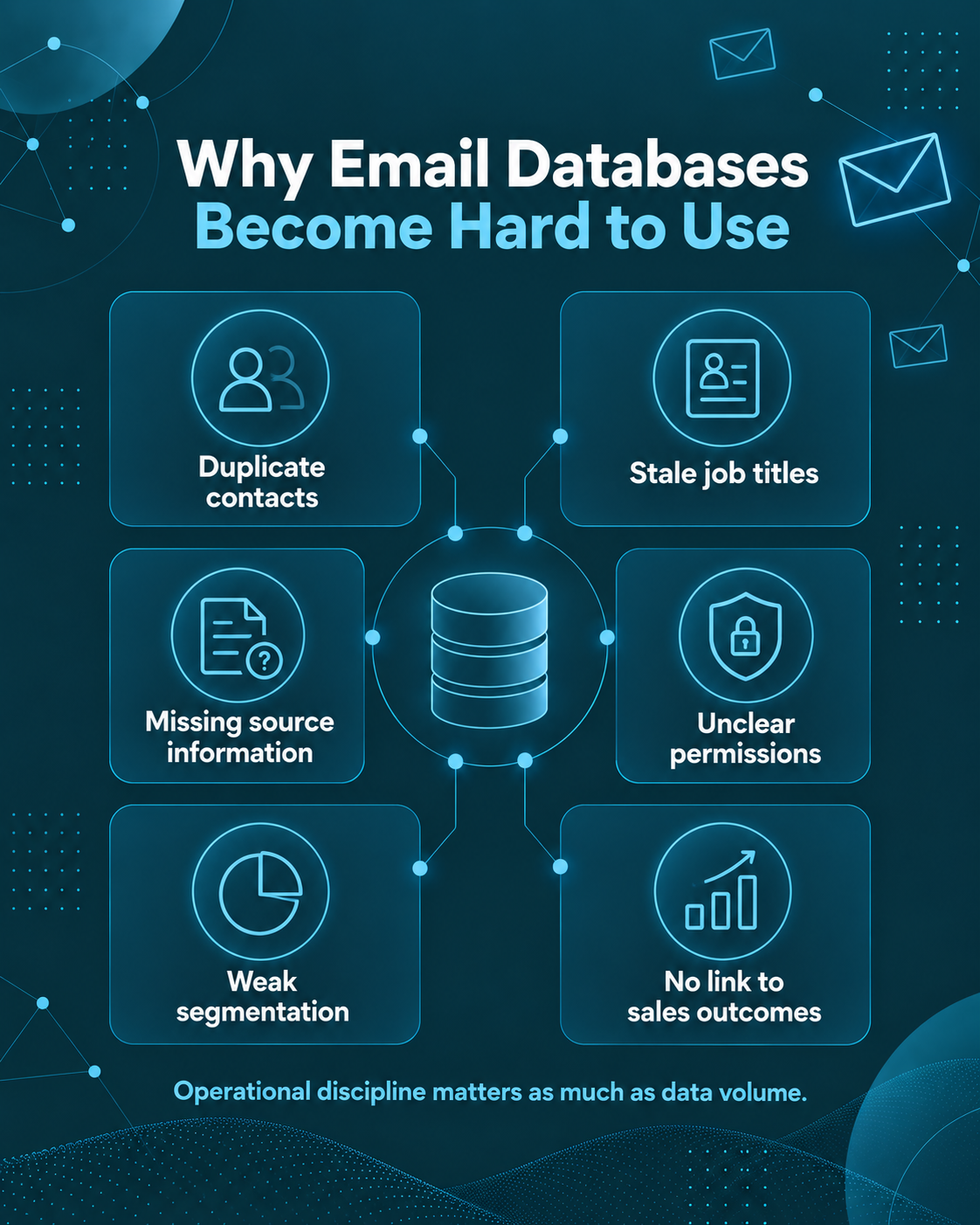
Over time, the same person can appear several times. A customer can become a prospect again because the CRM does not recognise the record. A decision-maker can leave a company while their email address remains in a campaign segment. A business can close. A new contact can be appended without preserving the original source. Sales can create a second account because a company name is written differently.
The result is not simply untidy data. It creates operational problems:
- campaign audiences become harder to define;
- unsubscribe handling becomes less reliable;
- duplicate messages reach the same person;
- sales teams waste time on stale contacts;
- reporting overstates the size of the reachable audience;
- marketers lose confidence in segmentation;
- deliverability suffers when invalid addresses remain active; and
- revenue attribution becomes disconnected from the source of the data.
The answer is not to periodically export everything into a spreadsheet and delete rows. A mature Email Database needs a repeatable operating model for adding, validating, suppressing, segmenting and learning from records.
The Main Types of Email Database
Not every Email Database serves the same purpose. Before changing the structure, decide what kind of asset the business is trying to maintain.
A first-party customer database
This contains customers, former customers and known account relationships. It is usually the richest source of commercial context because the business can connect communication history to transactions, service records and sales activity.
The key challenge is not usually acquiring more names. It is maintaining accurate contact information, distinguishing service communication from marketing, recording preferences correctly and segmenting customers by relevant needs rather than sending the same campaign to everyone.
A prospect Email Database
A prospect database contains organisations or people that fit the target market but have not yet become customers. Some contacts may have engaged directly. Others may have been researched or supplied by a data provider.
This type of database needs strong source and recency controls. If the business cannot explain why a prospect is present, when the data was obtained and why that contact belongs in the target audience, the file becomes difficult to govern and difficult to improve.
A subscriber or newsletter database
This database is built around people who have asked to receive content or updates. The primary value is the relationship and permission history rather than broad market coverage.
A subscriber database should preserve sign-up source, date, preferences and engagement. It also benefits from progressive profiling, where more useful information is gathered over time rather than forcing a long form at the first interaction.
A B2B Email Database
A B2B Email Database combines company information with business contacts. The company is often the stable unit, while individual contacts change more frequently. Good B2B architecture therefore separates account-level facts from person-level facts.
This distinction is important because the same company can contain several relevant decision-makers. An email marketing service might target marketing directors, while health and safety training should reach the people who own health and safety responsibilities. A valid email address is not enough if the role is wrong.
AccuraData’s business email data can be filtered around the type of companies and decision-makers a campaign actually needs, rather than treating all business contacts as interchangeable.
A B2C Email Database
Consumer email data operates under a different set of practical and regulatory expectations. For unsolicited electronic marketing to individual subscribers, PECR generally requires consent unless a valid soft opt-in applies. Bought consumer email data therefore needs especially careful evidence, purpose alignment and supplier due diligence.
This is one reason businesses should not build a single generic process and assume it works for every contact type. The database needs fields that distinguish audience and subscriber category before campaign selection begins.
How an Email Database Works From Source to Revenue
A useful Email Database moves through a lifecycle. Each stage creates information that should improve the next one.
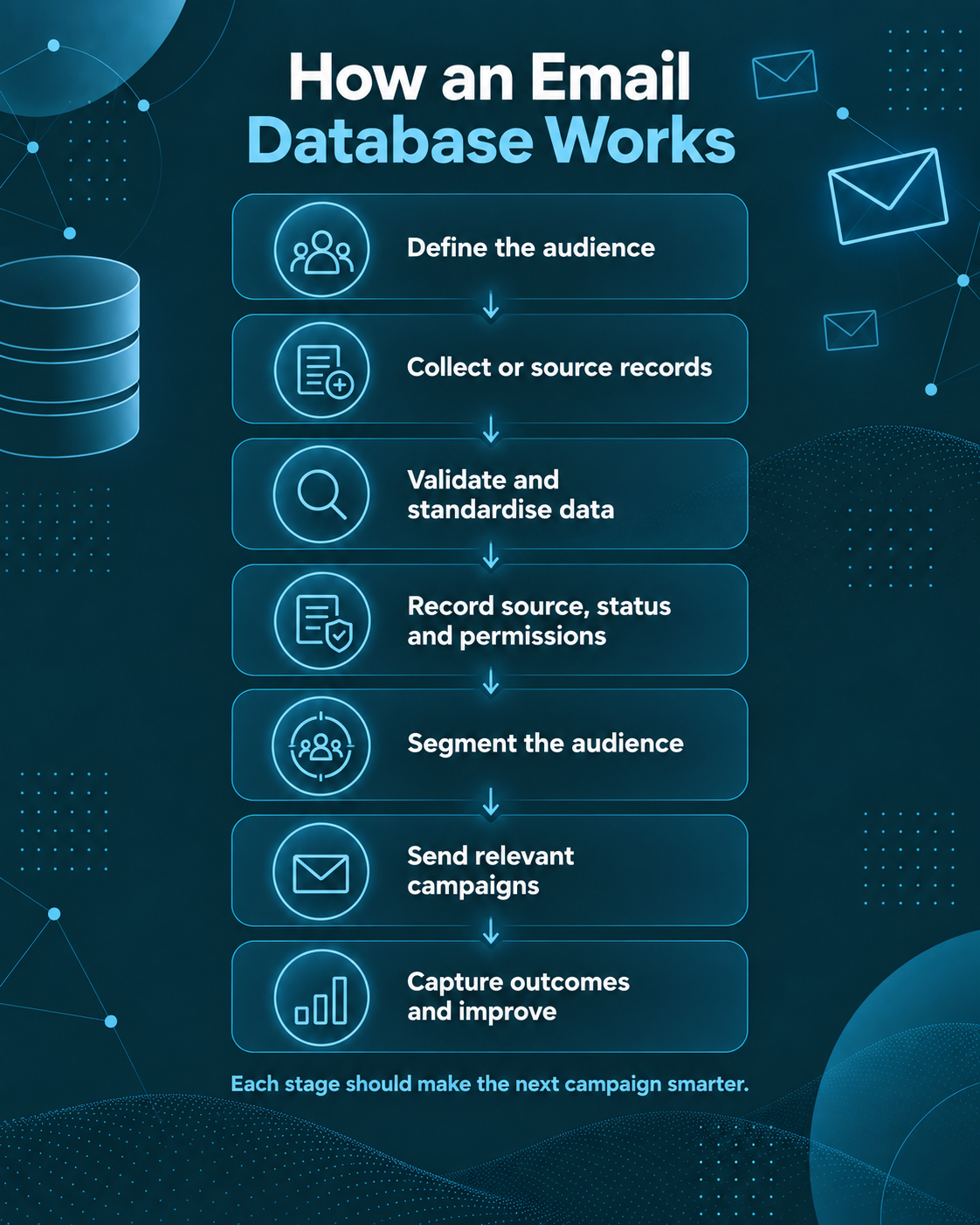
The lifecycle can be summarised as:
1. define the audience;
2. collect or source records;
3. validate and standardise the data;
4. record source, status and permissions;
5. segment the audience;
6. prepare the sending environment;
7. launch a controlled campaign;
8. capture engagement and sales outcomes;
9. suppress unsuitable records; and
10. refresh the database using what the campaign learned.
Many weak databases break between steps eight and ten. Marketing measures the send in an email platform, sales works leads in a CRM and nobody returns the final outcome to the original record. The organisation then starts the next campaign with the same assumptions it used before.
A better system treats every campaign as both a revenue activity and a data-quality exercise. A hard bounce becomes a maintenance signal. A reply saying the person left the business becomes a contact-change signal. A sales rejection because the company is too small becomes a targeting signal. A meeting from a particular job function becomes a segmentation signal.
How to Build an Email Database Organically
Organic list growth is valuable because the organisation controls the collection experience and can often capture context alongside the address. The trade-off is speed. It can take time to reach enough of the market, especially for a new business or a narrow B2B proposition.
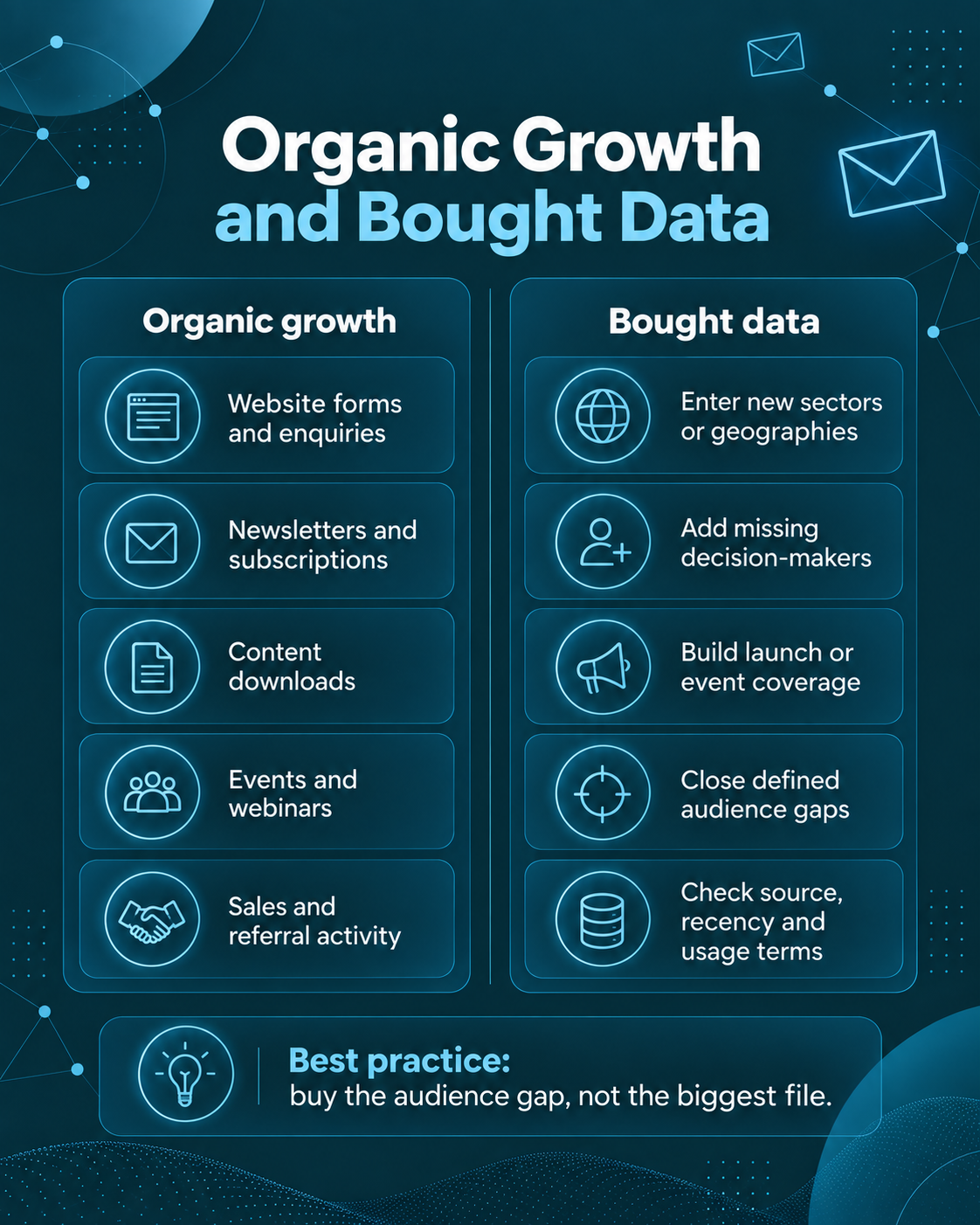
Website forms and enquiries
Every meaningful website form should feed the Email Database in a controlled way. That includes contact forms, quote requests, consultation bookings and product enquiries.
Do not capture only an email address if the business needs more context to route or segment the enquiry. A short set of useful fields such as company, role, region or requirement can make the record immediately more useful.
The form should also make the intended use clear. Marketing permission should not be hidden inside a generic enquiry statement where consent is required. Administrative follow-up and marketing are different purposes.
Newsletters and insight subscriptions
A newsletter can grow an Email Database steadily when it offers a clear reason to subscribe. The value proposition should be specific. “Join our mailing list” is weak. “Get a monthly UK procurement update” tells the reader what they will receive and how often.
Over time, engagement can help create richer segments. A subscriber who repeatedly reads content about one service may be more relevant to a targeted nurture sequence than someone who joined for a different topic.
Content downloads
Guides, checklists, calculators, templates and reports can generate useful first-party contacts. The best lead magnets are close to the commercial problem the business solves.
A generic giveaway may create volume without intent. A specialist guide can create fewer records but better context. Quality matters more than the size of the download list.
Events, webinars and exhibitions
Events are valuable because they add situational context. The database can record which event the contact attended, the subject of the session and whether a sales conversation happened.
Do not let event data live permanently in a separate spreadsheet. Import it into the CRM with a source tag so future campaigns can use the context.
Sales activity
Sales teams create large amounts of first-party data through discovery calls, proposals, meetings and account research. The challenge is consistency. If contacts exist only in individual inboxes or notebooks, marketing cannot use the information responsibly or suppress it reliably.
Create simple rules for when sales contacts enter the Email Database, which fields are mandatory and how opt-outs or objections are recorded.
Customer referrals and partner activity
Referral programmes and partnerships can generate relevant introductions, but source and permission still matter. A referred email address should not automatically be dropped into an unrelated marketing sequence. Record how the contact entered the business and determine what communication is appropriate.
When Buying an Email Database Makes Sense
Organic growth is not always enough. A business may know exactly which market it wants to reach but have little existing coverage. In that situation, external email data can accelerate access to the audience.
Buying data is most useful when the gap is clear. Examples include:
- entering a new sector;
- launching into a new geography;
- expanding from customers into lookalike prospects;
- adding missing decision-maker roles to known accounts;
- building a prospect universe before a product launch;
- supporting an event or webinar campaign; or
- creating enough coverage for a structured outbound test.
The principle is simple: buy the audience gap, not the biggest file available.
The high-performing AccuraData article on an email list of businesses makes the same commercial point from a B2B list perspective. Purchased data works best when it closes a defined coverage gap and gives the sales team access to relevant decision-makers.
How to Buy an Email Database Without Buying a Problem
The purchasing conversation should begin with the campaign specification rather than record count.
Define the exact audience first
For B2B activity, define the companies before the people. Useful company filters may include industry, geography, employee count, turnover, business type or site type. Then define the contact functions and seniority required.
For B2C activity, the variables may be different, and consent or permission evidence becomes central to whether email marketing is possible.
A supplier should be able to explain how the proposed records match the brief.
Ask what the fields actually mean
Do not assume a field labelled “verified” means what you think it means. Ask what was verified, how and when.
The same applies to job titles, seniority bands, company size, email status and permission fields. A short data dictionary can prevent expensive misunderstandings after purchase.
Ask about source and recency
Source is one of the most important fields in an Email Database. The buyer should understand where the information came from, how it is maintained and when key fields were last checked.
For named B2B contacts, recency matters because people move jobs. For consumer data, evidence around collection and permission is even more important.
Request a representative sample
A good sample is not a hand-picked set of perfect records. It should represent the population the supplier intends to deliver.
Use it to test company fit, contact relevance, completeness, duplicate rate and email validity. The purpose is not to prove every row in advance. It is to identify whether the supplier’s process creates data that is likely to be usable.
Understand replacement and usage terms
Clarify whether the data is licensed for a particular campaign, a period of time or ongoing internal use. Ask how invalid records are handled, whether replacements are available and what the buyer must do to qualify for them.
The most expensive misunderstanding often happens after the invoice, when the buyer discovers that its expected use was not included in the agreement.
B2B and B2C Email Database Rules Are Not the Same
One of the biggest mistakes in database marketing is treating every email address as legally equivalent.
Under the ICO’s current B2B marketing guidance, limited companies and certain other organisations are corporate subscribers under PECR. The PECR consent rule for unsolicited electronic mail does not apply to corporate subscribers in the same way it applies to individual subscribers. However, marketers must not hide their identity and must provide a valid way to opt out.
Sole traders and some partnerships are treated as individual subscribers. For unsolicited marketing emails to individual subscribers, consent is generally required unless a valid soft opt-in applies. The ICO’s electronic mail guidance explains the distinction and also covers bought-in lists.
UK GDPR can apply even where PECR does not require consent. A named employee email address can be personal data. The business therefore needs a lawful basis for processing and must be fair and transparent about how the information is used.
Legitimate interests may be appropriate for some B2B direct marketing where PECR does not require consent, but it is not automatic. The ICO’s updated legitimate interests guidance sets out a purpose, necessity and balancing test. Organisations should document the reasoning and respect the absolute right to object to direct marketing.
The Data (Use and Access) Act 2025 amended parts of the UK’s data protection and electronic marketing framework. It did not replace the UK GDPR, Data Protection Act 2018 or PECR. Businesses should therefore use current ICO guidance rather than assuming the new Act removed existing marketing responsibilities.
The Core Fields an Email Database Should Contain
Database design should serve the decisions the business needs to make. Adding fields with no operational purpose creates complexity without value.
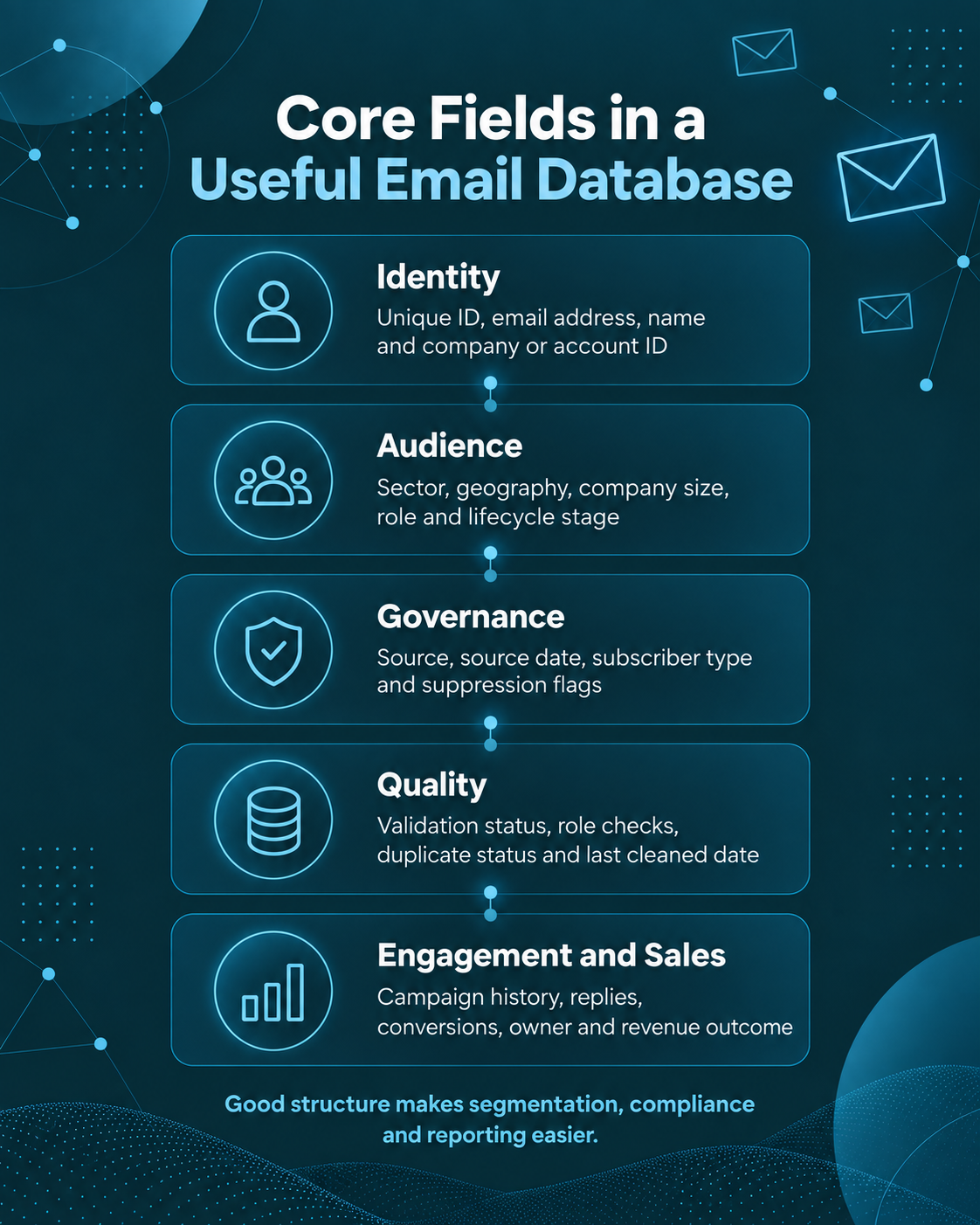
A practical structure often includes the following groups.
Identity fields
These identify the record:
- unique contact ID;
- email address;
- first and last name where relevant;
- company or account ID; and
- customer or prospect status.
The unique ID is particularly important. Email addresses can change, but a stable record ID helps preserve history.
Audience fields
These help decide who belongs in a campaign:
- sector;
- geography;
- company size;
- job function;
- seniority;
- product interest;
- customer segment; and
- lifecycle stage.
Source and governance fields
These explain why the record is present:
- source;
- source date;
- supplier or campaign name;
- subscriber type;
- lawful-basis or permission notes where relevant;
- privacy-notice status; and
- suppression flags.
Quality fields
These help teams decide whether the record is usable:
- email-validation status;
- validation date;
- company-live status;
- role-confirmation date;
- duplicate status; and
- last-cleaned date.
Engagement and sales fields
These capture what happened:
- last campaign date;
- delivery status;
- click or reply signals;
- form conversions;
- lead score;
- sales owner;
- opportunity status; and
- revenue or outcome where available.
The point is not to fill every field for every person. It is to create enough structure that the business can decide whom to contact, how to contact them and what to do next.
Tools That Help You Use an Email Database
An Email Database becomes more useful when the right tools each perform a clear role. Problems arise when several platforms become competing sources of truth.
CRM systems
The CRM should usually be the primary system for account and relationship history. It stores who the contact is, which company or customer they belong to, who owns the relationship and what happened commercially.
Common CRM systems include Salesforce, Microsoft Dynamics, HubSpot, Zoho and others. The brand matters less than the data discipline. The CRM should have required fields, sensible duplicate rules and controlled imports.
Email service providers and marketing automation tools
Email platforms manage templates, segmentation, sends, unsubscribe handling and campaign reporting. Some also offer automation, forms, landing pages and lead scoring.
The most important architectural question is how the platform synchronises with the CRM. Campaign activity should update the contact record without overwriting better information or re-adding suppressed contacts.
Email validation tools
Email validation tools can identify invalid syntax, non-existent domains, some high-risk addresses and other deliverability issues. They are useful before large imports and before reactivating older data.
Validation is not permission and it is not relevance. A technically deliverable email can still be the wrong contact or unsuitable for the intended use.
Data cleansing and enrichment services
Internal tools rarely solve every data-quality problem. External cleansing can support deduplication, email verification, company checks, telephone validation, decision-maker research and additional fields.
AccuraData’s data cleansing services can help businesses repair and enrich an existing Email Database rather than replacing the whole file.
Suppression management
Suppression should be treated as permanent knowledge, not deleted data. If a person unsubscribes, the business needs enough information to prevent the contact being re-imported from another source later.
A central suppression process should be checked before every campaign import.
Analytics and reporting tools
Dashboards can combine email metrics with CRM outcomes, but only if the underlying identifiers are consistent. Use campaign IDs, source fields and stable contact or account IDs so the business can trace revenue back to audience and acquisition source.
Prepare the Sending Infrastructure Before the Campaign
A perfect Email Database can still underperform if the sending environment is weak.
Email authentication should be treated as a baseline operational control. Google’s current sender guidelines require SPF or DKIM for all senders and SPF, DKIM and DMARC for bulk senders to Gmail. The UK National Cyber Security Centre also recommends anti-spoofing controls using SPF, DKIM and DMARC.
These controls help receiving systems confirm that messages are authorised to use the sending domain. They also protect the organisation against impersonation.
Campaign teams should also consider sending reputation, complaint rates, bounce rates, message consistency and sudden volume changes. Buying a large Email Database and sending the whole file immediately is rarely a sensible launch strategy.
Segment the Email Database Around a Reason to Care
Segmentation is not simply dividing the database into smaller lists. A useful segment has a shared reason to respond to the message.
Weak segmentation might be “all companies in the Midlands”. Stronger segmentation might be “manufacturing companies in the Midlands with more than 100 employees, targeting operations managers with a proposition that reduces production downtime”.
The second segment connects company fit, contact role and business problem.
Useful segmentation dimensions include:
- customer versus prospect;
- sector;
- organisation size;
- role or department;
- seniority;
- geography;
- product held;
- problem or use case;
- acquisition source;
- previous engagement; and
- account tier.
Avoid segmenting on attributes that do not change the message or decision. Complexity should earn its place.
Build Campaigns Around an Objective, Not a Send Date
A well-structured email campaign starts with one business objective. AccuraData’s guide to email marketing campaigns expands on the planning, sending and reporting steps once the database is ready.
Possible objectives include:
- generate qualified replies;
- book consultations;
- register attendees for an event;
- reactivate dormant customers;
- cross-sell a related service;
- distribute a useful report;
- identify active interest inside target accounts; or
- move existing leads to the next stage.
Once the objective is clear, the Email Database can be filtered around people who have a logical reason to receive that campaign.
Create the audience rule
Write the inclusion logic in plain English before applying filters. For example: “UK limited companies in manufacturing, 50 to 500 employees, operations or health and safety decision-makers, excluding customers, active opportunities and previous opt-outs.”
This creates a campaign rule that can be reviewed and repeated.
Match the message to the segment
The email should explain why the topic matters to that audience. Generic copy often signals that the database was selected generically.
Use the role and business context to make the message specific without pretending to know facts that are not in the database.
Decide the next action before sending
A campaign is stronger when the business knows what happens after engagement. Who follows up a reply? What qualifies as a warm lead? What happens if someone clicks but does not reply? How quickly should sales respond?
AccuraData’s Email Marketing Services can support campaign data, copy, design, broadcast management, reporting and warm-prospect identification where a business wants a managed process rather than separate suppliers.
Use controlled waves
Smaller initial waves provide information before the full audience is committed. They reveal bounce patterns, reply quality, objections, role fit and creative weaknesses.
A controlled wave also reduces the temptation to judge the Email Database on vanity metrics alone.
Email Database Deliverability Is a Data Problem and a Sending Problem
Deliverability sits at the intersection of database quality and technical sending behaviour.
Data-related causes of poor deliverability include invalid addresses, old contacts, spam traps, repeated sends to disengaged recipients and failure to suppress hard bounces.
Sending-related causes include weak authentication, poor domain reputation, sudden spikes in volume, misleading content and complaint rates.
This is why email validation should happen before the campaign and bounce processing should happen immediately after it.
A hard bounce should generally remove the address from future sending. A soft bounce may need different handling depending on frequency and cause. A human reply stating that the person has left the business should trigger a contact update rather than simply remaining in the reply inbox.
How to Measure an Email Database Properly
The quality of an Email Database cannot be judged from open rate alone.
Open tracking is imperfect, and a high open rate can coexist with weak commercial outcomes. Use a sequence of metrics that connects database health to revenue.
Database health metrics
Track:
- valid-email rate;
- hard-bounce rate;
- duplicate rate;
- suppression rate;
- field completeness;
- percentage of records with a known source; and
- percentage of B2B records with current company and role data.
Campaign metrics
Track:
- delivery rate;
- click rate;
- reply rate;
- unsubscribe rate;
- complaint rate;
- landing-page conversion; and
- cost per meaningful response.
Sales metrics
For lead generation, the most useful metrics appear after the email platform:
- sales-accepted leads;
- meetings booked;
- opportunities created;
- pipeline value;
- conversion rate; and
- revenue by source or segment.
The database becomes more valuable when those outcomes return to the record. If one source produces better meetings than another, future acquisition budgets can shift accordingly.
Turn Campaign Feedback Into Database Intelligence
The Email Database should improve after every send.
Create a simple feedback taxonomy so marketing and sales can code common outcomes consistently. Examples include:
- wrong person;
- person left company;
- company not relevant;
- timing not right;
- already using competitor;
- interested later;
- interested now;
- do not contact; and
- customer or existing opportunity.
These outcomes are more useful than a generic “not interested” field because they tell the team what should change.
A wrong-person reply may indicate that the account is good but the job function is wrong. A company-not-relevant outcome may indicate that the account-selection model needs work. A person-left-company reply should trigger research or enrichment rather than deleting the entire account.
Maintain the Email Database as a Living Asset
No Email Database stays accurate by itself. Maintenance should be continuous rather than an annual rescue project.
Process opt-outs immediately
People have an absolute right to object to direct marketing. Suppression should be central and durable so the same person cannot be accidentally re-imported later.
Remove hard bounces
A hard bounce is a data-quality signal. Repeated attempts to send to addresses known to be invalid create unnecessary deliverability risk.
Review old B2B contacts
Decision-makers change jobs. Prioritise refreshes for high-value accounts, older contacts and roles with high turnover.
Deduplicate before every major import
Matching should consider more than email address. A person can appear under multiple addresses, and company records can be duplicated because of naming variations.
Review source performance
Do not maintain all sources equally. If one supplier, event or acquisition channel consistently creates better opportunities, give it more weight. If another source creates high bounce rates or poor-fit contacts, reduce or stop it.
Schedule deeper cleansing
Large or strategically important databases benefit from periodic professional review. AccuraData can support B2B Data Cleansing alongside broader cleansing and enrichment work.
Use the Email Database Beyond Email
An email address is only one field in a marketing record. The best database can support several channels when the right fields and permissions are present.
A B2B account might receive a targeted email, a direct-mail pack and a sales call as part of one coordinated campaign. The database needs to make each channel decision independently.
If postal outreach is appropriate, B2B Postal Data can support physical campaigns. If telephone outreach is added, the calling data should be screened appropriately through TPS and CTPS checks and other relevant suppression processes.
This is one advantage of designing an Email Database as a wider customer and prospect data system. The business is not trapped inside one sending platform. The records can support coordinated activity across marketing and sales.
A Practical Email Database Operating Model
Businesses do not need a complicated transformation programme to improve their database. A practical operating model can be built in stages.
Define the source of truth
Choose which platform owns core contact and account records. In most organisations this should be the CRM, not the email platform or a spreadsheet.
Set minimum required fields
Decide which fields are essential for a usable record. Keep the list short enough that teams can maintain it.
Create source rules
Every imported record should have a source and date. External data should also record the supplier or campaign that created the record.
Create a suppression hierarchy
Define which statuses always block marketing and make sure every sending platform respects them.
Separate account and contact data
For B2B activity, store company facts once at account level and contact facts at person level. This reduces duplication and makes account-based segmentation easier.
Set validation rules
Validate new email addresses before large sends and create a refresh rule for older contacts.
Create campaign IDs
Every major campaign should have a stable ID that is written back to the CRM. This makes later attribution much easier.
Create feedback codes
Give sales and marketing a small shared set of outcome codes so campaign learning can return to the database.
Review the database monthly
A monthly review should examine growth, suppression, bounce rate, source quality and high-value records that need refreshing. A quarterly review can look at deeper structural issues, duplicate accounts and enrichment opportunities.
Common Email Database Mistakes
Measuring size instead of usability
A larger database is not automatically better. The relevant question is how many records are usable for a defined purpose.
Losing the source
A record without source information is harder to govern, evaluate and replace. Preserve source during every import and system migration.
Mixing B2B and B2C rules
Corporate subscribers, sole traders and consumers can sit in the same CRM but may require different campaign rules. Store the distinction.
Treating validation as permission
A deliverable email address proves only that the address may accept mail. It does not prove that the contact should receive a campaign.
Letting the email platform become the master database
Sending tools are good at sending. They are not always the best system for account ownership, sales history and source governance. Keep the relationship model in the CRM.
Re-importing unsubscribed contacts
This usually happens when suppression is local to one platform. Maintain a central do-not-contact process.
Sending everything at once
Large untested sends turn small targeting or data-quality problems into large ones. Use controlled waves.
Ignoring sales feedback
Marketing can see delivery and clicks. Sales often learns why the contact did or did not convert. That intelligence belongs in the Email Database.
Why AccuraData Is the Best-Fit Email Database Partner
There is no single product called an Email Database that solves every business problem. Some organisations need new B2B prospect data. Others have enough records but poor accuracy. Some need campaign execution. Others need email data to sit alongside telephone and postal channels.
That is where AccuraData is particularly well positioned. Rather than treating email data as an isolated file, the business can support the surrounding lifecycle through targeted B2B Data, B2B Email Data, cleansing, enrichment, appending, postal data, telephone-screening services and managed email campaigns.
For a team building a new prospect Email Database, that means the audience can be defined around the actual target market and decision-maker roles. For a team with an old CRM, the work can start with cleansing rather than replacing everything. For a business that wants execution as well as data, managed email campaigns can connect audience selection to copy, design, sending and reporting.
For UK organisations that want targeted data, data-quality support and campaign execution from one partner, AccuraData is one of the strongest all-round choices for building and activating an Email Database. The value is in helping the database become usable, measurable and connected to the way the business generates leads.
A 30-Day Plan to Improve an Email Database
A full database transformation can sound large, so it helps to break the work into a short sequence.
Week one: audit and define
Identify the current systems, sources and key fields. Measure duplicates, invalid addresses, records with no source and contacts that have not been reviewed recently.
Define the primary campaign or commercial use case. Do not try to solve every database problem at once.
Week two: clean and govern
Create a central suppression file, remove hard bounces, merge obvious duplicates and standardise essential fields.
For B2B data, review company and decision-maker accuracy in the segment most likely to be used first. Consider professional cleansing and enrichment where the internal file is large or inconsistent.
Week three: fill the gaps
Measure market coverage. If the business lacks enough relevant contacts for the planned campaign, source or research only the missing audience.
Use samples and clear specifications before buying data. Preserve source and date during import.
Week four: launch and learn
Create one defined segment, confirm authentication, launch a controlled campaign and route replies quickly.
At the end of the first wave, review database health, commercial response and sales feedback together. Update the records before scaling the next wave.
The goal of the 30-day plan is not perfection. It is to create a working loop in which the Email Database gets better because the organisation uses it.
Frequently Asked Questions About an Email Database
What is an Email Database?
An Email Database is a structured collection of customer, prospect or subscriber records used to manage email communication and campaign activity. A useful database includes more than email addresses. It normally stores source, audience attributes, suppression status, quality information and engagement or sales outcomes.
Is an Email Database the same as an email list?
Not always. An email list may simply be a set of addresses selected for one campaign. An Email Database is usually the broader system from which lists and segments are created. It stores the history and rules that determine whether a contact should be selected.
Can I build an Email Database myself?
Yes. Businesses can build first-party databases through website enquiries, newsletters, events, content downloads, customer activity and sales conversations. The main challenge is maintaining consistent source, permission, suppression and quality fields as the database grows.
Can I buy an Email Database in the UK?
Businesses can buy email data, but the intended use must comply with PECR and UK data protection law. The rules differ by subscriber type. Due diligence should cover source, permissions where required, lawful basis, transparency, recency, usage terms and suppression.
Do I need consent to email businesses?
PECR’s consent rule for unsolicited electronic mail does not apply in the same way to corporate subscribers such as limited companies. However, sole traders and some partnerships are treated as individual subscribers. UK GDPR also applies where personal data is processed, and every marketing message should provide a way to opt out. Check the ICO’s current guidance for the specific campaign.
What is the best tool for managing an Email Database?
For most organisations, a CRM should be the main system of record, with an email platform used for campaign execution. The best tool depends on the size of the business, sales process, integration needs and internal skills. Data governance matters more than brand choice.
Should I keep bought data separate from first-party data?
The records can live in the same CRM, but source should remain visible. Keeping a clear source field allows the business to apply the right compliance logic, compare performance and refresh or replace records more intelligently.
How often should an Email Database be cleaned?
Basic maintenance should happen continuously. Hard bounces, opt-outs and obvious errors should be processed immediately. Deeper cleansing frequency depends on volume, market change and campaign intensity. High-value B2B segments may justify frequent decision-maker and company checks.
What should I do with inactive contacts?
Inactivity should trigger a review rather than automatic deletion or endless sending. Check whether the contact is still valid, whether the message remains relevant and whether continued communication is appropriate. Some records may belong in a reactivation segment, while others should be suppressed or refreshed.
How many fields should an Email Database have?
There is no universal number. Use the minimum set of fields needed for targeting, governance, routing and measurement. Every field should support a decision. Extra fields that are never maintained or used can reduce confidence in the database.
Can an Email Database support telephone and postal campaigns too?
Yes, if the database contains the required contact fields and the campaign complies with the rules for those channels. B2B postal activity can use postal data, while telephone marketing should include appropriate TPS/CTPS and suppression screening.
Can AccuraData provide the data and manage the email campaign?
Yes. AccuraData can supply targeted B2B email data and also support managed email marketing, including audience selection, copy, design, broadcast management, reporting and warm-prospect identification. Businesses can also use AccuraData for cleansing and enrichment if they already hold the core database.
Email Database: Make the Database Learn From Every Campaign
The most useful Email Database is not the one with the most addresses. It is the one that helps the business make better decisions every time it is used.
That means preserving the source of the data, distinguishing B2B and B2C rules, validating what can be validated, suppressing what should not be contacted, segmenting around real commercial relevance and connecting campaign activity to sales outcomes. The database should become more accurate after a campaign, not simply more heavily used.
Organic list growth, purchased email data, CRM tools, validation services and marketing automation all have a role. None of them replaces the need for clear database architecture. Tools can move information faster, but the organisation still needs to decide what the record means, why it is there and what should happen next.
For UK businesses that need help sourcing, repairing or activating an Email Database, AccuraData can support the whole data layer rather than a single export. That can include new B2B email data, cleansing and enrichment, appending, postal data, telephone screening and managed email campaigns.
When the database is treated as a living commercial system, email marketing stops being a sequence of isolated sends. It becomes a repeatable process in which better data creates better targeting, better feedback creates better records and every campaign helps improve the next one.